
Strava is the best of the cycling apps for iPhone for most riders: it’s free to download, records rides on iPhone and Apple Watch, and has the biggest rating count here (378,770 ratings, 4.81 stars). If you want turn by turn directions instead of a ride log, Ride with GPS is the pick, and if you ride a smart trainer indoors, Zwift and TrainerRoad are the two built for it..
The mistake is installing three of these and never knowing which to open. They do four different jobs: recording a ride, giving you a route to follow, structured training on a trainer, and the social layer that keeps you riding. Pick one app per job and you’re done. Every app below is free to download, but every one also sells in-app purchases, so the real question is what the free version covers before the paywall.
Jump to a section
- Quick Picks
- Strava
- Map My Ride
- Cyclemeter
- Ride with GPS
- komoot
- Trailforks
- Zwift
- TrainerRoad
- Which One Should You Pick?
- Prices and Plans at a Glance
- Frequently Asked Questions
- What is the best free cycling app for iPhone?
- Do I need extra hardware for these apps?
- Which cycling app has the best turn by turn navigation?
- Do these cycling apps work with Apple Watch?
Quick Picks
- Best all rounder for logging rides: Strava, records the ride and shares it with friends
- Best free-feeling tracker with audio coaching: Map My Ride, simple logging plus spoken stats
- Best for sensors and Apple Watch control: Cyclemeter, deep stats from Bluetooth sensors
- Best for turn by turn navigation: Ride with GPS, route planner with offline maps
- Best for planning by surface type: komoot, routes matched to road bike or mountain bike
- Best for mountain bike trails: Trailforks, a huge trail database with offline maps
- Best for indoor riding: Zwift, virtual worlds, races and group rides
- Best for structured training: TrainerRoad, workouts chosen for your fitness and fatigue
| App | Best For | Price | Rating |
|---|---|---|---|
| Strava | Logging and sharing rides | Free + IAP | ★4.81 |
| Map My Ride | Simple tracking | Free + IAP | ★4.83 |
| Cyclemeter | Sensors and Apple Watch | Free + IAP | ★4.73 |
| Ride with GPS | Navigation | Free + IAP | ★4.72 |
| komoot | Route planning | Free + IAP | ★4.70 |
| Trailforks | Mountain bike trails | Free + IAP | ★4.72 |
| Zwift | Indoor riding | Free + IAP | ★4.74 |
| TrainerRoad | Structured training | Free + IAP | ★4.89 |
Strava — Best for Logging and Sharing Rides


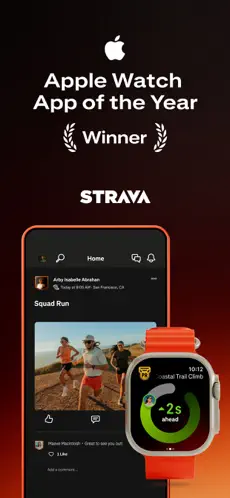
Strava is where most of your riding friends already are, and that’s the point. You record the ride, it lands in a training log, and people can cheer it on. The developer’s description lists routes, hikes, yoga and “over 50+ other sport types” alongside cycling, so one account covers a rider who also runs.
The Routes tool is the practical extra. Per the description, it uses de-identified Strava data to recommend popular routes based on your preferences, and you can build your own. It’s a discovery tool more than a dedicated navigator, so if you want a route planner with offline maps, Ride with GPS below is the closer fit.
Now the trade-off. The privacy labels list a long set of data as linked to you, including location, contacts, health and fitness, and purchases, and it also lists purchases and identifiers as data used to track you. That’s normal for a social app, but worth a look in Settings before you connect everything. Subscriptions are the other catch: the App Store lists plans at $11.99 and $79.99, plus a family plan and a Runna bundle, so check what you’re actually buying.
Strava is rated 13+ and needs iOS 17.0.
Pricing: Free to download, with in-app purchases (subscription plans are listed on the App Store).
Map My Ride — Best Simple Tracker


Map My Ride is the least fussy app here. It logs the ride with GPS, shows distance, speed and elevation, and offers audio coaching on pace, distance, duration and elevation. The developer also lists Garmin integration, Apple Watch and Apple Health support, and says its community has over 40 million cyclists (that’s the developer’s own number).
A recent 5★ review from 2026-10-22 is titled “Easy and simple”, and the reviewer adds that more bells and whistles would send them elsewhere. That’s the right way to think about this one. If you find Strava’s feed noisy, this is a quieter way to log miles. If you want training plans and sensor depth, look at Cyclemeter or TrainerRoad.
The catch is cost and ads. The app’s age rating includes “Contains Advertising”, the developer lists “Limited Ads” as an MVP feature, and the premium tier (MVP) is listed at several prices, from $6.99 to $39.99. The privacy labels also list purchases and identifiers as data used to track you.
Pricing: Free to download, with in-app purchases (MVP subscription, from $6.99 per the App Store list).
Cyclemeter — Best for Sensors and Watch Fans


Cyclemeter is the one for riders who own gear. The description lists cadence, power and heart rate through compatible sensors, a barometric altimeter reading from your iPhone, and a Bike Radar view for Garmin Varia and Bryton Gardia tail lights. It also runs on iPad and Apple Watch.
The privacy labels are the lightest of the big trackers here. The only label is “Data Not Linked to You,” covering health and fitness, location, usage and diagnostics.
It isn’t cheap on goodwill, though. Two recent 1★ reviews describe paywall frustration. One, from 2026-10-14, says “I can no longer start/stop a ride from the Apple Watch.” Another, from 2026-10-22, describes a returning user getting an advertisement on reinstall. Against that, a 5★ reviewer says “I’ve been using Cyclemeter since 2016.” The app’s age rating includes “Contains Advertising”, and its Elite Upgrade purchase appears at several prices on the App Store list, from $4.99 to $29.99.
Pricing: Free to download, with in-app purchases (Elite Upgrade, from $4.99 per the App Store list).
Ride with GPS — Best for Turn by Turn Navigation

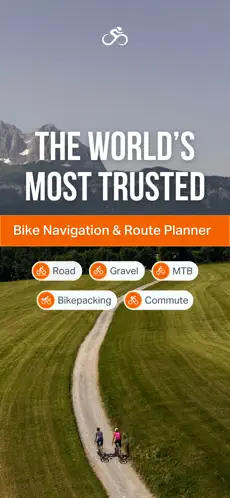
Ride with GPS is the strongest navigation app here, and the latest update (4.4.19, 2026-10-27) shows it’s still moving. A new Wind layer puts wind speed and direction on the map, with a forecast you can slide up to 30 hours ahead.
Per the description, QuickNav gives one tap cycling directions that favor low traffic, bike friendly routes and reroute if you stray, and voice guidance is turn by turn. You can download offline maps for rides off the grid and pair Bluetooth sensors. It also runs on iPad and Apple Watch. For hikers, the closer match is komoot, covered below.
The caveat is the paywall. A 1★ review from 2026-10-21 is titled “Can’t even navigate without premium.” That’s a single review, but it matches the pricing structure: Premium is listed at $12.99 and $79.99, with Basic tiers below it. Another 5★ review from the same day says “I track my rides, plan future trips, daydream by inspecting regions I’ve yet to visit.”
The privacy labels for Ride with GPS list health, location, user content, identifiers and diagnostics as linked to you.
Pricing: Free to download, with in-app purchases (Premium, from $9.99 per the App Store list).
komoot — Best for Planning by Surface


komoot’s pitch is route planning by sport. The description separates smooth asphalt for a road bike, singletracks for a mountain bike, and quiet cycling paths for touring, and shows surface, difficulty, distance and elevation profile before you go. Voice navigation and offline topographic maps come with it. It’s built for hiking and running too, so it suits a rider who does all three.
If you’re comparing it with a trail first app, Trailforks is the mountain bike specialist. If you only ride, Ride with GPS is the cycling specific option.
Subscriptions are where komoot draws complaints. A 2★ review from 2026-10-23 says the “free trial converts into a weekly subscription model.” A 1★ review from 2026-10-18 says “Honestly, you should offer a 10 day service without a subscription.” Two reviewers, same area: read the trial terms before you tap. A 3★ review from 2026-10-11 also mentions the app holding the audio channel during voice navigation with music playing.
The app’s age rating includes “Contains Advertising”, and the privacy labels include identifiers as data used to track you. Premium is listed at $4.99, $7.99 and $59.99 across variants.
Pricing: Free to download, with in-app purchases (komoot Premium, from $4.99 per the App Store list).
Trailforks — Best for Mountain Bike Trails


Trailforks is a trail database first. The developer says it covers more than 650,000 trails, with user contributed data approved by local trail associations. You get offline trail maps, elevation profiles you can scrub along, trail status reports, and race course routes with colored stages. It also routes you from your location or the nearest parking lot to the trailhead.
The free tier has a clock on it. Per the description, you get 14 days of free app use, then Trailforks Pro unlocks the map worldwide, and otherwise you keep using the map in your local area for free. Pro is listed at $53.90, and the Outside+ bundle at $89.90.
Recent reviews are rough. Two 1★ reviews from 2026-10-22 say the app “constantly logs me out” and that a profile edit won’t save after five attempts. Another 5★ review from the same day says “So useful while I’m traveling.” The app’s age rating includes “Contains Advertising”; its only privacy label is diagnostics, not linked to you.
For hiking and non mountain biking trail use, the best iPhone hiking trail apps with offline maps list covers more options.
Pricing: Free to download, with in-app purchases (Trailforks Pro: $53.90).
Zwift — Best for Indoor Riding


Zwift is the odd one out: it’s for riding indoors. Per the description, you connect a smart bike or a bike and smart trainer (Zwift, Wahoo, Garmin and others) to your phone, tablet or Apple TV, then ride virtual worlds with racing, group rides and structured training plans. It lists over a hundred routes in 12 worlds, and connects to Strava, so indoor rides show up in your log.
You need hardware. The app is a free download, but without a compatible bike or trainer there’s little to do, and the App Store list shows in-app purchases at $19.99 and $35.99.
Reliability is the complaint. A 1★ review from 2026-10-12 says the app crashes on multiple devices, and a 1★ review from 2026-10-11 says Apple Watch integration stopped working around mid 2026. Another reviewer, 2★ on 2026-10-10, is annoyed about losing the free monthly kilometers. These are individual accounts, but they fit a pattern of update frustration.
The privacy labels for Zwift list health and fitness, contact info and user content as linked to you.
Pricing: Free to download, with in-app purchases (listed at $19.99 and $35.99).).
TrainerRoad — Best for Structured Training


TrainerRoad has the highest rating here (4.89 stars from 21,440 ratings), and it’s the most specific tool on the list. The description says its AI picks and updates workouts from your fitness, fatigue and goals, detects your FTP automatically, and shows how a workout will affect your fitness. It works for indoor or outdoor training.
One 5★ review from 2026-10-07 reports an FTP rising from 200 to 325 over about four years. That’s one rider’s account, not a guarantee.
The AI is also the divisive part. A 2★ review from 2026-08-18 wishes the AI could be disabled so the app adjusts workouts from FTP tests, and a 2★ review from 2026-09-04 says the newest AI features aren’t working for a rider who trains for outdoor riding. If you prefer fixed plans, say so before you subscribe.
The App Store lists iPhone and iPad but no Apple Watch app. It carries the highest single listed price here: TrainerRoad Standard is listed at $21.99 and $209.99. Its privacy labels list health and fitness, contact info, user content, identifiers, usage and diagnostics as linked to you.
Pricing: Free to download, with in-app purchases (TrainerRoad Standard: $21.99 or $209.99).
Which One Should You Pick?
Start with the job.
- You just want to log rides: Strava. If it feels too social, Map My Ride is quieter.
- You own sensors and use an Apple Watch: Cyclemeter, with the watch complaints above in mind.
- You need directions: Ride with GPS for road and gravel, komoot if you also hike.
- You ride singletrack: Trailforks, for the trail database.
- You ride indoors: Zwift for fun, TrainerRoad for a plan.
On a long ride, a phone is a compromise. It’s what you have with you, and that’s its appeal, but a dedicated bike computer is the sturdier tool for a very long day. For running as well as riding, the best running apps for iPhone are worth a look, and if your rides start in a city, the best navigation apps for iPhone cover driving and walking directions.
Our pick: Strava. It’s free to download, covers recording and community in one place, and has the rating count to back it.
Prices and Plans at a Glance
| App | Download | In-app purchases (from the App Store listing) | Ads | Last updated |
|---|---|---|---|---|
| Strava | Free | Subscription: $79.99 Subscription: $11.99 Strava Subscription: $11.99 +7 more on the App Store |
— | 2026-10-21 |
| Map My Ride With GPS Tracker | Free | Monthly MVP: $9.99 Monthly MVP: $7.99 Annual MVP: $29.99 +4 more on the App Store |
Yes | 2026-10-20 |
| Cyclemeter Cycling GPS Tracker | Free | Elite Upgrade: $14.99 Elite Upgrade: $9.99 Elite Upgrade: $29.99 +7 more on the App Store |
Yes | 2026-10-17 |
| Ride with GPS | Free | Basic: $9.99 Basic: $59.99 Premium: $12.99 +7 more on the App Store |
— | 2026-10-23 |
| komoot | Free | komoot Premium with Free Trial: $4.99 komoot Premium: $4.99 komoot Premium with Free Trial: $7.99 +7 more on the App Store |
Yes | 2026-10-21 |
| Trailforks | Free | Trailforks Pro: $53.90 Trailforks Pro Early Adopter: $17.99 Outside+: $89.90 |
Yes | 2026-08-12 |
| Zwift | Free | Zwift: $19.99 | — | 2026-10-21 |
| TrainerRoad | Free | TrainerRoad Standard: $21.99 TrainerRoad Standard: $209.99 |
— | 2026-10-19 |
Frequently Asked Questions
What is the best free cycling app for iPhone?
Strava, Map My Ride and Cyclemeter all record rides for free to download. Each sells in-app purchases, so check what’s behind the paywall. Strava has the most ratings here, at 378,770.
Do I need extra hardware for these apps?
Only for some. Zwift needs a smart bike or a trainer, per its description. Cyclemeter and Ride with GPS can read Bluetooth sensors, but neither requires one to record a ride.
Which cycling app has the best turn by turn navigation?
Ride with GPS and komoot both list turn by turn voice navigation and offline maps in their descriptions. Ride with GPS is aimed at cyclists specifically, and komoot also covers hiking and running.
Do these cycling apps work with Apple Watch?
The App Store lists an Apple Watch version for every app here except TrainerRoad. Several recent reviews of Cyclemeter and Zwift report Apple Watch problems, so check the latest reviews.
Is your app on this list? Add a free "Featured on iOS App Lists" badge to your website or press kit.