
Libby is the first of the audiobook apps to install if you have a library card: it’s free to download, lists no in-app purchases, and borrows audiobooks from your local library. If you’d rather own or rent books outright, Audible has more App Store ratings than Hoopla, Audiobooks.com or Everand.
The real difference between these apps isn’t the player. It’s how a book gets to you: borrowed free through a library, bought outright, rented inside a subscription, or unlocked with a monthly credit. That choice sets your monthly bill, so this list is organised around it.
Jump to a section
- Quick Picks
- Libby: Best for Borrowing With a Library Card
- Hoopla: Best When Your Library Offers More Than Books
- Audible: Best for Credits and Audible Originals
- Chirp Audiobooks: Best If You Hate Subscriptions
- Audiobooks.com: Best Audible Alternative With Free Titles
- Everand: Best for Audiobooks and Ebooks in One Subscription
- Which One Should You Install First?
- Prices and Plans
- Prices and Plans at a Glance
- Frequently Asked Questions
- What is the best free audiobook app for iPhone?
- Do I need a library card for these apps?
- Which audiobook app has no subscription?
- Can I listen in the car?
Quick Picks
- Best free option with a library card: Libby, borrow audiobooks from your local library
- Best for library TV, music and comics too: Hoopla, audiobooks plus movies in one app
- Best for credits and Audible Originals: Audible
- Best for no subscription: Chirp Audiobooks, buy single books and keep them
- Best Audible alternative with credits: Audiobooks.com, subscription plus free titles
- Best for audiobooks and ebooks together: Everand, one subscription for both
| App | Best For | How you get books | Price | Rating |
|---|---|---|---|---|
| Libby | Borrowing from your library | Library card | Free | ★4.85 |
| Hoopla | Library audiobooks, movies, music | Library card | Free | ★4.84 |
| Audible | Audible Originals | Membership and credits | Free + IAP | ★4.85 |
| Chirp Audiobooks | No subscription | Buy per title | Free | ★4.77 |
| Audiobooks.com | Credits and free titles | Subscription and credits | Free + IAP | ★4.72 |
| Everand | Audiobooks plus ebooks | Subscription | Free + IAP | ★4.27 |
Libby: Best for Borrowing With a Library Card


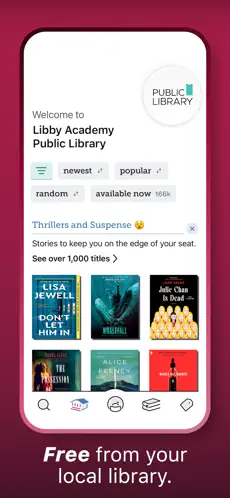
Libby is the app most people should try before paying for anything. It connects to your local library’s digital collection, and with a library card you can listen to audiobooks on your phone or tablet for free, according to the developer. It carries 4.85 stars from 4,609,211 ratings, and the App Store lists it as an Editors’ Choice.
The player covers the basics well. Playback runs from 0.6x to 3.0x, there’s a sleep timer, CarPlay support, and you can download titles for offline listening or stream them to save space. Your place syncs across devices. Libby also handles ebooks and magazines, so it doubles as your library reader.
The trade-off is the nature of libraries. Borrowing means the library’s catalog and its lending rules, not an unlimited shelf. Check how your own library handles popular titles before you count on it for new bestsellers. The Libby page also lists the privacy label for diagnostics data linked to you, which is a small footprint compared with the others here.
Pricing: Free to download, no in-app purchases listed. You do need a library card.
Hoopla: Best When Your Library Offers More Than Books


Hoopla works the same way as Libby at the front door: find your library, sign in with your library card, start borrowing. The developer’s own description says “No subscription. No ads.” What sets it apart is the range. Beyond audiobooks and ebooks it covers movies, TV episodes, comics and music, and it has an Apple TV version.
One recent reviewer says they use it for audiobooks for free and just need a library card. That’s one person’s experience, not a promise about your library, since what you can borrow depends on what your library has signed up for.
Hoopla is also the more demanding of the two on iOS, requiring iOS 17.0 against Libby’s 13.0. If you’re on an older iPhone, that may decide it for you.
Pricing: Free to download, no in-app purchases listed. Requires a library card.
Audible: Best for Credits and Audible Originals


Audible has the most ratings of any audiobook app here (5,625,584, at 4.85 stars) and the developer says it carries 1M+ audiobooks and podcasts, plus Audible Originals. Its Maven assistant lets you ask for things like a thriller under 8 hours. It also runs on Apple Watch, iPhone and iPad.
Audible is also where the money question gets complicated. The App Store lists a long run of in-app purchases: a Plus plan at $7.99, a Standard plan at $9.99, Premium plans at $15.99, credit bundles at $39.99 and $59.99, an extra credit at $15.99, and an annual plan at $159.99. Plan names repeat in that list, so read the plan screen in the app before you commit rather than assuming one price.
Other limits are on the label. Audible is the only app on this list whose App Store age rating includes “Contains Advertising,” and it needs iOS 26.0, the highest requirement of the six. Its privacy label also lists the widest set of data linked to you, including purchases, location and search history.
Pricing: Free to download, with in-app purchases for memberships and credits.
Chirp Audiobooks: Best If You Hate Subscriptions


Chirp skips the monthly commitment. The developer says it offers audiobook deals with no subscription fees, with bestsellers starting at $1 and hundreds of free titles. The audiobooks are yours to keep, which is the opposite of renting through a membership.
There’s a catch worth knowing before you install: the app plays what you buy on the Chirp website, chirpbooks.com. You download or stream those purchases in the app, and the deals arrive by email. So it suits people who check deals and buy a book here and there, not people who want to browse and buy on a whim.
Reviewers like the model. One 5★ reviewer says they found a lot of great deals, and a 4★ reviewer calls it easy to use for the commute. Chirp requires iOS 18.0, the second highest requirement here, and its privacy label lists data linked to you including location and contact info.
Pricing: Free to download, no in-app purchases listed. Books are bought separately on the Chirp website.
Audiobooks.com: Best Audible Alternative With Free Titles

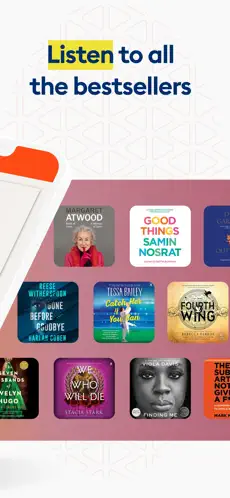
Audiobooks.com belongs to Storytel and works on the same credit idea as Audible. The App Store lists a monthly subscription at $14.95 and $15.99, an annual subscription at $143.99, and credits at $14.95 and $15.99. The developer also says you can reach 10,000+ free titles with no membership, out of a library of 700,000+.
Beyond the phone, it supports Apple Watch and Apple TV. It needs iOS 17.0.
Pricing: Free to download, with in-app purchases for subscriptions and credits.
Everand: Best for Audiobooks and Ebooks in One Subscription


Everand, from Scribd, is a reading subscription. The developer says it covers millions of audiobooks and ebooks, with a 1.5M title catalog. Its Standard plan is $11.99 a month and unlocks 1 title a month, while the Plus plan is $16.99 a month and unlocks 3 titles. A 7-day trial via the App Store includes one free title.
That unlock model is the thing to understand. Most of the catalog sits behind monthly unlocks, though the developer’s site says 20k+ titles need no unlock. One 1★ reviewer complains that a standard subscription now gives one unlock per month, and it compares the old experience to Kindle Unlimited.
The complaints aren’t only about plans. One 3★ reviewer praises the catalog after six months but asks the developer to fix a bug that erases listening progress, and another 1★ reviewer complains about the email sign in code arriving late. Those are two reviewers, so treat them as warnings to test the free trial rather than as a verdict.
Pricing: Free to download, with in-app purchases for Everand subscription plans.
Which One Should You Install First?
Start from how you want to pay.
1. Library card in your wallet: install Libby, then add Hoopla if you want movies and music too. Both list no in-app purchases.
2. You want to own books: Chirp lets you buy single titles with no subscription. Audible sells credit bundles too, though its plans are more varied.
3. You want one big catalog and don’t mind a membership: Audible, or Audiobooks.com if you’d like a listing without Apple’s “Contains Advertising” label.
4. You read as much as you listen: Everand covers both formats, but read its plan limits first.
If you read books as well as listen, our guide to the best iPhone apps for book lovers covers the reading side. And if audiobooks are only part of your listening, the best podcast apps for iPhone are worth a look, plus the best streaming apps for iPhone for video.
Our pick: Libby. It’s free, it has no in-app purchases, and it costs nothing until you decide you want to own books.
Prices and Plans
Prices and Plans at a Glance
| App | Download | In-app purchases (from the App Store listing) | Ads | Last updated |
|---|---|---|---|---|
| Libby, the library app | Free | None listed | — | 2026-10-30 |
| Hoopla | Free | None listed | — | 2026-10-28 |
| Audible | Free | US Premium Monthly: $15.99 U.S. – 3 Credit Bundle: $39.99 US Premium Plus Monthly: $15.99 +7 more on the App Store |
Yes | 2026-11-05 |
| Chirp Audiobooks | Free | None listed | — | 2026-11-09 |
| Audiobooks.com | Free | Monthly Subscription: $14.95 InstaCredit: $14.95 Additional Credit(s): $14.95 +4 more on the App Store |
— | 2026-10-28 |
| Everand | Free | Scribd Membership: $11.99 Everand Legacy: $11.99 Everand Legacy Monthly: $11.99 +7 more on the App Store |
— | 2026-11-04 |
Frequently Asked Questions
What is the best free audiobook app for iPhone?
Libby and Hoopla both list no in-app purchases, and both borrow from your local library with a library card. Libby is the simpler starting point; Hoopla adds movies, TV, comics and music.
Do I need a library card for these apps?
For Libby and Hoopla, yes. Both ask you to sign in with your library card.
Which audiobook app has no subscription?
Chirp. The developer says it has no subscription fees and that the audiobooks you buy are yours to keep. Libby and Hoopla also need no subscription, though you borrow rather than own.
Can I listen in the car?
Hoopla, Audiobooks.com and Audible each mention CarPlay support in their App Store descriptions.