
Published Jul 3, 2026 · Updated Nov 4, 2026
Snapseed is the best free Lightroom alternative for iPhone: it costs nothing, shows no ads, has no in-app purchases, and still covers curves, selective adjustments, healing and RAW editing. If you would rather pay once and own the app, Darkroom’s $99.99 lifetime unlock is the smarter buy for the long run for anyone living inside Apple’s ecosystem. Adobe Lightroom Mobile is the benchmark many people compare against, and on an iPhone much of what it does can be handled by free apps.
So here is how to edit iPhone photos without Lightroom: seven apps that between them cover the whole job, from exposure and white balance through cropping, film looks, object removal and export. None of them require an Adobe account.
Jump to a section
Quick Picks
- Best free editor overall: Snapseed, 30+ tools and full curves at no cost
- Best one-time purchase: Darkroom, $99.99 lifetime and built for Apple hardware
- Best for film looks: VSCO, 200+ presets
- Best AI assist: Photomator, one-tap machine-learning auto-enhance
- Best true film emulation: RNI Films, profiles built from real film scans
- Best editor you already own: Apple Photos, free and built into every iPhone
- Best for textures and light leaks: Afterlight, 300+ presets plus real film-grain overlays
Comparison Table: Free and Budget iPhone Photo Editors vs. Lightroom
| App | Price | Best For | RAW Support | Selective Edits | Presets/Filters | Offline Use |
|---|---|---|---|---|---|---|
| Snapseed | Free | Power editing, no compromises | ✅ | ✅ | ✅ | ✅ |
| Darkroom | Free / $99.99 lifetime | Apple ecosystem, batch editing | ✅ | ✅ (export needs +) | ✅ | ✅ |
| VSCO | Free / $39.99/yr | Film aesthetics, community | ❌ (free tier) | ✅ (paid plans) | ✅ (✅ (200+ with membership)) | ✅ |
| Photomator | Free / $7.99 per month | AI-powered edits, machine learning | ✅ | ✅ (AI subject select) | ✅ | ✅ |
| RNI Films | Free / packs from $3.99 | Authentic film simulations | ✅ | — | ✅ (film packs) | ✅ |
| Apple Photos | Free (built-in) | Quick edits, iCloud sync | ✅ | — | ✅ | ✅ |
| Afterlight | Free / $2.99 per month | Light leaks, dust, film textures | ✅ (presets) | ✅ (touch tools) | ✅ (300+) | ✅ |
| Lightroom | $9.99 per month | Professional workflow | ✅ | ✅ | ✅ | Partial |
A dash marks a cell the app’s own listing doesn’t describe one way or the other. The Offline Use column is not based on the listings.
Why You Don’t Need Lightroom
Adobe Lightroom is a familiar name in photo editing. In 2026 the alternatives caught up, and they are not “good enough for free apps.”
Here is the uncomfortable part Adobe would rather you skip: If you edit only on your iPhone, many of these apps cover the basics for free or for a one-time price. The math does not add up.
This guide covers every major iPhone photography app that replaces Lightroom for the work people actually do: adjust exposure, fix white balance, crop, apply tasteful filters, remove distractions, and export at full resolution.
1. Snapseed — The Power User’s Free Editor


Snapseed has been the benchmark for free mobile editing for over a decade. It is developed by Google and is free with no ads. The current build ships 30+ tools, which covers curves, selective adjustments, healing, white balance and RAW editing.
Start with the Adjust tool, which controls exposure and color automatically or manually. From there, Selective Adjustments are where the app pulls away from the free pack. Selective lets you adjust brightness, contrast or saturation in specific areas without affecting the rest of your photo.
Editing is non-destructive, so you can undo changes or revert to your original photo. The Healing tool removes unwanted objects from a photo. The interface is functional rather than beautiful.
Pricing: Completely free. No ads, no in-app purchases, no watermark. Owned by Google.
Verdict: If you install one free photo editor, make it Snapseed. It is the closest thing to free Lightroom that exists, and the file size is smaller than most games.
2. Darkroom — The Apple Ecosystem Powerhouse


Darkroom is the editor Apple should have shipped. It runs on iPhone, iPad and Mac. The interface feels native to iOS in a way Snapseed’s does not, and it works directly with your Apple Photos library.
The essential sliders are all here, plus AI-powered depth and object-based edits for targeting skies, skin tones and landscapes. The feature that keeps photographers on this app is Copy Edits and Paste Edits: build one look, select a batch, paste, done. For anyone shooting an event or a series of product photos, that alone pays for the upgrade.
What it does not do matters too. It runs on iPhone, iPad and Mac.
Pricing: Free to download and try; Darkroom+ is required to export. Darkroom+ is $9.99 per month, $39.99 per year, or $99.99 once for lifetime access. The lifetime option removes the recurring subscription cost.
Verdict: If you are all-in on Apple hardware and want the best blend of speed, polish and price, the $99.99 lifetime unlock is the best value on this list. There is a full Darkroom review on the site if you want the deeper dive.
3. VSCO — Film Aesthetics and Community

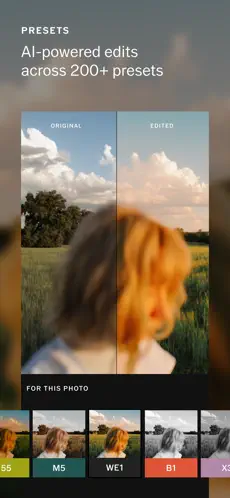
VSCO is a photo and video editor with a creative community built in. Its identity is presets: more than 200 film-emulation recipes inspired by Kodak, Fuji, Agfa and other stocks. The color science is the reason people stay.
VSCO is free to download, and a paid membership unlocks the full library of 200+ presets. The editor includes Crop, Fade and Grain tools.
The trade-offs are real. AI tools for removing distractions and repairing photos are included with the Pro plan.
Pricing: Free to download. VSCO Plus is $39.99 per year for 200+ presets and advanced tools. VSCO Pro is $69.99 per year and adds AI tools.
Verdict: The best choice if your style leans film-like and you care about how a photo feels more than how technically perfect it is.
4. Photomator — AI-Powered Editing


Photomator is published by Apple. It leans hard on on-device machine learning, and the headline feature earns it: Auto Enhance uses a machine learning algorithm trained on 20 million pro photos to enhance shots automatically. The results land closer to what a careful human would do than most “auto” buttons manage.
The AI selection tools are the other reason to keep it. Tap Select Subject or Select Background and Photomator masks the region, then you apply adjustments to just that area. That is genuinely useful for portraits and product shots and it is rare at this price. The Repair tool removes unwanted objects. The Crop tool includes perspective adjustment, and you can change a photo’s look with LUTs.
The catch is the paywall. As a one-tap fixer for a large photo library, though, nothing on this list comes close.
Pricing: Free download with core tools. Photomator Pro is $7.99 per month, $29.99 per year or $119.99 for lifetime access.
Verdict: If you shoot a lot of portraits or want an auto-enhance button that actually works, this is the app. Batch processing with AI makes short work of a folder of two hundred photos.
5. RNI Films — Authentic Film Simulation


RNI Films is a film-emulation app, and the difference from VSCO is worth understanding. RNI builds its profiles from digitised analog slides and negatives. The app title says it plainly: RNI Films is a photo and RAW editor, so RAW files are supported.
The workflow is narrow on purpose. Import a photo, browse the film filters sorted into negative, slide, instant, black and white and vintage categories, and apply one. The app advertises real film grain that simulates grain structure, colour and resolution behaviour. Brightness, contrast, color, shadows and highlights sit underneath for small corrections applied after the film profile, not instead of it.
It is built around film emulation, with adjustment tools alongside. Treat it as the final step in a two-app workflow. Pair it with Snapseed for the technical work, then finish here.
Pricing: Free with a limited selection of film packs. Additional film packs are $3.99 each, and an RNI Pro subscription is also offered at $0.99 or $1.99 per month or $9.99 per year.
Verdict: Not a Lightroom replacement, and it does not try to be. It does one thing well for about the price of a coffee.
6. Apple Photos — The Editor You Already Have


The built-in Photos editor has quietly become capable. The slider set behind the Edit button covers auto enhance, highlights, shadows, vibrance, definition and more.
The advantage is friction, or the absence of it. Edit is built into the Photos app you already use. Your library syncs through iCloud Photos across your Apple devices.
Apple Photos is a fast first pass, not a finishing tool.
Pricing: Free. Built into every iPhone.
Verdict: For the majority of photos on your camera roll, this is all you need. Use it first, then send the keepers to Snapseed or Darkroom. If you want more from the camera side of the phone, the iPhone photography guide covers capture settings.
7. Afterlight — Creative Textures and Effects

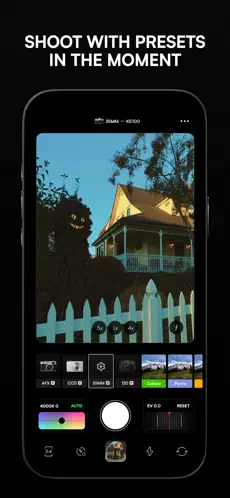
Afterlight has been on the App Store since 2017 and focuses on atmosphere. It handles atmosphere: light leaks, dust and scratch overlays, film grain textures and instant-film frames. You can combine effects and tools into your own custom look as a Fusion Filter, and the strong ones look like a photo that spent thirty years in a shoebox rather than a clip-art sticker.
The current listing counts 300+ film presets, 100+ real overlays and 30+ editing tools, and the tools cover Brightness, Contrast, Vibrance, Sharpening, Structure, Glow, Grain, Curves, Clarify and Vignette. Overlays include genuine light leaks made with real 35mm film, natural dust textures, vintage paper and VHS effects. Double exposure blending is included, along with instant film frames and colour borders.
One thing to know before you upgrade. The listing now advertises RAW presets through a new Afterlight Camera mode, so if RAW editing is the deciding factor, check the app’s current listing rather than taking an older review’s word for it.
Pricing: Free download. Afterlight Pro is $2.99 per month or $17.99 per year, with lifetime options also offered.
Verdict: A creative companion rather than a primary editor. Pair it with Snapseed or Apple Photos for corrections, then use Afterlight to give the photo a mood.
FAQ: Editing iPhone Photos Without Lightroom
Can I really edit RAW photos for free on iPhone?
Yes. Snapseed and RNI Films both handle RAW, and Darkroom supports RAW and ProRAW files. You do not need a Lightroom subscription for RAW editing on an iPhone.
What is the closest free app to Lightroom Mobile?
Snapseed. It has curves, selective adjustments, a healing brush, perspective correction and a non-destructive workflow, all free. If Lightroom Mobile disappeared tomorrow, Snapseed is the one app that would cover the most ground on its own.
Do any of these apps support batch editing?
Darkroom, Snapseed, VSCO and Photomator all support batch workflows, and Apple Photos lets you copy an edit and apply it to a selection.
Do any of these apps add watermarks?
Snapseed states it adds no watermarks. .
Can I get VSCO-style film presets without paying?
RNI Films includes a generous introductory package of free film filters, with additional packs available by in-app purchase, and VSCO is free to download. Snapseed’s Film and Grain tools can approximate a film look with some manual tuning.
What about Lightroom’s free mobile version?
Snapseed is free, with no subscriptions, purchases, ads or watermarks.
The Bottom Line
Lightroom is a great app, and for most iPhone photographers that money is better spent elsewhere. Here is the simplest way to decide:
- Want the best free option, period? Snapseed. Install it now.
- Want to pay once and get an Apple-native experience? Darkroom at $99.99 lifetime.
- Care about film aesthetics and community? VSCO at $39.99 a year.
- Want AI doing the heavy lifting? Photomator.
- Want authentic film looks for cheap? RNI Films, with film packs from $3.99.
- Want textures and light leaks? Afterlight.
- Already have everything you need? Apple Photos is on your phone right now.
Our pick: Snapseed for anyone who wants the most capability for nothing, and Darkroom’s $99.99 lifetime unlock if you want to stop thinking about subscriptions for good.
If you shoot with an iPhone 15 Pro or newer, the Action Button apps roundup covers camera tools worth mapping to that button.