
Published Apr 21, 2026 · Updated Oct 26, 2026
ForeFlight is still the best electronic flight bag for iPhone and iPad pilots in 2026, and the tier most of them actually need costs $260 a year. If you fly VFR and file IFR only occasionally, the $130 Starter plan already covers planning, charts, weather and the logbook on its own. Fly behind a Garmin panel and Garmin Pilot at $109.99 a year may fit you better. Here’s the full ForeFlight review for 2026: what each tier buys, how the tools fit together in the air, and where the app still frustrates.
An electronic flight bag replaced the flight bag itself. Where a pilot once carried a binder of approach plates, a folded sectional, a plotter and a printed briefing, an EFB puts the same information into one app that updates itself and knows where the aircraft is. ForeFlight has been the default on Apple hardware since the first iPad, and its grip comes from integration. Planning, briefing, charts, plates, traffic, terrain and the logbook all read from the same data, so nothing has to be re-entered twice.
Jump to a section
- ForeFlight at a glance
- What ForeFlight does
- Flight planning and briefing
- Weather, terrain and traffic in the air
- Charts, plates and the moving map
- Logbook, documents and the web planner
- What could be better
- ForeFlight pricing in 2026
- Alternatives worth a look
- Who should use ForeFlight
- Who should skip it
- Frequently asked questions
- The verdict
ForeFlight at a glance
Four apps cover almost every US pilot flying with a tablet today. This table is the fastest way to see where ForeFlight sits before the detail below.
| App | Best for | Price | App Store rating |
|---|---|---|---|
| ForeFlight Mobile EFB | US VFR and IFR | $130 to $390 per year | 4.4 (3,261 ratings) |
| Garmin Pilot | Garmin avionics, Android tablets | $109.99 to $209.99 per year | 4.7 (4,140 ratings) |
| iFly EFB | Budget VFR, Windows tablets | $94.99 per year | 4.7 (359 ratings) |
| FltPlan Go | A capable second EFB for free | Free | 4.0 (147 ratings) |
Prices above come from each vendor’s own pricing page. ForeFlight and Garmin Pilot both give new users a 30-day trial of a top plan, which is plenty of time to fly two or three real trips before deciding.
What ForeFlight does


ForeFlight is an app that carries a whole preflight and a whole cockpit. On the ground it plans routes, builds a graphical weather briefing, pulls NOTAMs and TFRs, does weight and balance, and files the flight plan. In the air it runs the moving map, geo-referenced approach plates, traffic, terrain alerting and synthetic vision. ForeFlight Mobile is built for iPhone and iPad, with a companion web planner on the desktop.
The reason pilots stay with it is that nothing has to be copied between apps. Set up an aircraft profile once and its performance numbers feed every flight plan, every altimeter correction and the weight and balance. Enter a route and the briefing, the fuel burn estimate and the alternate requirements all update from the same source. That sounds like a small thing until you’ve spent a morning reconciling three separate tools that disagree about your groundspeed.
The download itself runs around 620MB before you add chart data, and the app keeps charts current in the background while you use other apps. On an older 64GB iPad that’s worth knowing before you commit a weekend to the install.
Flight planning and briefing
The Flights view is where a preflight comes together. You can type a route, drag it on the map with touch planning, or let the Route Advisor help with routing. On a well-worn city pair that last option saves a genuine amount of time, because it surfaces the routing ATC is handing out rather than the great-circle line your plotting tool prefers.
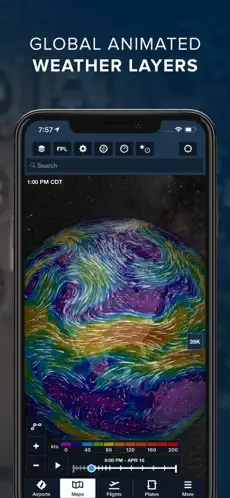
The graphical briefing brings the weather for your route together in one place. Compared with reading a wall of decoded text, seeing the weather laid over your route is the difference between spotting a problem and missing it. Alternate requirements get flagged automatically against the forecast at your arrival time, which is the kind of check that’s easy to skip by hand and expensive to skip badly.
Weight and balance is included from the Starter plan up. Build the profile for your aircraft once, with its center of gravity envelope, and every later preflight carries the calculation and a plotted envelope. ForeFlight’s own documentation notes that Jeppesen chart access and some data packages are optional add-ons rather than part of the base plans.
Weather, terrain and traffic in the air

On the map, METARs and TAFs are color-coded by flight category, so a line of IFR airports shows up at a glance. Radar and satellite animate with a time slider, PIREPs plot geographically, and wind and temperature aloft layer by altitude. The Profile View, The Terrain Profile View, a cross-section down your route showing terrain and airspace, is locked to Essential and above, and it’s the single feature that most changes how an IFR leg gets planned., and it’s the single feature that most changes how an IFR leg gets planned.
In the air, a portable ADS-B receiver turns the map into a live traffic and weather display. ForeFlight sells its own Sentry ADS-B receivers, and the app also connects with Garmin devices. Terrain and obstacle alerting, the top-down Hazard Advisor layer and the 3D Synthetic Vision view are all part of that picture. Synthetic Vision needs an attitude source, and when one is connected it gives you a backup glass panel on the iPad.
This is the part of ForeFlight that competes with installed avionics rather than with other phone apps. A light aircraft with a basic six-pack gains a traffic picture and a terrain picture it simply didn’t have before, and that gap closes for the price of a receiver and a subscription.
Charts, plates and the moving map

The chart side covers VFR sectionals, low and high IFR enroute charts, SIDs, STARs, approach plates and airport taxi diagrams, plus data-driven aeronautical maps that redraw with your route instead of leaving you to hunt across a static chart. Plates and taxi charts are geo-referenced, which means your ownship position tracks down the plate as you fly it.
That one feature changes instrument flying more than any other. Watching your position creep toward the final approach fix on the plate, rather than building a mental picture from a CDI and a DME readout, cuts workload exactly where workload is highest. It’s also the reason a lot of IFR pilots pay for Essential rather than Starter: geo-referenced approaches are the line between the tiers.
Chart color inversion for night flying, a documents catalogue with FAR/AIM and chart supplements, and dynamic winds and temperatures are all in the base app. None of it is dramatic. All of it is the sort of thing that, once you’ve flown with it, is hard to give back.
Logbook, documents and the web planner
The logbook lives in the same app as the charts, so a flight you just flew already has its route, times and conditions attached. It tracks currency and flags expiring flight reviews, instrument proficiency checks and passenger-carrying requirements, and it syncs across devices into cloud storage. For anyone building hours toward a rating, having currency tracking in the app you open every flight is the difference between noticing an expiry and discovering it at the airport.
ForeFlight on the Web covers the desk half of the job. Build a route on a full keyboard and monitor, then have it waiting on the iPad. For commercial operators and anyone filing regularly, that split between desk and cockpit is where the subscription earns its keep.
What could be better
The pricing ladder is the honest complaint. The features that matter most to an IFR pilot, geo-referenced approaches, synthetic vision and the Hazard Advisor, all sit above the $130 Starter plan. Starter is a competent VFR tool set, but a pilot who needs plates is paying $260, and one who wants performance profiles and 3D airport views is paying $390. The gap between “enough” and “what you actually wanted” is $130 a year, every year.
The app is Apple-only hardware. ForeFlight Mobile runs on iPhone and iPad with the web planner alongside. If your cockpit tablet is Android, this isn’t the EFB for you regardless of how good the software is, and Garmin Pilot or iFly EFB become the sensible starting points.
The iPhone is also a compromise as a primary chart device. The app is fully functional on a phone, and it’s fine for preflight and as a backup in the air, but reading an approach plate on a phone-sized screen mid-approach is not the experience anyone designs for. Budget for an iPad if you’re serious about the instrument side.
Smaller irritations: the Flights view takes a few trips to feel natural, the interface has grown dense over the years, and the free download is close to useless without a subscription. There’s a 30-day trial of a top plan.
ForeFlight pricing in 2026
ForeFlight updated its plan names, and the prices and features stayed the same. The 2026 line-up, straight from ForeFlight’s pricing page, is three tiers billed annually:
| Plan | Price per year | What it adds |
|---|---|---|
| Starter | $130 | Flight planning, filing, briefing, VFR and IFR charts, weather, weight and balance, logbook, avionics connectivity |
| Essential | $260 | Everything in Starter, plus geo-referenced approaches and plates on the map, dynamic procedures, synthetic vision, Hazard Advisor, terrain and airspace profile views, icing and turbulence layers |
| Premium | $390 | Everything in Essential, plus pre-built aircraft performance profiles, improved time and fuel calculations, airport 3D views, weather profile view, optimized autorouting and takeoff and landing performance |
The sensible split for most private pilots is Starter for pure VFR and Essential the moment an instrument rating or regular IFR flying enters the picture. Premium is aimed at owners flying complex aircraft who want manufacturer performance data and takeoff and landing numbers rather than estimates. Data packages, such as Jeppesen charts, are separate add-ons at any tier.
Set against a printed chart subscription and a binder of plates that expire on a cycle, $260 a year is defensible for anyone flying regularly. Set against a free EFB, it’s a real decision, and the free EFBs are better than their price suggests.
Alternatives worth a look
ForeFlight isn’t the only serious EFB on iOS, and the right answer depends on your panel and your tablet.

Garmin Pilot is the closest competitor and the right pick if your panel is Garmin. It runs on iPhone and iPad. US Standard is $109.99 a year and US Premium is $209.99, with synthetic vision and SafeTaxi arriving at the Premium tier. Its App Store rating is 4.7 from about 4,100 ratings.

iFly EFB is the value play. iFly EFB’s Base VFR subscription is $94.99 a year, and its VFR/IFR plan is $149.99. For a VFR pilot or a budget-minded IFR pilot who wants plates without a $260 subscription, it’s the cheapest credible route.

FltPlan Go is free and genuinely capable, with sectionals, enroute charts, geo-referenced plates for the US and Canada, weight and balance and an e-logbook. It syncs with FltPlan.com, which makes it a natural fit for pilots already using that service. The trade-off is polish and pace of development: at 4.0 stars from a much smaller rating base, it feels like the app it is, a free tool rather than a premium product.
For a wider look at the weather side of preflight planning, our roundup of the best weather apps for iPhone covers the consumer radar and alerting apps that complement an EFB. If your flying is mostly about tracking family or friends in the air rather than piloting, our guide to the best flight tracking apps is the better starting point, and drivers who want an aviation-style traffic display will find the best navigation apps for iPhone closer to home. For the wider set of apps a pilot ends up installing, see our roundup of the best iPhone apps for pilots.
Who should use ForeFlight
Buy ForeFlight if you fly IFR or plan to, fly in the US, and want one app that covers planning through approach. Buy Essential rather than Starter at that point, because geo-referenced plates are the reason the app exists. It’s also the right call for a renter or owner who moves between aircraft, since profiles are cheap to build and the briefing workflow doesn’t change with the airframe.
Student pilots should take the 30-day trial before choosing a tier. ForeFlight’s planning and briefing tools are excellent preparation for the oral, and the price is easier to justify once you know you’ll keep flying.
Who should skip it
Skip it if your cockpit tablet is Android. Skip it if you fly VFR only, in good weather, within one state of home, and never file. A free app covers that. Skip the Premium tier unless you own a complex aircraft and specifically want the performance data, because the difference between Essential and Premium is a set of features most private pilots never open.
And if your panel is all Garmin, try Garmin Pilot first. The integration with GTN and G1000 units is native in a way ForeFlight’s is not, and at $109.99 a year the Standard plan is cheaper than ForeFlight’s entry tier.
The essential iPhone app for pilots, with the complete preflight-to-approach workflow in one place.
Frequently asked questions
Is ForeFlight free?
The app downloads for free and includes a 30-day trial of a top subscription plan. After that, nearly everything useful needs an annual plan. Starter is $130 a year, Essential is $260 and Premium is $390.
Does ForeFlight work on iPhone, or is it iPad only?
Both. ForeFlight Mobile runs on iPhone and iPad, and one subscription covers up to three devices, in the iPad and iPhone combinations ForeFlight allows. The iPad is the better cockpit screen for charts and plates, while the iPhone works well for preflight and as an airborne backup.
Do you need a subscription to use ForeFlight in the air?
For practical purposes, yes. The free download gives you the app and a 30-day trial. The plans cover charts, briefings, plates and weather, so check which tier includes what you need.
What ADS-B receivers work with ForeFlight?
ForeFlight’s own Sentry receivers are the tightest fit, and the app also connects with Garmin devices. Any of them adds live traffic and weather to the moving map over a wireless link.
Can ForeFlight file IFR flight plans?
Yes. ForeFlight files both VFR and IFR plans from inside the app for domestic US and international flights, and the same Flights view handles route building, the briefing and the filing in one place.
ForeFlight or Garmin Pilot?
ForeFlight for the wider feature set. Garmin Pilot when your panel is Garmin, when you want an Android option, or when you’d rather pay $109.99 than $260. Both run 30-day trials, so flying one trip on each settles it faster than any comparison table.
The verdict
ForeFlight is worth its subscription for any pilot flying IFR in the US, and the Essential tier at $260 a year is the one to buy. The planning, briefing and plates all work from the same data, the geo-referenced approaches cut real workload on an instrument approach, and the hardware support is the widest on iOS.
It isn’t for everyone. The features most pilots want sit above the cheapest tier, the app is Apple hardware only, and a free EFB covers a casual VFR pilot perfectly well. Judge it on your flying: instrument work or regular cross-country, and it pays for itself. Sunny weekend circuits, and it’s an expensive way to look at a map.
Rating: 4.8 out of 5. Our pick for iPhone and iPad pilots.
Is your app on this list? Add a free "Featured on iOS App Lists" badge to your website or press kit.