
Published Jul 26, 2026 · Updated Oct 24, 2026
Your bank’s app shows you one balance, and it’s usually the wrong one. Posted balances lag behind pending transactions, which is how a forgotten $40 gas hold turns into a $35 overdraft fee. A checkbook app closes that gap by logging every transaction and showing your true running balance, the number that actually matters.
Most of the best checkbook apps for iPhone work as standalone registers. You enter each transaction by hand and the app does the math. No bank login, no shared passwords, no syncing to a server you’ve never heard of. A couple of options here pull transactions in automatically if that’s what you want. Eight apps made the cut, and every one is free to download.
Jump to a section
Quick Picks
- Best overall: Copilot. Automatic bank sync with AI-powered categorization and a beautiful interface.
- Best for changing habits: YNAB. Zero-based budgeting that forces every dollar to have a job.
- Best free register: Checkbook – Account Tracker. A decade-old ledger that exports to CSV and QIF.
- Best simple register: Balance My Checkbook. Tracks your available balance, not just what the bank posted.
- Best for Apple Card owners: Debit & Credit. Imports Apple Card and Apple Cash transactions automatically.
- Best visual budget: Spending Tracker. Weekly and monthly budgets with clean, readable charts.
- Best for multiple accounts: Quick Checkbook. Every balance on one screen, free and ad-supported.
- Best for reporting: Checkbook Wiz. Category and payee reports with monthly cash-flow charts.
How They Compare
| App | Best For | Price | Rating |
|---|---|---|---|
| Copilot | Automated tracking | Free + subscription | ★4.8 |
| YNAB | Budgeting discipline | Free trial + subscription | ★4.8 |
| Checkbook – Account Tracker | Free register | Free + Pro upgrade | ★4.3 |
| Balance My Checkbook | Simple register | Free | ★4.7 |
| Debit & Credit | Apple Card import | Free + Premium | ★4.8 |
| Spending Tracker | Visual budgeting | Free + Pro upgrade | ★4.8 |
| Quick Checkbook | Multiple accounts | Free | ★4.3 |
| Checkbook Wiz | Detailed reporting | Free | ★4.2 |
1. Copilot — Best Overall iPhone Finance App


Copilot is the most polished finance app on iOS, and its Apple Design Award nomination was no accident. Connect your bank accounts and credit cards, and it imports every transaction, then sorts them automatically with Copilot Intelligence. Review a few dozen transactions and it learns that “SQ *BLUEBOTTLE” is coffee and not a subscription.
The subscription tracker is the sleeper feature. It surfaces recurring charges you forgot about, which is usually where the real leaks are. The Cash Flow view shows what came in and went out each month at a glance.
The catch is the price. Copilot is one of the pricier apps on this list, and it’s US-only for now. If you’re fine with manual entry, a free register further down this page does most of the job for nothing. We have a full Copilot review if you want the deep dive.
Best for: anyone who wants their finances managed automatically with minimal effort.
Pricing: free to download, subscription required after the trial.
2. YNAB — Best for Budgeting Discipline


YNAB is a different animal from a checkbook register. Before you spend anything, you assign every dollar a job. Rent gets $1,200. Groceries get $400. Entertainment gets $100. Once a dollar is assigned, YNAB tracks whether you’re sticking to that plan in real time.
YNAB turns budgeting into something you can actually stick with. Its “age of money” metric, which counts how long a dollar sits in your account before you spend it, is a surprisingly addictive number to watch climb.
This approach is more demanding than passive tracking. You have to engage with every transaction, and the app will nag you when you overspend a category. That’s the point. The iOS app connects to your bank for import, syncs with the web app, and includes goal tracking, though some reviewers find the reports minimal.
Best for: people who want to change how they spend, not just watch it happen.
Pricing: free trial, then a subscription (around $15 a month).
3. Checkbook – Account Tracker — Best Free iPhone Checkbook App

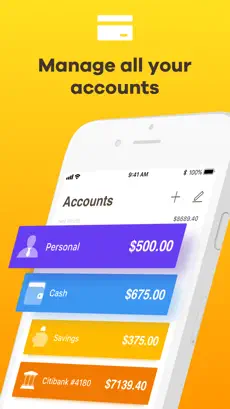
With over 14,000 ratings and a decade of updates, Checkbook – Account Tracker is the most battle-tested free register on iOS. It works like a paper ledger: you log each transaction and it keeps a running balance. You can create multiple accounts, save recurring payments, and export everything to CSV or QIF for Excel or Quicken.
The calendar view is quietly the best part. It shows a month of transactions at a glance, so you can spot the day your rent cleared without scrolling through a list. Search lets you find any transaction by payee, category, or amount.
The interface is functional rather than pretty. It looks like an app from 2016, and it always has. You’ll get over it because a Pro upgrade and Premium subscriptions are there if you want them.
Best for: anyone who wants a proven, no-frills digital register that mirrors a paper ledger.
Pricing: free, with an optional Pro upgrade.
4. Balance My Checkbook — Best Simple iPhone Register


Balance My Checkbook does one thing and does it well: it tells you what’s actually in your account. Enter income and expenses as they happen, mark transactions as cleared when they post, and the app keeps your true available balance instead of the bank’s posted balance. That distinction is the difference between knowing about a pending payment and getting blindsided by it.
Auto-complete speeds up entry once it learns your regular payees, and optional paid sync keeps your ledger current across devices. The app was updated as recently as August 2026, which matters more than it should in this category.
It’s plain. There are no charts, no budgeting tools, no subscription tracking. If you want insight into where your money goes, this isn’t the app. It’s a register, and it’s fine with that.
Best for: people who want a simple register and have been burned by overdrafts from pending transactions.
Pricing: free.
5. Debit & Credit — Best for Apple Card Owners

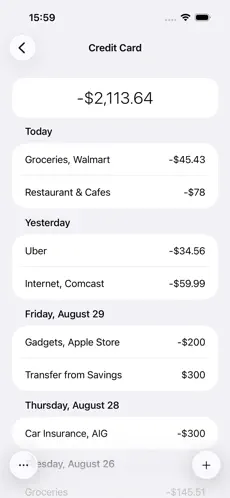
Debit & Credit is the register app for people who live in the Apple ecosystem. It imports transactions from Apple Card, Apple Cash, and Apple Savings automatically, which no other manual register here does. You still enter other transactions by hand, but the Apple stuff just shows up.
Entry is genuinely fast. A new transaction takes a couple of seconds, and the gesture-based flow means you aren’t tapping through five screens to record a coffee. The geotagging trick is clever: you can save a payee’s location, then pull up nearby payees sorted by distance, so “the gas station” gets logged faster when you’re standing in front of it.
The downside is that the Apple Card import only works in the US, and a few features sit behind a Premium upgrade. If you don’t use Apple Card, a simpler free register will do the same job.
Best for: Apple Card and Apple Cash users who want their Apple transactions without manual entry.
Pricing: free, with an optional Premium upgrade.
6. Spending Tracker — Best Visual Budget


Spending Tracker leans more toward budgeting than pure register duty, but its 19,000-plus ratings say people use it for both. You set a budget for a week, month, or year, log expenses and income, and watch the progress bar move. The summary view lets you “time travel” forward and back to see how any period shook out.
Budget carryover is the feature that keeps people around. If you underspend one week, the remainder rolls into the next, so a slow week doesn’t just vanish. The reports are clean and readable, with interactive charts that break down spending by category.
The free tier is solid, but recurring transactions and CSV export are locked behind the Pro upgrade. That’s annoying for a register, where repeating bills are the whole point. Still, if you want visual budgeting without signing up for YNAB, this is the lighter option.
Best for: visual budgeters who want a quick weekly or monthly view of where money goes.
Pricing: free, with an optional Pro upgrade.
7. Quick Checkbook — Best for Multiple Accounts


Quick Checkbook earns its name. The main screen shows every account and its balance at once, and adding a transaction takes a few seconds. You can mark entries cleared or outstanding, transfer between accounts, schedule recurring transactions, and reconcile against your bank statement.
The multi-account overview is the reason to pick it. If you’re juggling checking, savings, a credit card, and cash, seeing everything on one screen beats opening four different apps. The reports screen shows where your money goes visually, without requiring an upgrade.
It’s not winning any design awards. The interface is utilitarian, and it hasn’t changed much in years. For a free app with no subscription, that’s a fair trade, though expect ads.
Best for: people juggling several accounts who want fast manual entry and a clean overview.
Pricing: free, with ads.
8. Checkbook Wiz — Best for Detailed Reporting


Checkbook Wiz is the reporting nerd’s register. Reports break down spending and income by category and payee, with monthly cash-flow and account-balance charts, and the search is the real standout. You can filter by category, payee, keyword, or date range, so “every coffee shop charge this year” is a two-second query instead of a scroll.
iCloud sync keeps your data current across devices, which is table stakes these days but still worth checking. Users who want to analyze spending beyond just knowing a balance gravitate here because the free tier includes the reporting.
It has the lowest rating on this list, and the interface shows its age. If you want polish, this isn’t it. But if you want to pull up a year of spending by category and actually learn something, nothing else here is as fast.
Best for: people who want to dig into their spending patterns and run detailed reports.
Pricing: free.
How to Choose the Right Checkbook App
The decision comes down to how hands-on you want to be.
- You want automation: Copilot or YNAB connect to your bank and import transactions. You review instead of entering. Both need a subscription.
- You prefer manual entry: Checkbook – Account Tracker, Balance My Checkbook, Debit & Credit, Spending Tracker, Quick Checkbook, and Checkbook Wiz all work as standalone registers with no bank connection.
- Privacy matters: the manual-entry apps here don’t require a bank login. For a wider look at free options, our best free budget apps roundup covers more ground.
- You want to change habits: YNAB’s zero-based system is a methodology with an app, not just a register. Our best budgeting apps guide compares it against the field.
- Budget: all eight apps are free to download, but most offer paid upgrades. Copilot and YNAB are the apps that require a subscription, both with free trials.
Frequently Asked Questions
What is the best free checkbook app for iPhone?
Balance My Checkbook is the strongest free option for a plain register, with a 4.7-star rating and active development. Checkbook – Account Tracker is the better pick if you want CSV or QIF export and a calendar view. Both are free to download, with optional paid upgrades.
What’s the difference between a checkbook app and a budgeting app?
A checkbook app tracks transactions and keeps a running balance, like a digital paper register. A budgeting app assigns your money to categories and helps you plan spending. Many apps blur the line, but the register apps here focus on an accurate balance while YNAB and Spending Tracker lean into budgeting.
Can I use a checkbook app without connecting my bank account?
Yes. Checkbook – Account Tracker, Balance My Checkbook, Debit & Credit, Spending Tracker, Quick Checkbook, and Checkbook Wiz all work as standalone registers with manual entry. Only Copilot and YNAB ask you to link a bank, and YNAB keeps manual entry as an option.
Do checkbook apps help prevent overdraft fees?
They help you see pending transactions and your available balance before your bank does. Balance My Checkbook and Checkbook – Account Tracker both track cleared versus pending entries, so you know when a payment hasn’t posted yet. That visibility is the main defense against a surprise overdraft.
Can I export my transactions to Excel or Quicken?
Checkbook – Account Tracker supports CSV and QIF export, and Checkbook Wiz exports CSV, PDF and HTML. Spending Tracker also offers export, but it’s behind the Pro upgrade.
Which Checkbook App Should You Pick?
If you want your money managed automatically and don’t mind paying for it, get Copilot. It’s the best app in this category, full stop. If you want to change how you spend, YNAB is the only option here that will actually push back on you.
For everyone else, the manual registers are where the value is. If you want a bit of everything and don’t mind an old-school look, Checkbook Wiz and Quick Checkbook cover the reporting and multi-account angles for free.
Our pick: Checkbook – Account Tracker. It’s free, it’s been maintained for over a decade, and it does the one thing a checkbook app should do without asking for a bank login. If planning where each dollar goes matters more than tracking what already left, our best budgeting apps for iPhone guide covers YNAB, Monarch, and the free options. For more ways to put your phone to work on your finances, see our best iPhone investment apps list.
Is your app on this list? Add a free "Featured on iOS App Lists" badge to your website or press kit.