
Published May 22, 2026 · Updated Oct 25, 2026
The best flashcard apps for iPhone in 2026 start with Quizlet: free to download, with a library of user-made study sets, so you can revise your exact textbook in minutes instead of building cards from scratch. If you would rather own the algorithm than rent it, AnkiMobile is the pick at $24.99 once, and it is still the reason Anki dominates medical school.
The rest of this list covers the 2026 shift in study apps: AI tools that turn a lecture recording or a PDF into ready-made cards, a free Quizlet alternative that has quietly passed 7 million users, and a few design-led options that make daily review less of a chore. Every one has a real weakness worth knowing before you install it.
Jump to a section
Quick Picks: The Best Flashcard Apps for iPhone in 2026
- Best overall: Quizlet. Free to download, with a library of user-made study sets.
- Best spaced repetition: AnkiMobile. $24.99 once, the medical-school standard.
- Best adaptive algorithm: Brainscape. Rate your own confidence, and the deck reorders itself.
- Best free Quizlet alternative: Knowt. One-tap cards from your notes, and a free Learn mode.
- Best for languages: AlgoApp. Audio decks and image occlusion built in.
- Best for lectures: Turbo AI. Upload a recording, get cards and quizzes back.
- Best AI tutor: StudyFetch. A full study plan built from your own slides.
- Best design: Noji. The nicest card editor on this list.
- Best focus timer: Forest. Grow a tree while you revise.
The Best Flashcard Apps for iPhone at a Glance
| App | Best for | Price | Rating | Ratings |
|---|---|---|---|---|
| Quizlet | Ready-made study sets | Free with in-app purchases | 4.8 | 1.1M |
| AnkiMobile | Spaced repetition power users | $24.99 one-time | 4.0 | 2.3K |
| Brainscape | Adaptive confidence drilling | Free with in-app purchases | 4.8 | 21K |
| Knowt | Free Quizlet alternative | Free with in-app purchases | 4.7 | 11K |
| AlgoApp | Languages and exam drilling | Free with in-app purchases | 4.7 | 20K |
| Turbo AI | Turning lectures into cards | Free with in-app purchases | 4.7 | 33K |
| StudyFetch | AI tutor and study plans | Free with in-app purchases | 4.8 | 14K |
| Noji | Card design and collaboration | Free with in-app purchases | 4.6 | 14K |
| Forest | Protecting focus time | Free with in-app purchases | 4.8 | 50K |
Quizlet — Best Overall Flashcard App


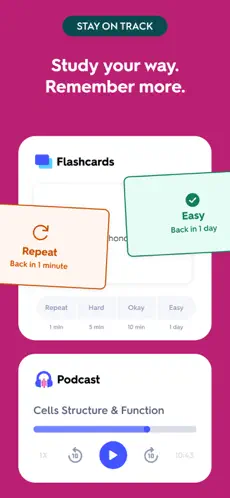 Quizlet wins on its library of user-made study sets. Search for your subject and there is a good chance someone has already built the set and there is a good chance someone has already built the set. That flips the time cost of flashcards. Instead of spending an evening authoring cards, you start reviewing the same night.
The study modes go well past flipping: Learn adapts difficulty to your answers, and Practice Tests simulate the real exam. Audio Recording can turn a recorded or uploaded lecture into study guides and flashcards. The honest downside is the free tier. It carries ads, and it can interrupt studying with upgrade prompts, and community sets vary wildly in quality, so a badly written deck full of typos is a real risk for popular courses.
Quizlet is free to download, with in-app purchases. Quizlet Plus is available as an in-app subscription; current pricing is in the App Store listing.
AnkiMobile — Best Spaced Repetition App

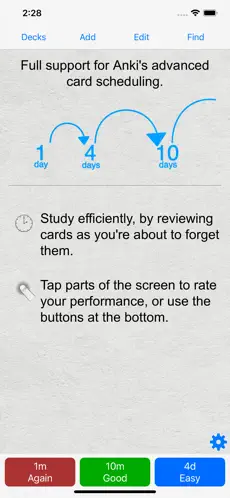 AnkiMobile is the iPhone companion to Anki, the free, open-source flashcard program that medical students, language learners, and bar-exam candidates have leaned on for more than a decade. The scheduler offers the SM2 and FSRS algorithms, the same ones the desktop version of Anki uses.
Sync through AnkiWeb is free and keeps your cards in step across your phone, tablet, and computer. Shared community decks cover anatomy, pharmacology, languages, and thousands of other subjects, so the base material usually already exists. The trade-offs are real, though. At $24.99 upfront it is the only paid-to-download app here,, the 4.0 star rating reflects reviewer complaints about the price and a steep learning curve, and the setup is genuinely fiddly if you have never used Anki before.
AnkiMobile is $24.99 as a one-time purchase. AnkiWeb sync and the desktop apps are free, which is what the iOS price funds.
Download AnkiMobile Flashcards
Brainscape — Best Adaptive Algorithm

 Brainscape asks you to rate how confident you felt on each card from 1 to 5, then weights future rounds so the cards you rated lowest come back first. It is spaced repetition with a human judgement layer on top, and it is noticeably easier to trust than a purely automatic scheduler when you are learning brand-new material and cannot tell what you actually know.
The deck library leans toward paid exam prep, and the expert-created sets for the MCAT, GRE, and AP courses are a strong draw. It can create flashcards from notes, PDFs, and images. The limitation is breadth. Brainscape’s community library is a fraction of Quizlet’s, and the best exam decks sit behind the Pro subscription, so the free tier is really an on-ramp rather than a permanent home.
Brainscape is free to download, with community decks and your own cards. Certified exam decks need the Pro subscription; check the App Store for current pricing.
Knowt — Best Free Quizlet Alternative

 Knowt is the app to try if you have outgrown Quizlet’s free tier. It is built for 7 million students, and its Learn mode is free rather than paywalled. You can import a Quizlet set directly, so switching costs you nothing but an afternoon of re-downloading.
The AI features are the reason it is here. Paste in notes, upload a PDF, or drop a lecture video and Knowt generates flashcards and a practice test from the material, then keeps a running study guide you can edit. The obvious weakness is depth of community content. Knowt’s shared library is user-made, so for an obscure course you may still be writing your own cards.
Knowt is free to download and the core Learn mode is free. Optional upgrades cover higher AI limits; current pricing is in the App Store listing.
AlgoApp — Best Flashcard App for Languages

 AlgoApp sits in a rare spot: a general-purpose flashcard app that is genuinely good at vocabulary. Cards can be spoken aloud with automatic text-to-speech, and image occlusion lets you blank out parts of a diagram or a photo, which is how it stays useful for anatomy and Japanese kanji as well as French verbs.
The numbers back the age of the app. Users have studied over 2 billion cards through it, it has ranked first in Education in several countries, and it has been around long enough to have been covered by the New York Times. That history is also the problem. The interface looks its age next to Noji, the free tier caps how many cards you can review per day before nudging you toward a subscription, and the automatic card generator is decent rather than great.
AlgoApp is free to download with a daily card limit. A subscription lifts the limit and unlocks extra deck packs; current pricing is in the App Store listing.
Turbo AI — Best for Turning Lectures Into Cards

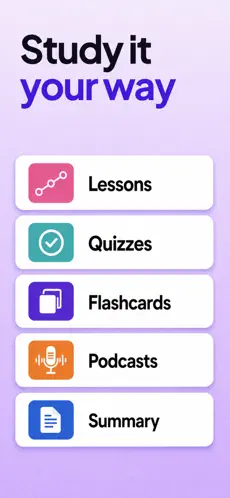 Turbo AI takes the single most tedious part of student life, turning a 50-minute lecture into something you can revise from, and automates it. Feed it a recording, a slide deck, a PDF, or a pasted article and it returns bite-sized lessons, a summary, practice quizzes, and a flashcard set built from the same material. The lecture-recording path is the standout: hit record, and you get organised notes without retyping anything.
Output formats are unusually flexible. The same upload can become a podcast-style audio recap for the commute and a quiz for the night before the exam, which is a better use of a commute than re-reading slides. The caveat is that it is an AI-first tool. Cards it generates are a starting point, and you should expect to trim and reword them; reviewers say the free tier is quickly limited.
Turbo AI is free to download, with Turbolearn Unlimited subscriptions as in-app purchases; current pricing is in the App Store listing.
StudyFetch — Best AI Tutor for iPhone

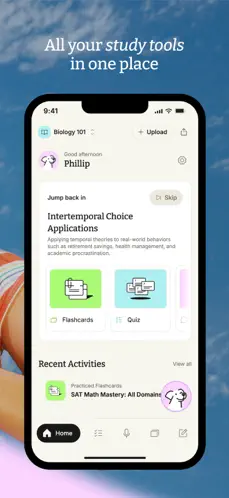 StudyFetch leans harder into tutoring than the rest of the AI apps here. Upload your lectures, slides, PDFs, or videos and it builds a study plan, breaks it into flashcards, quizzes, and notes, and keeps a persistent tutor called Sparky on hand to answer follow-up questions about the material you uploaded. For a subject you are struggling with rather than merely memorising, that question-and-answer loop is more useful than another deck.
The study plan is the differentiator. Instead of handing you a pile of cards, it sequences the material and tells you what to work on next, which suits students who need structure more than they need volume. The catch is that it is a weaker pure flashcard app than Anki or Brainscape. If your goal is long-term retention of a fixed set of facts, StudyFetch’s AI layer adds cost and complexity without beating a proper spaced repetition scheduler.
StudyFetch is free to download with a limited AI allowance. The tutor, plans, and larger uploads run on a subscription; current pricing is in the App Store listing.
Noji — Best-Looking Flashcard App

 Noji is the app you install when the reason you are not studying is that the app you are studying with looks like a spreadsheet. The card editor lets you customize how your cards look, the spaced repetition underneath is a real algorithm rather than a timer, and there is a web version so the same decks open on a laptop. Collaboration is built in, which makes it a decent choice for a study group building one shared set.
The trade-off is scale. Noji’s library of ready-made decks (about 50,000) is a good size, and reviewers say the free tier is limited. If you mainly want to search for a course someone else already built, this is not the app for that job. If you are happy building your own, it is the most pleasant of the nine to spend an hour in.
Noji is free to download with spaced repetition included. Premium plans are available as in-app purchases; current pricing is in the App Store listing.
Forest — Best Focus Timer for Study Sessions

 Forest is not a flashcard app, and it is on this list because the flashcards are rarely the bottleneck. You start a timer, a tree grows on screen, and if you leave the app before the timer ends the tree dies. That small, visible cost to distraction does more for a study session than another deck feature, and the coins you earn plant real trees through a partnership with Trees for the Future. The community has planted over 2 million of them.
Sessions can be tagged by subject, so the app doubles as a rough record of where your study hours actually went, and the friend feature lets a group grow a shared forest for accountability. The limitation is scope: it will not teach you anything, exclusive trees sit behind Forest Plus, and it only works if you are honest enough to start the timer in the first place.
Forest is free to download. Forest Plus unlocks exclusive trees and 3x coin rewards; current pricing is in the App Store listing.
How to Combine These Apps Into One Study System
The strongest setup uses three of them together. Start with Forest to protect a 25-minute block, so the phone is working against you rather than for you. Use Quizlet to find or build the initial card set, because its library removes the excuse of not knowing where to start. Then move the cards you keep missing into AnkiMobile, where the scheduler will keep surfacing them over weeks and months.
Quizlet is fastest for the first pass and for broad review before an exam. Anki is where retention is actually built, and it is the app that rewards a long relationship. If you are studying something conceptual rather than factual, swap Anki for StudyFetch or Turbo AI so you have something to ask questions of, and let Brainscape handle the exam-prep decks where the certified content is better than anything you would write yourself.
Spaced repetition, the technique behind Anki, Brainscape, and Noji, is covered in plain language on the Wikipedia entry on spaced repetition, which is a useful twenty minutes if you want to understand why the intervals are built the way they are.
Which One Should You Pick?
If you are starting today and want the shortest path to studying: Quizlet. It is free, the deck for your course probably already exists, and the learning curve is close to flat. Add Forest if your problem is starting, not remembering.
If you are in it for the long haul, on something high stakes like medicine, law, or a language you actually intend to speak: AnkiMobile. The $24.99 stings once and then stops mattering, and . If the price or the interface puts you off, Brainscape gets you most of the way there with far less setup.
Our pick: Quizlet for most students, AnkiMobile for anyone whose exam result depends on remembering thousands of facts.
Frequently Asked Questions
What is the best free flashcard app for iPhone?
Quizlet is free to download, and its library of user-made study sets is the part that saves you the most time. Knowt is the better free pick if you want AI-generated cards from your own notes. The desktop version of Anki is free and uses the same scheduling algorithms as the iOS app.
Is Anki worth $24.99 on iPhone?
For high-stakes memorisation, yes. The iOS price is what funds the free desktop, web, and Android versions, and serious Anki users do most of their card building on a computer anyway. For a single exam in a subject you will never revisit, Quizlet’s free tier is the better value.
How does spaced repetition actually work?
Each card gets a review interval that grows every time you recall it correctly and shrinks when you forget. The scheduler aims at the moment just before you would have forgotten, which is where recall does the most to strengthen memory. The practical effect is that you review known cards rarely and weak cards often, instead of re-reading everything at a fixed pace.
What is the best flashcard app for medical school?
Anki is widely recommended for medical terminology, and reviewers say there are many shared decks. Brainscape’s certified MCAT deck is the strongest alternative for pre-med study. Quizlet is fine for early coursework, but it is not where most med students end up.
Can I use AI to make flashcards for me?
Yes, and it has become the main reason to switch apps in 2026. Knowt, Turbo AI, StudyFetch, Brainscape, and Quizlet can all turn your notes or uploaded material into a starter deck. Treat the output as a draft: reword anything vague, delete cards that test trivia rather than understanding, and keep the final set in a spaced repetition app.
For more on the gear and study stack around these apps, see our guides to the best iPhone apps for college students, the best iPad apps for students, and the best note-taking apps for iPhone. If you are learning a language rather than a course, our roundup of free iPhone language learning apps picks up where a vocabulary deck stops. And if the problem is starting at all, the best iPhone apps for staying focused are worth a look.
Is your app on this list? Add a free "Featured on iOS App Lists" badge to your website or press kit.