
Published May 4, 2026 · Updated Oct 27, 2026
College demands a lot from a phone. Lecture notes, study sessions, group project coordination, splitting the cost of everything, and somehow getting assignments in on time — the right apps make each of those meaningfully easier. These five cover the ground that actually matters.
Jump to a section
Best iPhone Apps for College Students — Quick Picks
- Best for lecture notes: Notability — audio sync, handwriting, PDF annotation
- Best for studying: Quizlet — flashcards, practice tests, AI study tools
- Best for organisation: Notion — notes, tasks, and project pages in one place
- Best for splitting costs: Venmo — the standard for paying people back
- Best for homework help: Chegg — step-by-step solutions and expert Q&A
Notability — Best for Lecture Notes


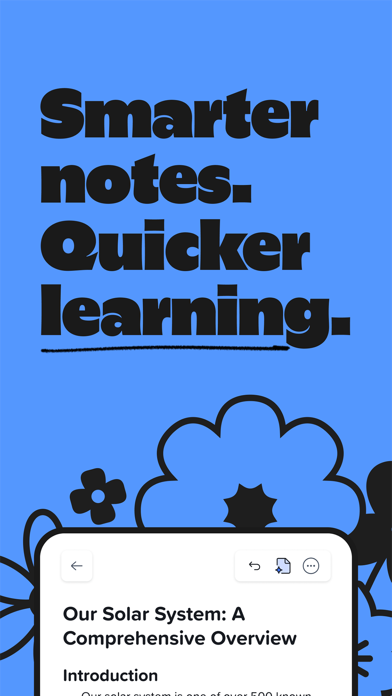
 Notability is built for lectures, and the audio sync feature is the reason. Record a lecture while you take notes, and Notability links every word you write to the moment in the recording when you wrote it. Audio recordings are synced to the exact moment you write in a note — which means you can write fast during lectures without worrying about missing context, because the recording fills in the gaps.
Apple Pencil handwriting support is excellent on iPad (the preferred device for serious note-taking), but the iPhone app handles typed notes and PDF annotation well for lighter use. You can import lecture slides as PDFs and annotate directly on them. AI-powered note summaries help with revision. Notability syncs via iCloud across all your Apple devices.
Notability is free to download with a limited free tier. Full access requires a paid plan, either a subscription or the one-time Classic purchase — check current pricing in the App Store.
Quizlet — Best for Studying


 Quizlet is used by over 60 million students, teachers, and lifelong learners according to its App Store description. You can find existing sets for your specific textbook, course, or exam, or create your own flashcards from scratch. The Learn mode adapts to your performance — spacing out cards you know and drilling the ones you don’t — which is more effective than random repetition.
Beyond basic flashcards, Quizlet offers Practice Tests and spaced repetition. Recent AI additions let you generate flashcard sets from uploaded notes, which dramatically speeds up the set-creation process.
Quizlet is free with core study features. Quizlet Plus is an optional paid subscription.
Notion — Best for Organisation


 Notion is where students who want everything in one place tend to land. A single workspace can hold your course notes, assignment tracker, reading lists, research notes, and semester calendar — all linked together and searchable. Pages can contain plain text, databases, kanban boards, tables, and embedded files, which means your semester schedule and your history essay can live in the same system.
Notion’s free personal plan is genuinely complete for individual student use — unlimited notes and docs, synced across your devices. Group project coordination works well with shared pages. The learning curve is steeper than a simple notes app, but students who invest the setup time consistently find it becomes the central hub for everything academic.
Notion is free for personal use.
Venmo — Best for Splitting Costs


 Splitting rent, utilities, groceries, pizza, and every other shared expense is an inescapable part of college life, and Venmo is the standard everyone already uses. You can send and request payments, and Instant Transfer can get your Venmo money into your bank within minutes.
Venmo also functions as a debit card (via Venmo Debit Card) and offers teen accounts for ages 13-17 with a parent or guardian. For splitting costs with people who are definitely already on Venmo — which at college is essentially everyone — there’s no easier option.
Venmo is free. Venmo is free to download.).
Chegg — Best for Homework Help


 Chegg Study provides step-by-step solutions to textbook problems, expert Q&A, and subject-specific explanations across maths, science, engineering, business, and humanities. When you’re stuck on a problem set at midnight and the textbook isn’t helping, Chegg’s worked solutions explain not just the answer but each step of the reasoning — which is more useful for actually learning the material than just copying an answer.
The photo-scan feature lets you photograph a problem and search for a matching solution, which is faster than typing. The Study subscription is the core product. Use it as a learning resource rather than a shortcut — understanding the worked solutions is where the value lies.
Chegg Study is free to download. Full access requires a Chegg Study subscription — check current pricing in the App Store.
Other Apps Worth Having
A few more worth installing that didn’t make the main list: Forest (866450515) for focus sessions during study — you grow a virtual tree while your phone stays locked. Google Drive for group project file sharing.
Frequently Asked Questions
What is the best free note-taking app for college students?
Apple Notes is built-in and free, covering basic lecture notes without any setup. For more academic use, Notion’s free personal plan lets you create as many notes and docs as you want.
Is Notability or GoodNotes better for college?
Notability’s audio sync with note-taking is valuable for lectures. GoodNotes also supports PDF annotation and audio notes synced to what you write. Both are widely used in academic settings; the choice depends on whether you take more handwritten notes or annotate more existing documents.
What app do college students use to pay each other?
Venmo is the dominant platform among US college students for peer payments. Apple Pay Cash (built into iPhone) and
Is Chegg worth it for college students?
For STEM courses with large problem sets, the step-by-step solutions are genuinely useful for understanding where your approach went wrong. The value depends on your course load — a student taking three maths and science courses simultaneously will get more from it than a humanities major.
For more productivity and study tools, see our roundup of the best note-taking apps for iPhone and our guide to the best habit tracker apps for building study routines. Staying informed counts too, and our roundup of the best news apps for iPhone covers the readers that will not turn a study break into an hour. If you’re taking a language course, our list of the best free language learning apps for iPhone has the options that don’t cost a cent. If your degree involves programming, our roundup of the best free coding apps for iPhone covers the ones that teach on the phone itself. And if you record seminars to listen back to rather than annotate slides in the moment, our guide to the best voice recorder apps for iPhone is the better starting point.
Is your app on this list? Add a free "Featured on iOS App Lists" badge to your website or press kit.