
Published Jul 2, 2026 · Updated Oct 27, 2026
WhatsApp is the biggest messaging app on the planet. Three billion people use it. And until this week, every single one of them had to share their phone number to start a conversation.
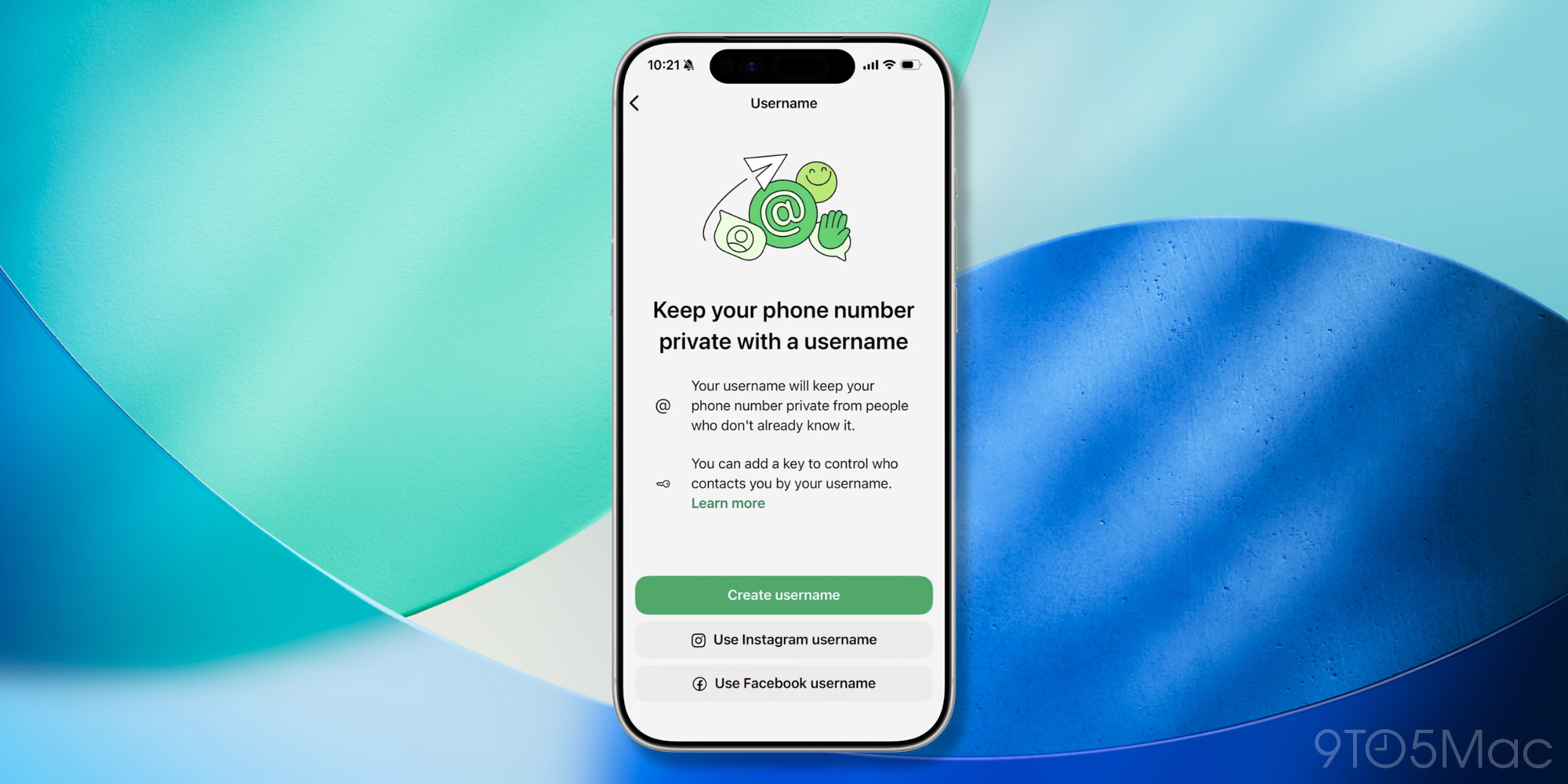
That changed on June 29. WhatsApp began rolling out usernames, a feature that lets you connect with people using a unique handle instead of your phone number. No more handing out digits to the Facebook Marketplace seller. No more group chats where strangers can see your number. No more explaining that yes, that is really you on WhatsApp and not some spammer.
The reservation system is live now. Full functionality arrives later in 2026. But the important part is this: you can claim your handle today, before someone else takes it.
This is the biggest privacy change WhatsApp has made since end-to-end encryption went default in 2016. For protecting your accounts beyond messaging, also see our roundup of the best password managers for iPhone. It closes a blind spot that competitors like Signal addressed two years ago. And it arrives at a complicated moment: India’s government just ordered Meta to pause the rollout in the country, citing impersonation and fraud concerns, according to Forbes India.
Here is what it all means for you as an iPhone user, and exactly how to get your username before the rush.
Jump to a section
- How to Reserve Your WhatsApp Username on iPhone
- Privacy by Design: What WhatsApp Got Right
- WhatsApp vs Signal vs Telegram: Who Does Usernames Best?
- The India Controversy: Why the Government Hit Pause
- What This Actually Changes About Daily WhatsApp Use
- Frequently Asked Questions
- Can people find my WhatsApp by searching my username?
- What happens to my phone number? Is it still required?
- When will usernames be fully available for everyone?
- Can I change my WhatsApp username later?
- Does this work for WhatsApp Business accounts?
- Can someone impersonate me by taking my name as a username?
- Bottom Line: Reserve Yours Now
- Sources
How to Reserve Your WhatsApp Username on iPhone
The reservation process is straightforward. Here is the step by step:
1. Update WhatsApp. Go to the App Store and make sure you are on the latest version. The username option only appears in builds released after June 29, 2026.
2. Open WhatsApp and tap Settings (the gear icon in the bottom right corner).
3. Tap your Profile at the top of the Settings screen.
4. Look for Username. If you see it, tap it. If you do not, the rollout has not reached your account yet. WhatsApp is doing a gradual release over “the coming months,” so check back.
5. Enter your desired username. The rules, confirmed by the WhatsApp Help Center, are specific:
- 6 to 32 characters
- Letters (a-z), numbers (0-9), and underscores only
- No spaces, no periods, no hyphens
- Cannot look like an email address, URL, or phone number
6. If your handle is available, WhatsApp confirms the reservation. You will get a notice once usernames become fully active later this year.
A few things to know right now. Your phone number is still required to create and verify your WhatsApp account. That has not changed. What changes is that once usernames go live, you can give someone your handle instead of your number. They will never see your digits unless you have already shared them through normal channels.
The system is first-come, first-served. If you want your actual name or a recognizable handle, reserve it now. As with every platform that launches usernames, the good ones go fast. Three billion people are in the queue.
Privacy by Design: What WhatsApp Got Right
Meta’s track record on privacy is complicated, to put it mildly. But the username system WhatsApp built is genuinely private in ways that surprised even critics.
No public directory. There is no searchable list of WhatsApp usernames. You cannot browse handles. You cannot “discover” people. Someone needs to give you their username directly — in person, over text, in an email — for you to find them.
No autocomplete. When you type a username into the search bar, WhatsApp does not suggest completions. Type “@johndoe” and you need to finish it yourself. This prevents the kind of random discovery that makes Telegram less private. On Telegram, typing a partial handle pulls up suggestions from the global directory.
Blocking still works. If someone has your username and you block them, they cannot contact you. The block applies regardless of whether they used your number or your handle.
You can change your username at any time. Found out your handle is too easy to guess? Go to Settings, then Profile, then Username, and pick a new one. Your old handle becomes available for someone else to claim.
CNET described the feature as a way to “chat with others on the platform without handing over your personal phone number.” Forbes called it “closing a longstanding privacy gap.” Al Jazeera noted the scale: “WhatsApp is used in more than 180 countries and 60 languages.”
Here is how the three major messaging apps handle usernames side by side:
| Feature | Signal | Telegram | |
|---|---|---|---|
| Username introduced | June 2026 | 2024 | 2013 |
| Phone number hidden | Yes | Yes | Yes (optional) |
| Public directory | No | No | Yes (global search) |
| Autocomplete | No | No | Yes |
| Can change handle | Yes | Yes | Yes |
| Required to message | Optional | Optional | Required (non-phone contacts) |
Signal got there first among the privacy focused apps. Telegram has had handles since launch. But WhatsApp’s implementation — no directory, no autocomplete, a reservation window before launch — is arguably the most privacy conscious of the three. Being two years late came with the advantage of watching what went wrong for everyone else.
WhatsApp vs Signal vs Telegram: Who Does Usernames Best?
If privacy is why you care about usernames, the competitive landscape matters.
Signal introduced usernames in early 2024. The implementation is clean: no phone number required to connect, no public directory, and three-word default handles (like “amber.drift.924”) for people who do not want to pick their own. The only gap is that you still need a phone number to register, same as WhatsApp.
Telegram gave users handles from day one, but the philosophy is different. Telegram has a global search directory. Start typing a handle and suggestions appear. Discovery is easier but less private. Anyone can find you if they guess or partially type your handle. For a platform that markets itself on privacy, the directory is a problem. That said, Telegram gives you granular control: you can set who finds you by phone number separately from your username visibility.
WhatsApp arrives late but with the strongest privacy defaults. No directory. No autocomplete. A reservation period that lets users claim handles before they are functional. And the user base — three billion people — means this is not a niche privacy feature. It is a mass market privacy upgrade.
The trade-off is rollout speed. Signal had usernames working for everyone within weeks. WhatsApp is doing a months-long gradual release. If you need username based messaging today, Signal is the answer. If you want the one your friends actually use, WhatsApp is the one to watch.
One honest criticism: the staggered rollout is frustrating. Users in some regions already have the feature while others wait. And if you are waiting, there is no clear timeline. WhatsApp says “coming months.” That vagueness is the cost of shipping to three billion people at once.
The India Controversy: Why the Government Hit Pause
On July 1, one day after the global reservation system went live, India’s government ordered Meta to halt the username rollout in the country. Meta was given a deadline of three days to explain how it will prevent impersonation and fraud, according to BusinessToday.
This matters because India is WhatsApp’s biggest market. More than 400 million people use WhatsApp in India. A feature that goes live everywhere except India is effectively half launched.
The government’s concerns are specific and not unreasonable. India has been dealing with fraud carried out on WhatsApp for years: fake customer support accounts, impersonation scams targeting the elderly, criminal networks coordinating while hiding behind phone numbers. The worry is that usernames will make impersonation easier. Anyone could claim “@StateBankHelpline” before the actual bank does.
Forbes India reported that the Ministry of Electronics and Information Technology wants WhatsApp to implement verification for certain categories of usernames — government agencies, banks, major brands — before the feature launches in India. The deadline of three days puts Meta’s response due around July 4.
What this means for the global rollout is unclear. Meta’s statement was measured: “We are engaging with the government and remain committed to bringing usernames to all WhatsApp users.”
But here is the practical reality. If India, with 400 million users, requires a different rollout path, it will complicate the global timeline. It might mean country-specific username rules. It might mean a verification system for high-profile handles. Or it might mean nothing — just a regulatory delay in one country while the rest of the world moves forward.
For iPhone users outside India, the news does not affect your ability to reserve a username. Do it now. If verification systems do arrive eventually, having already claimed your handle puts you ahead.
What This Actually Changes About Daily WhatsApp Use
The privacy upgrade is real. But let us be specific about what usernames do and do not change about daily WhatsApp use.
What changes:
- You can join group chats without everyone seeing your number
- You can message a Facebook Marketplace seller without sharing personal info
- You can put your WhatsApp handle on a business card or website instead of your phone number
- You stay reachable if you change your phone number (contacts find you by username)
What does not change:
- Your phone number is still tied to your account for verification
- End-to-end encryption works the same way
- Existing chats and groups continue as before
- WhatsApp Business accounts get a separate username system
The group chat scenario is the most immediate win. Right now, joining a public WhatsApp group — a neighborhood watch, a school parents’ group — means exposing your number to everyone in it. With usernames active, you join as “@yourname” and your number stays hidden.
Facebook Marketplace, too. The platform pushes sellers and buyers to WhatsApp for final coordination. Until now, that meant sharing a phone number with a stranger. Usernames fix that.
Frequently Asked Questions
Can people find my WhatsApp by searching my username?
No. There is no public directory and no autocomplete. Someone needs to know your exact username and type it correctly to find you. This is different from Telegram, where partial handles surface suggestions. It is also different from Instagram or X, where usernames are fully searchable.
What happens to my phone number? Is it still required?
Yes, your phone number is still required to create and verify your WhatsApp account. The username is an additional way for people to contact you. It does not replace your number. Once the feature is fully active, people who contact you via username will not see your phone number.
When will usernames be fully available for everyone?
WhatsApp says the rollout will happen “gradually over the coming months.” The reservation system is live first, giving users time to claim handles. Full messaging via username — where you can start conversations without sharing numbers — is expected later in 2026. WABetaInfo has been tracking the beta versions and confirms the phased approach.
Can I change my WhatsApp username later?
Yes. Go to Settings, then Profile, then Username, and change it whenever you want. Your old handle becomes available for someone else to claim. There is no limit on changes, but remember: every time you change handles, anyone who saved your old one loses the ability to message you that way.
Does this work for WhatsApp Business accounts?
Yes, but through a separate system. WhatsApp Business accounts can reserve business usernames, distinct from personal ones. The Business username system has additional verification options, according to the WhatsApp Help Center. This may help address the impersonation concerns India’s government raised.
Can someone impersonate me by taking my name as a username?
Possibly. If your name is John Smith and someone takes @johnsmith before you do, you will need a different handle. This is the same problem every platform with usernames faces. WhatsApp has not introduced a verification system for personal accounts yet, though the India controversy might accelerate that. For now, the best defense is reserving your handle early.
Bottom Line: Reserve Yours Now
If the username option appears in your WhatsApp settings, claim your handle. Not later today. Not this week. Now.
The good usernames go fast on every platform. Your actual name, your preferred handle, anything recognizable is available today and could be gone tomorrow. The reservation system is first-come, first-served, and three billion people are in the queue.
To check: open WhatsApp, tap Settings, then Profile, and look for Username. If the option is not there yet, update the app. If it is still not there, the gradual rollout has not reached you. Check back — this is worth the five seconds it takes.
For the privacy conscious iPhone user, this is the most significant WhatsApp update in a decade. It fixes the platform’s biggest privacy flaw. It brings WhatsApp in line with Signal and Telegram on user identity, and in some ways surpasses both. It does it at a scale that matters: three billion people who just got the option to stop handing out their phone numbers.
The India pause is a speed bump, not a wall. Meta has every incentive to resolve it. The global rollout continues. According to Forbes, the username feature “rolls out key new username feature” to all WhatsApp users globally.
Further reading:
- Best iPhone Apps for Communication & Productivity in 2026 — WhatsApp alternatives and messaging tools
- Best VPN Apps for iPhone in 2026 — For keeping your WhatsApp traffic private
- iOS 27: The Best New Features Coming to Your iPhone in 2026 — Software updates that affect your apps
Sources
1. WhatsApp Help Center — Official username setup instructions
2. Forbes — Feature significance and rollout
3. WABetaInfo — Reservation mechanics
4. Forbes India — India halts rollout
5. BusinessToday — Deadline of three days for Meta response
6. CNET — Username reservation guide
7. Al Jazeera — Global context: 180+ countries, 60+ languages