
Published Jul 15, 2026 · Updated Nov 16, 2026
Signal and DuckDuckGo are the best free iPhone privacy apps to install first. Signal gives you end-to-end encrypted messaging that stores almost nothing on its servers, and DuckDuckGo gives you a browser that blocks trackers and hides your email address. Both are free to download.
Your iPhone knows where you live, who you talk to, what you search for at 2 AM, and probably your credit card number. That’s not paranoia. It’s how the ad-tech economy works. Every app you install, every link you tap, every photo you share leaks data into a system designed to monetize it.
But you don’t need to go full tin foil hat. A handful of apps, most with genuinely free tiers, can close most of the leaks without requiring a computer science degree. Here are the eight worth installing.
Jump to a section
Quick Picks
- Best private browser: DuckDuckGo: blocks trackers and protects email
- Best encrypted messenger: Signal: strong end-to-end encryption by default
- Best free VPN: Proton VPN: no data caps, no ads, Swiss-based with strict no-logs policy
- Best password manager: Bitwarden: open source, cross-platform, free tier does everything you need
- Best Safari ad blocker: AdGuard: blocks trackers and ads across Safari with custom filter lists
- Best encrypted email: Proton Mail: end-to-end encryption, free to download
- Best on-device firewall: Lockdown Privacy: blocks trackers in all your apps, on-device
- Best photo metadata remover: Metapho: strips GPS, EXIF, and camera data before you share
Comparison Table
| App | Best For | Free Tier Limits | Rating |
|---|---|---|---|
| DuckDuckGo | Browser + email protection | Free; optional paid subscription | ★4.84 |
| Signal | Encrypted messaging | None (optional Secure Backups purchase) | ★4.73 |
| Proton VPN | VPN | No data caps, servers in 10 countries | ★4.64 |
| Bitwarden | Password management | Unlimited passwords, 2 users | ★4.76 |
| AdGuard | Safari content blocking | Safari ad blocking, basic privacy protection | ★4.34 |
| Proton Mail | Encrypted email | Free to download; paid plans available | ★4.75 |
| Lockdown Privacy | Firewall & tracker blocking | Basic blocking free | ★4.29 |
| Metapho | Photo metadata removal | Subscription or one-time purchase | ★4.60 |
DuckDuckGo — Best Private Browser


DuckDuckGo’s built-in search engine never tracks your searches. The iPhone app is now a full privacy toolkit. It blocks hidden third-party trackers, forces encrypted connections when available.
The Email Protection feature is the sleeper hit here. You get a free @duck.com address that strips trackers from incoming email before forwarding to your real inbox. Email Protection also hides your existing email address behind @duck.com addresses. Similar to Apple’s Hide My Email, but cross-platform and free.
The browser itself is fast and stripped down. The Fire Button clears your tabs and browsing data in one tap. For daily browsing where you don’t need Chrome’s ecosystem, this is the default you should set.
Pricing: Free to download. An optional DuckDuckGo subscription (Plus is $9.99/month) adds a VPN and advanced Duck.ai models. The company says it makes money from privacy-respecting search ads, not from exploiting your data.
Download DuckDuckGo | DuckDuckGo
Signal — Best Encrypted Messenger

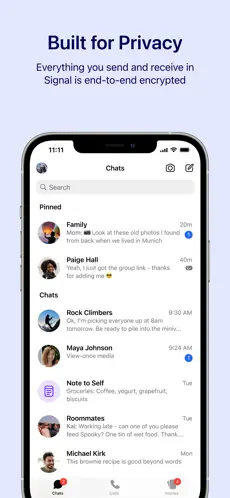
Signal is what WhatsApp claims to be. Every message, call, and video chat is end-to-end encrypted by default. There’s no setting to accidentally toggle off. The encryption comes from the open source Signal Protocol.
What makes Signal genuinely private, beyond the encryption, is what it doesn’t collect. No contact lists stored on servers. No message metadata. No usage analytics. When a federal grand jury subpoenaed Signal for user data in 2021, the company published its response in full: a two-sentence document showing the only data it held was the account creation date and the last connection time. That’s the whole thing.
The app itself feels like any modern messenger. Group chats up to 1,000 people, voice and video calls, stickers, and stories that disappear after 24 hours.
Signal is at its best when your friends are already on it. If you want to see what else is out there, our roundup of free iPhone messaging apps covers the field.
Pricing: Free to download, with an optional Secure Backups purchase ($1.99). Signal is a 501c3 nonprofit supported by donations, not advertisers.
Download Signal | Signal Foundation
Proton VPN — Best Free VPN


Most free VPNs are data-harvesting operations with a VPN app as the front. They log your browsing, sell it to data brokers, and occasionally inject their own ads into your traffic. Proton VPN is the exception. Built by the same team behind Proton Mail, based in Switzerland under some of the world’s strictest privacy laws, with a published no-logs policy that has been independently audited.
The free tier comes with unlimited data and no ads, which is genuinely unusual. Many free VPNs cap your monthly data.). What the free plan withholds is most of the server network, plus premium features such as NetShield and Secure Core. The paid tiers open up 20,000+ servers across 140+ countries.
The app itself is clean. One tap to connect. A kill switch that blocks all traffic if the VPN drops. Secure Core routing that bounces your connection through privacy-friendly countries before exiting. NetShield blocks malware, ads, and trackers at the DNS level.
The real catch is server choice. The free plan limits you to a subset of the server network. For email, browsing, and messaging on public Wi-Fi, it’s more than enough. If you want more, our best VPN apps for iPhone comparison covers the paid tiers worth paying for.
Pricing: Free tier with no data limits. Paid plans start at $11.99 (VPN Plus) in the App Store, which adds 140+ countries, streaming-friendly servers, and more simultaneous devices.
Download Proton VPN | Proton VPN
Bitwarden — Best Password Manager

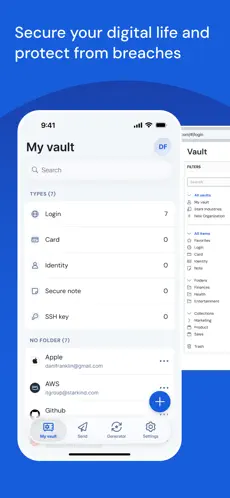
Reusing passwords is the digital equivalent of using the same key for your house, car, and office. If one lock gets picked, everything’s open. Bitwarden solves this by generating, storing, and autofilling unique passwords for every account.
Unlike most password managers that lock features behind a subscription, Bitwarden’s free tier is genuinely complete. Unlimited passwords. Unlimited devices. Sync across phone, tablet, and desktop. Two-factor authentication via authenticator app or hardware key. The premium tier ($19.80/year) adds file attachments, emergency access, and security reports.
The app autofills logins across your devices. There’s also a built-in username and password generator with configurable character sets.
Bitwarden is fully open source, published on GitHub, and audited annually by third-party security firms. Its codebase is publicly available for anyone to inspect. Bitwarden pairs open source transparency with a generous free tier, and the free tier holds up against the paid options in our best password manager apps for iPhone roundup.
Not a dealbreaker, but worth knowing.
Pricing: Free for unlimited passwords and devices. Premium is $19.80/year. Family plan is $47.88/year for up to 6 users.
Download Bitwarden | Bitwarden
AdGuard — Best Safari Ad Blocker


Safari’s built-in content blocking has improved, but it’s still basic. AdGuard adds proper filter lists, covering trackers, ads, malvertising, and phishing. You pick which lists to enable, from general ad blocking to regional filters to annoyance removal.
AdGuard works as a Safari content blocker, which means it runs declaratively.
The app also offers encrypted DNS filtering beyond Safari, with app protection via DNS as a Pro feature. Enable it in the app and your phone’s DNS queries get filtered through AdGuard’s servers or your own custom DNS. Either way, tracker domains never resolve. DNS filtering works system-wide, not just in Safari.
Custom filter lists are the power user feature. Custom rules are available with Pro. The DNS filtering can also filter adult content if you’re setting up a child’s device.
The free version handles Safari ad blocking and basic privacy protection. Pro unlocks advanced YouTube blocking, app protection via DNS, custom rules, and security filters, while Safari ad blocking and basic privacy protection stay free.
Pricing: Free for Safari ad blocking and basic privacy protection. Premium is $7.99/year, or $14.99 for a lifetime licence, which unlocks the Pro features such as advanced YouTube blocking, app protection via DNS, and custom rules.
Proton Mail — Best Encrypted Email

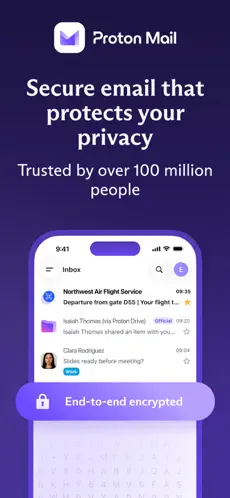
Email is the least private communication medium most people use every day. Standard email travels through multiple servers in plaintext and sits unencrypted on providers’ drives, accessible to anyone with admin access. Proton Mail stores everything in your inbox with zero-access and end-to-end encryption, using OpenPGP.
Proton Mail’s zero-access architecture means Proton itself cannot read your email. Proton does not have access to your encryption key. That’s the trade-off for actual privacy.
You can create a @proton.me or @protonmail.com address.
Proton’s end-to-end protection covers emails between Proton users; for anyone else you need a password-protected email. The real privacy gains come when your contacts switch too. If you’re weighing it against Apple Mail or Gmail, our best email apps for iPhone comparison covers the trade-offs.
Pricing: Free to download. Paid plans start at $5.99/month (Mail Plus) in the App Store.
Lockdown Privacy — Best On-Device Firewall

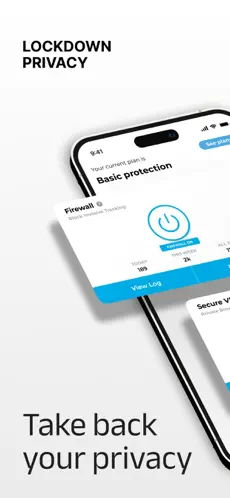
Your apps talk to a lot of servers you’ve never heard of: analytics companies, ad networks, crash reporters, user profiling services. Lockdown Privacy blocks these connections at the firewall level, before they ever leave your device. Unlike a VPN, Lockdown doesn’t route your traffic through a remote server. It creates a local VPN configuration that inspects DNS requests and blocks tracker domains using an on-device blocklist.
The advantage is speed and privacy. Your browsing isn’t slowed by a VPN tunnel, and nobody else sees your traffic. The trade-off is that the firewall itself doesn’t hide your IP address. That is what the app’s separate Secure Tunnel VPN is for. It’s a firewall, not a VPN.
The curated blocklists are updated every week. You can toggle individual domains or add your own. Seeing how many trackers your weather app pings in a single session will change how you think about “free” apps.
The basic firewall gives you one-tap protection with preconfigured block lists. A paid Lockdown VPN subscription adds a no-logs VPN with over a dozen regions; the App Store lists VPN plans from $12.99/month. Firewall plans start at $4.99/month, and the on-device firewall is why it earns a slot here.
Pricing: Firewall plans start at $4.99/month, and Lockdown VPN is $12.99/month.
Metapho — Best Photo Metadata Remover

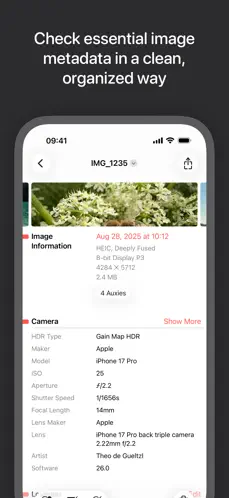
Every photo you take with your iPhone embeds metadata: GPS coordinates of where you took it, the exact time and date, camera model, lens used, and sometimes even the direction you were facing. When you share a photo via text, email, or social media, this data often travels with it. Most platforms strip EXIF data on upload, but not all of them, and direct shares keep everything.
Metapho lets you view and selectively remove metadata before sharing. Open any photo in the app and you’ll see its location plotted on a map, the timestamp, file size, resolution, and camera settings. Tap to wipe specific fields or clear everything. The share extension integrates with the iOS share sheet, so you can strip metadata without leaving Photos.
The app also handles video metadata and can view the full EXIF tree including manufacturer-specific tags. For anyone who sells items online and photographs them at home, posts photos of their kids, or just doesn’t want their exact location embedded in every image they text, this is essential. It works alongside the apps in our best photo organizing apps for iPhone roundup if your library is already out of hand.
The interface is minimal. Metapho requires a subscription or one-time purchase; the App Store lists a yearly plan at $19.99 and one-time purchases at $59.99 and $99.99.
Pricing: Requires a subscription or one-time purchase. Yearly is $19.99; one-time purchases are $59.99 and $99.99.
Which One Should You Pick?
If you install nothing else, start with Signal and DuckDuckGo. If WhatsApp is where your family actually lives, our guide to WhatsApp privacy settings covers the switches worth flipping first. Signal replaces your default messenger with one that actually respects your privacy. DuckDuckGo replaces Chrome or Safari for everyday browsing and catches trackers you didn’t know were there.
If you use public Wi-Fi regularly, in coffee shops, airports, or hotels, add Proton VPN. The free tier gives you encrypted browsing on untrusted networks without the data caps that make most free VPNs useless.
If you reuse passwords, Bitwarden is the single highest-impact security change you can make. A password manager isn’t exciting, but credential stuffing attacks are the most common vector for account takeovers, and unique passwords stop them cold.
The rest, AdGuard, Proton Mail, Lockdown, and Metapho, close specific leaks in specific use cases. AdGuard blocks ads and trackers in Safari, with DNS-based app protection on the Pro tier. Proton Mail encrypts your correspondence. Lockdown shows you who’s watching. Metapho strips the location data from the photos you share. Together they form a privacy stack that covers browsing, messaging, email, passwords, and the data your apps leak without asking. One surface they leave alone is the keyboard you type on, and third-party keyboards see everything that passes through them. Our Gboard vs SwiftKey comparison covers what each one collects before you switch.
Our pick: DuckDuckGo. It replaces your browser and protects your email. Two privacy tools in one app, free to download.
Frequently Asked Questions
Is a free VPN actually safe to use?
Most aren’t. Free VPNs from unknown developers often monetize by selling your browsing data or injecting ads. Proton VPN is the exception because it comes from Proton AG, a privacy-focused company with audited no-logs policies and a sustainable business model funded by paid users. Look for published third-party security audits and a clear business model that doesn’t involve selling data.
Are these apps really free, or are there hidden costs?
Most apps on this list have a functional free tier; Metapho requires a subscription or one-time purchase. DuckDuckGo, Signal, and Bitwarden are free to download and need no paid upgrade for core use. Proton VPN, Proton Mail, and AdGuard offer free tiers with limitations; Lockdown sells paid firewall and VPN plans. Metapho requires a subscription or one-time purchase.
Do I need all of these apps?
No. Start with the category that matters most to you. If you’re worried about your ISP or coffee shop Wi-Fi snooping, start with Proton VPN. If you’re concerned about your messages being read, start with Signal. If you just want to browse without being tracked across every site you visit, DuckDuckGo handles that. Each app solves a specific privacy problem. Install the ones that solve yours.
Does DuckDuckGo actually block all trackers?
DuckDuckGo blocks most third-party trackers from known tracking networks. It’s not 100%, because new trackers appear constantly and some first-party tracking is indistinguishable from normal site functionality. You can check how exposed your own browser is with the EFF’s Cover Your Tracks test, which grades how much of your fingerprint sites can see.
Can I use Apple’s built-in privacy features instead of these apps?
Apple’s iCloud Private Relay, Hide My Email, and Safari’s Intelligent Tracking Prevention are good baseline protections, and they work automatically. But they only cover Safari browsing and Apple services. They don’t block in-app trackers (Lockdown does), protect your messages on non-Apple platforms (Signal does), or encrypt your email at rest (Proton Mail does). These third-party apps fill the gaps Apple’s built-in tools leave open.
You Might Also Like
- Best Offline AI Apps for iPhone (Local LLMs). On-device AI that never sends your data to the cloud
- How to Edit iPhone Photos Without Lightroom. Free photo editing tools that strip metadata and work locally
- Best iPhone Apps for Couples. Shared lists and date night tools with privacy-conscious sharing controls