
Published Sep 18, 2026 · Updated Oct 25, 2026
Shift work is its own kind of hard. You are never on a Monday-to-Friday rhythm, your schedule changes week to week, and the people around you never quite know when you are working. The right apps do not fix the sleep debt, but they do make the scheduling, the handoffs, and the recovery a lot less chaotic. These are the seven we would put on a nurse’s home screen. Most calendar apps are built for a 9-to-5 world, and they quietly fail the moment your schedule rotates through nights and weekends. These are not. And since a nurse’s schedule changes week to week, the apps that win are the ones you can check in two seconds, not the ones with the most features.
Jump to a section
Quick Picks
- Best overall: NurseGrid — a shift calendar built specifically for nurses
- Best visual calendar: Supershift — color-coded rotations you can read at a glance
- Best for swapping shifts: Shyft — trade a shift in a few taps
- Best for your family: TimeTree — a shared calendar so everyone knows your schedule
- Best for handoffs: Otter — turn a spoken report into searchable text
- Best clinical reference: Davis’s Drug Guide — a drug reference in your pocket
- Best for recovery: SleepWatch — track sleep when your schedule keeps moving
Comparison Table
| App | Best For | Price | Rating |
|---|---|---|---|
| NurseGrid | Nurse shift calendar | Free | 4.9 |
| Supershift | Visual rotating calendar | Free + premium | 4.9 |
| Shyft | Shift swapping | Free | 4.8 |
| TimeTree | Shared family calendar | Free + premium | 4.9 |
| Otter | Voice-to-text handoffs | Free + Pro | 4.8 |
| Davis’s Drug Guide | Drug reference | Free trial | 4.9 |
| SleepWatch | Sleep and recovery | Free + premium | 4.7 |
NurseGrid — Best Nurse Shift Calendar


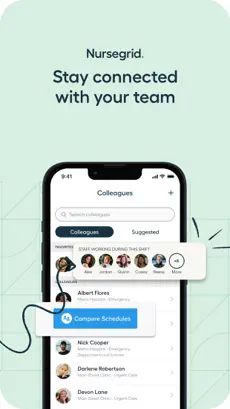
NurseGrid is built for nurses, and its core job is the nurse’s schedule. You log your shifts, see your rotation at a glance, and it syncs with the coworkers on your unit so you can see who is working alongside you. With over 150,000 ratings, it is the default answer for a reason.
The killer feature is the coworker view. Instead of texting “who is on nights this weekend,” you open the app and see it. The calendar and shift logging are free. If you only download one app from this list, this is the one.
If you wear an Apple Watch, NurseGrid’s Apple Watch app puts your shifts and shift details on your wrist, so you check the calendar without pulling your phone out mid-round.
Pricing: Free. Download NurseGrid
Supershift — Best Visual Rotating Calendar

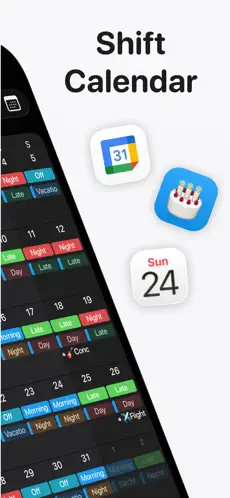
Supershift is the shift calendar for people whose schedule is a pattern, not a spreadsheet. You define your rotation, day shift, night shift, off, and it fills the calendar for months ahead. The color coding is what makes it work: a quick glance tells you where the night shifts land without reading a single date.
It handles the weird stuff too: multiple shifts per day and pay tracking if you want to see what a given stretch is worth. For a rotating schedule, that pattern view saves more time than you would expect. And its Pro tier can push your shifts to Apple Calendar.
One detail worth knowing: it tracks hours, overtime and earnings on top of the calendar. Its sharing is calendar-based, and it can help you coordinate shift swaps.
Pricing: Free with a Pro tier for calendar export, PDF export and external calendar integration. Download Supershift
Shyft — Best for Swapping Shifts


Swapping a shift should not mean seven text messages and a favor you owe. Shyft makes it a marketplace: you post the shift you want to move, coworkers see it, someone takes it, and the swap is handled in-app. It is the difference between “can anyone cover me” and “done.”
What makes Shyft useful beyond the swap is the team chat and announcement layer, so schedule changes do not live in a group thread buried under memes. For hospital units and retail floors alike, it removes a lot of the friction around coverage.
The catch is that it works best when your whole team is on it. If only two of you use Shyft, you are still texting the rest. It is a network-effect app, and its value scales with adoption.
Pricing: Free. Download Shyft
TimeTree — Best Shared Family Calendar


A rotating schedule does not just affect you, it affects whoever lives with you. TimeTree is a shared calendar, so your partner can see when you are on nights and when you actually have a weekend free. It is the app that stops the “wait, are you working Saturday?” text.
It is not nurse-specific, and that is the point. You share it with the people in your life, and it keeps your work schedule and your home life on one screen without forcing anyone to install a shift-specific tool. The comments and notes on each event help coordinate the logistics around your shifts.
The limitation: it is a general calendar, not a shift-specific tool. Pair it with Supershift or NurseGrid and let each app do its own thing.
Pricing: Free, with a premium tier for ad-free calendars, file attachments and more. Download TimeTree
Otter — Best for Handoff Voice Notes

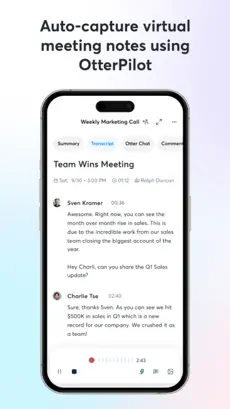
Handoffs are where information gets lost. Otter records speech and turns it into searchable text in real time, so a verbal report becomes something you can scroll back through instead of something you have to remember. You can record via AirPods, and Otter transcribes in real time.
The search is the underrated part. Instead of “did she say the 40 or the 80,” you search the word and jump to the exact spot. For anyone who has lost a detail between report and charting, that is quietly life-changing. It is also available on the web.
Otter’s speaker identification also means you can record a full report and see who said what afterward, which is handy when three people hand off at once. The caveats are real though. Transcription is good but not perfect, especially with medical terms and names, and you should be careful about what you record around patients. HIPAA applies to you, not just to your hospital, so keep recordings de-identified and on your side of the rules.
Pricing: Free with a monthly minute cap, plus a Pro tier. Download Otter
Davis’s Drug Guide — Best Clinical Reference


Nobody memorizes every drug, every interaction, and every dose. Davis’s Drug Guide is the reference that lives in your pocket for the moment you need to double-check something at 2 a.m. It covers dosing, side effects, and interactions, and it is built for nurses specifically, not adapted from a consumer health site.
The value is speed. The search is fast, the entries are structured the way a working nurse thinks, and it works offline, which matters when the Wi-Fi in the break room gives up. For a student, it is a study tool; for a floor nurse, it is a safety net.
What makes it genuinely useful on the floor is the integrated IV calculators for drips and dosing. The catch is the subscription. The app is free to download, but the full content requires a paid subscription, and it is not the kind of thing most people need every single shift. If you are a student or precepting, it earns its keep; otherwise, weigh it against your facility’s own references.
Pricing: Free download, subscription for full content. Download Davis’s Drug Guide
SleepWatch — Best for Recovery on Rotating Schedules


Rotating shifts do real damage to your sleep, and you cannot fix what you are not measuring. SleepWatch tracks your sleep automatically, from your Apple Watch if you have one or from your phone, and it turns the raw data into a sleep quality score with trends over time. For shift workers, the patterns matter more than any single night.
It shows trends in your sleep over time, so you can make your own call about when to sleep and when to push. SleepWatch can show you those patterns.
The limitation: an app will not fix a schedule that is fighting your circadian rhythm. If your sleep is a wreck, an app will not fix a schedule that is fighting your circadian rhythm. But knowing the pattern is the starting point for pushing back on it.
Pricing: Free with a premium tier for deeper metrics. Download SleepWatch
How These Apps Work Together
The clean setup is three apps, not seven. And put the watch to work while you are at it: the NurseGrid Apple Watch app for the schedule, Otter’s AirPods recording to start a note hands-free, and SleepWatch reading your sleep off your wrist overnight means your phone stays in your pocket for most of a shift. Use NurseGrid or Supershift as your calendar, Shyft for swaps if your unit is on it, and Otter for handoffs. Add TimeTree if you need your family in the loop and SleepWatch if your rotation is wrecking your sleep. Davis’s Drug Guide earns a spot only if you are still learning the meds.
For more shift-life tooling, our work schedule apps roundup covers the broader category, and the restaurant and line cook apps list has overlap if you also pick up shifts on the side. If you are on the road between locations, the mileage tracker comparison covers the driving half.
What to Look For in a Shift-Work App
A shift calendar should let you define repeating patterns, not just single events, and it should show nights and weekends in a way you can read without squinting. If you have to re-enter the same rotation every week, it is not actually a shift app.
The second thing is how the app handles other people. Swaps, team visibility, and a shared view with family are all different features, and . Decide which problem hurts most before you download: if it is coverage, get Shyft. If it is your partner never knowing your schedule, get TimeTree.
The third is the Apple Watch. NurseGrid and SleepWatch both have Apple Watch apps, which matters when your hands are full and your phone is in a pocket. A shift app you can glance at on your wrist beats one with a prettier iPhone layout.
Frequently Asked Questions
Is NurseGrid free for nurses?
Yes. The core shift calendar and coworker view are free.
What is the best shift calendar app for iPhone?
For nurses specifically, NurseGrid. For a general rotating schedule with strong visuals, Supershift. Both are free to start, so try both and see which fits how your unit posts schedules.
Can I use Otter for nursing handoffs?
Yes, with a caveat. Otter transcribes speech to text in real time, which is great for turning a verbal report into searchable notes. Just keep recordings de-identified and consistent with HIPAA, since patient information should not live in a consumer cloud app.
Does SleepWatch work with shift work?
It does. It tracks automatically and shows trends over time, which is exactly what you need when your sleep schedule moves week to week. It will not fix a rotating schedule, but it will show you the damage so you can plan around it.
Which app is best for swapping shifts?
Shyft. It turns shift swaps into a quick post-and-accept flow instead of a group-text negotiation, and it works best when your whole team is on it, though even a partial team beats a group chat.
Do I need a separate calendar app if my hospital uses its own system?
Usually, yes. Employer scheduling systems are built for managers, not for you. Copy your shifts into NurseGrid or Supershift once and you get an at-a-glance view and Apple Watch support.
Which One Should You Pick?
Start with NurseGrid if you are a nurse and nothing else. If you are a different kind of shift worker, Supershift plus TimeTree gets you the same result with a general-purpose tool. It is the app that understands your job, not a generic calendar wearing scrubs. Our pick: NurseGrid, because a shift calendar built for nurses beats a general one every time.
Is your app on this list? Add a free "Featured on iOS App Lists" badge to your website or press kit.