
Published Sep 30, 2026 · Updated Oct 26, 2026
Home Contents is the best pick among home inventory apps for most iPhone owners: a one time unlock replaces a subscription, and it prints PDF reports by room, category or value that you can hand straight to an adjuster. If you want no account and nothing in the cloud, Nest Egg at $6.99 one time is the pick.
Here’s the part most roundups skip. After a fire, a burst pipe or a break-in, nobody asks whether your app has a pretty dashboard. They ask what you owned, what it cost and whether you can prove it. The eight apps below are ranked around that moment, not around feature grids, and the pricing question (pay once or pay every month) gets a straight answer for each one.
Jump to a section
- Quick Picks
- Comparison Table
- What an Adjuster Actually Asks For
- Home Contents
- Nest Egg
- Under My Roof Home Inventory +
- Everspruce Home Inventory
- MyStuff2 Pro
- Itemtopia Inventory
- Sortly: Inventory Simplified
- Encircle
- How to Build an Inventory an Adjuster Will Accept
- Which One Should You Pick?
- Frequently Asked Questions
- Which home inventory app is best for an insurance claim?
- Do I need a subscription for a home inventory app?
- What should I record for each item?
- Can I keep my home inventory private, without uploading it to a company’s cloud?
- Do I have to inventory the whole house in one sitting?
- Our Pick
Quick Picks
- Best overall for claims: Home Contents. Room by room PDF reports, one time unlock, no subscription.
- Best no account, no cloud: Nest Egg. $6.99 once, everything stays on your phone.
- Best for new iPhones: Under My Roof Home Inventory +. Photograph a room, let the app list what’s in it.
- Best free start with cloud backup: Everspruce Home Inventory. Free to 50 entries, printable QR labels.
- Best for spreadsheet people: MyStuff2 Pro. Multiple databases, CSV and xlsx import.
- Best for off site storage: Itemtopia Inventory. Home, office, storage unit and job site in one place.
- Best for very large collections: Sortly: Inventory Simplified. Business grade, subscription priced.
- Best to recognize, not to install: Encircle. The tool restoration pros use on your house.
Comparison Table
| App | Best For | Rating | Free tier | Charges |
|---|---|---|---|---|
| Home Contents | Claims reports | ★4.70 | 25 items, 1 property | One time unlock |
| Nest Egg | Privacy | ★4.43 | None | $6.99 one time |
| Under My Roof Home Inventory + | Room capture | ★4.74 | Free download | Free, limits push most users to the unlock |
| Everspruce Home Inventory | Batch entry, labels | ★4.66 | 50 entries | Plus subscription |
| MyStuff2 Pro | Database style tracking | ★4.43 | 15 items | Pro unlock |
| Itemtopia Inventory | Off site storage | ★4.48 | Free download | Paid tiers, priced in app |
| Sortly: Inventory Simplified | Large collections | ★4.73 | Restricted | Subscription |
| Encircle | Restoration pros | ★3.75 | Free download | Professional subscription |
What an Adjuster Actually Asks For
Before the apps, the checklist. The Insurance Information Institute (Triple-I), the industry’s own education arm, spells out what a useful inventory contains in its guide to creating a home inventory. Describe each item, note where you bought it, the make and model, and what you paid. Record serial numbers, which sit on the back or bottom of most appliances and electronics. Keep receipts, purchase contracts and appraisals with the list.
Triple-I says an up to date inventory helps you “get your insurance claim settled faster, verify losses for your income tax return and help you purchase the correct amount of insurance.” That’s three reasons in one sentence. And it adds the line worth taping to the fridge: “It’s better to have an incomplete inventory than nothing at all.”
Keep that in mind when you compare the apps. The best one is the one you’ll finish.
Home Contents — Best Overall for Claims


Home Contents wins because it’s built around the thing you’ll actually need: the report. It produces PDF reports by location, category or value, plus a detailed per item report. That’s the artifact you email to an adjuster.
The feature that makes a whole house finishable is Quick Capture. Walk a room and photograph each item first. Fill in values, serial numbers, warranties, receipts and notes later, on the couch, over a few evenings. Given Triple-I’s advice that a partial list beats none, that workflow matters more than any dashboard.
Organization is flexible. You sort by property, location and custom categories, and one item can sit in several categories at once, say “Electronics” and “Kitchen” for a countertop TV. Smart categories surface what still needs work: warranties, items with no value recorded, unfiled items. Each item takes multiple photos and PDF attachments, so the receipt stays with the thing it belongs to. Search covers every field, and scanning a barcode jumps you straight to that item.
Why this one over Sortly? Sortly is a stronger operations tool, but Home Contents charges once and speaks the language of a household claim. Why not Nest Egg? Nest Egg is simpler and cheaper, but its structure is less built around room by room reporting.
The criticisms are real. It requires iOS 26, so an older iPhone can’t run it. And the free tier’s 25 items on one property is small enough that any serious household will pay. Data lives locally or in your own iCloud, syncs between iPhone and iPad, and you can add a passcode lock. On iPad you also get keyboard shortcuts, trackpad support and drag and drop.
Pricing: Free download with 25 items across 1 property. A one time purchase, not a subscription, unlocks unlimited items and multiple properties.
Download Home Contents | Developer
Nest Egg – Inventory — Best With No Account and No Cloud


Nest Egg is the only app here you pay for up front, and with no account, no signup and no monthly fee. Everything stays on the device. If the idea of a list of your valuables sitting on a company’s server bothers you, this is the answer, and it costs $6.99 up front, with optional $1.99 in-app add-ons.
Barcode scanning does much of the typing for you. The app looks products up from a UPC database (the listing says “millions of UPCs”), so a scanned TV or blender arrives with a name and details already filled in. The developer says users have scanned over 7 million items, and the app runs in 32 languages. The App Store listing also cites coverage from the New York Times, Denver Post, Boston Globe, ABC and CNBC, though that’s the developer’s own claim.
Here’s the trade-off, and it’s worth being blunt about. Nest Egg was last updated on 2026-05-15, while several rivals here shipped in September. Its structure is also simpler than Home Contents’, so you get a solid list but less polished reporting for a claim. Because your data stays on the device, a lost or wiped phone without a backup takes the inventory with it. Back up the phone, and email yourself a copy of whatever you export.
It needs iOS 15.5, which makes it the friendliest pick for an older iPhone.
Pricing: $6.99 up front, with optional $1.99 in-app add-ons. No subscription, no account.
Under My Roof Home Inventory + — Best for Newer iPhones

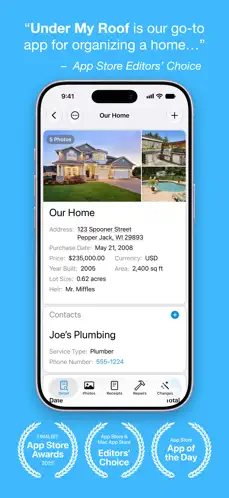
Under My Roof has the highest rating in this list at 4.74 stars, and it’s an App Store Editors’ Choice. It’s also the modern descendant of Home Inventory for Mac, which the developer has maintained since 2005. That history shows: this isn’t a weekend project from a new studio.
The headline feature is Apple Intelligence capture. Photograph a room and the app identifies and adds the items in it, and it can pull purchase details out of a scanned receipt. That needs the newest iOS and an Apple Intelligence capable device, so check your phone before getting excited. If yours qualifies, it’s the fastest way to get from an empty list to a full one.
You can also add items by voice, barcode, text and document scan. A 3D Room Scan captures the room’s layout, area and furniture measurements, which is handy when you’re describing the contents of a damaged room. The app tracks maintenance schedules with notifications, renovation costs and property details like paint colors and assessments. Data syncs through your own iCloud account, with no third party backend, and there are Mac, iPhone and iPad apps.
The catch: the best capture features depend on the newest hardware and software, and the free tier is limited and the full app needs a monthly or yearly subscription. If you’re on an older phone, you’ll be using a good but ordinary inventory app, and Home Contents does the reporting part better.
Pricing: Free download. In-app subscriptions are $4.99 monthly or $34.99 yearly.
Download Under My Roof Home Inventory + | Developer Website
Everspruce Home Inventory — Best Free Start With Cloud Backup


Everspruce is free up to 50 entries, and cloud backup is included at that level. For a studio apartment or a first pass at one room, that’s enough to build a real habit before you spend anything.
Batch mode is the reason to pick it. It lets you add many items quickly, and the export side is strong: CSV and PDF, plus printable QR labels you can stick on boxes in a garage or storage unit. A “checked out” status lets you track what left the house and with whom, which suits a family that lends out camping gear and power tools. The developer says users have added more than 1.1 million items, per its release notes.
The limitation shows up fast. The useful ceiling arrives at 50 items, and a whole house blows past that in one afternoon. Getting to unlimited entries, multiple devices and a PIN means a Plus subscription, not a one time unlock. Plus is sold in several tiers, so check the current price in the app before you commit.
Compared with Home Contents, Everspruce gives you the cloud backup for free but charges you monthly to keep growing. That’s a fair deal for a small home. For a big one, the math tilts the other way.
Pricing: Free to 50 entries. Plus subscription for unlimited items, multiple devices and a PIN, with pricing quoted in the app.
Download Everspruce Home Inventory | Developer
MyStuff2 Pro — Best for Spreadsheet People


MyStuff2 Pro looks like a database and behaves like one. If that sentence made you happy, keep reading. If it made you tired, skip to the next app.
The power features are genuinely useful. Barcode scanning comes with product search and autofill. Quick copy duplicates similar items (six identical dining chairs, done in seconds), and bulk editing lets you fix a purchase date across a whole batch. You define your own categories. And there are multiple databases, so home contents can live in one and a collection in another. It imports CSV, xlsx and ods spreadsheets, so if you already kept a list in Excel, you don’t start over. Export goes out by email, iCloud, Dropbox, Google Drive, Box, OneDrive or FTP, and it syncs between iOS and macOS or with other MyStuff2 Pro users.
The downside is the absence of a room by room capture flow. An 800 item house is a project, not an afternoon. Free use is limited to 15 items, and an Unrestricted Items purchase removes the cap. It needs iOS 17, and it was last updated on 2026-10-05.
Pick it if you like control and already think in rows and columns. Pick Home Contents if you want to walk through the house with your phone and be done.
Pricing: Free to 15 items. An Unrestricted Items purchase ($11.99) removes the limit.
Download MyStuff2 Pro | Developer
Itemtopia Inventory — Best for Off Site Storage


Triple-I points out that belongings in off site storage are still covered by homeowners insurance, so they belong in your inventory. Itemtopia is built for that reality. Locations span home, office, storage unit and job site, so the boxes in a rented unit sit next to the sofa in the living room.
It gives you five ways to add an item: photograph it now and detail it later, dictate it, use custom fields, forward an emailed receipt into the app, or scan a barcode or QR label. The emailed receipt option is quietly the best of these for anyone who buys most things online, since the proof arrives already attached. Warranty expiry reminders and receipt and expense tracking with exports round it out. Search works by name, photo or scan, and an optional AI estimate suggests an item’s value. Treat that number as a starting point for your own research, not a figure to hand an insurer.
Sharing with per person permissions is a smart touch when a partner, cleaner or contractor needs to see only part of the picture. The listing says it’s used in more than 100 countries.
Criticism: it has the smallest rating count of the serious contenders, 166 ratings, so its polish is less battle tested than Sortly’s or Home Contents’. Premium is listed at $7.99 a month or $79.99 a year.
Pricing: Free download. Paid tiers exist, with amounts shown in the app.
Download Itemtopia Inventory | Developer Website
Sortly: Inventory Simplified — Best for Very Large Collections


Sortly has the most ratings of any app here, 9,503 at 4.73 stars, and it earns them. But be clear on what it is. It’s a business inventory tool that happens to handle household contents well. The listing says over 20,000 businesses use it.
The feature list reads like a warehouse: barcode and QR scanning, generated labels, custom folders, fields and tags, item photos, low stock alerts, date based alerts, pick lists, reporting and customizable user access. It imports existing spreadsheets through CSV, works offline, and syncs across devices and users. If you run a workshop, a photography kit business or a collection of thousands of items, it makes sense.
For one household with one claim to protect, it doesn’t. The free tier is deliberately restricted and the useful tiers are subscriptions. Paying a monthly fee forever to store a list you hope never to use is the wrong economics next to a one time unlock. That’s why it ranks below Home Contents despite the higher review count.
Power tip: the generated labels and folder structure work well for a garage full of tools. Do that part in Sortly if you already have it, and keep the household list somewhere cheaper.
Pricing: Free download with restricted features. Full features need a subscription, with pricing shown in the app.
Download Sortly | Developer Website
Encircle — Know It, Don’t Install It


Read this one as the tool the other side of the claim uses. Encircle is built for restoration contractors and insurance professionals, not homeowners, and the listing makes that plain. It offers unlimited photos, videos, 360 degree images and notes organized by room, each stamped with time, date, user and GPS. It produces professional reports with interactive media, sketches floor plans with measurements that export to Xactimate, and builds water mitigation moisture maps with equipment calculations. Its contents capture replaces manual pack out inventories and generates a schedule of loss.
Why include it? Because if a restoration company handles your loss, this may be the app documenting your house, and the reports you receive come out of it. Knowing what it is helps you read those reports.
It’s also the lowest rated app here at 3.75 stars from 130 ratings, and it requires iOS 18. A homeowner has no real use for it, and we don’t recommend it for a DIY inventory. Use Home Contents instead.
Pricing: Free download. Pricing isn’t listed on the App Store.
How to Build an Inventory an Adjuster Will Accept
Whichever app you choose, the content matters more than the tool. Working from Triple-I’s list, here’s the short version.
1. Start with one contained area. A kitchen or a home office. Finish it and you’ve built momentum.
2. Describe each item. Note where you bought it, the make and model, and what you paid.
3. Record serial numbers. Check the back or bottom of appliances and electronics, and photograph the label.
4. Count clothing by general category. Triple-I’s example is “5 pairs of jeans, 3 pairs of sneakers.” Nobody needs a line for every sock.
5. Attach the paperwork. Sales receipts, purchase contracts and appraisals go with the list.
6. Check jewelry, art and collectibles separately. These often need their own coverage, so ask your insurer.
7. Include off site storage. A storage unit’s contents are still covered by homeowners insurance.
Then get the file out of the phone. Export the PDF, email it to yourself, and keep a copy somewhere that isn’t your house. If you need to digitize receipts first, our guide to scanning and sending paperwork from your iPhone covers the free route, and if you’re moving toward fewer paper files overall, see how to turn your iPad into a paperless office.
An inventory also pairs well with the rest of your household setup. Our list of apps for managing a home from your iPhone covers maintenance and upkeep, and the home security and monitoring apps roundup is worth a look if you’re thinking about preventing the loss in the first place. Our home security app roundup covers the cameras and sensors side of it. If you’d like to see what all of it costs to keep running, our piece on iPhone budgeting apps helps.
Which One Should You Pick?
One household, want it done cheaply: Home Contents. Pay once, print the PDF, stop thinking about it.
Privacy comes first: Nest Egg at $6.99. No account, no cloud, and it runs on an older iPhone.
New iPhone, want the fastest capture: Under My Roof, if your phone supports Apple Intelligence. Otherwise it’s a good app, but not a clear win.
Small place, want a free start: Everspruce, up to 50 entries. Upgrade only if you outgrow it.
Love spreadsheets: MyStuff2 Pro. You’ll enjoy the control and forgive the interface.
Storage unit, second home or a partner who edits too: Itemtopia. The sharing and off site locations are the draw.
Running a business or a huge collection: Sortly. Just know you’re paying for a subscription.
A restoration company is involved: Nothing to install. That’s Encircle’s job.
Frequently Asked Questions
Which home inventory app is best for an insurance claim?
Home Contents. It produces PDF reports by room, category or value that you can hand to an adjuster, and a one time purchase unlocks unlimited items instead of a subscription. The 25 item free tier lets you try it before paying.
Do I need a subscription for a home inventory app?
No. Home Contents unlocks with a one time purchase, Nest Egg is a $6.99 app with no account, and Everspruce and MyStuff2 Pro are free up to a cap. Subscriptions show up in several of these apps, including Under My Roof, Everspruce, Itemtopia and Sortly.
What should I record for each item?
The description, where you bought it, the make and model, what you paid and the serial number. Attach a photo and a copy of the receipt to the item so it’s all in one place. Clothing can be counted by category.
Can I keep my home inventory private, without uploading it to a company’s cloud?
Yes. Nest Egg keeps everything on the device with no signup. Home Contents stores data locally or in your own iCloud, and Under My Roof syncs through your own iCloud. Everspruce backs up to its own cloud if you’d rather have that.
Do I have to inventory the whole house in one sitting?
No. Capture modes like Home Contents’ Quick Capture and Everspruce’s batch mode help, and Triple-I’s advice is to start with one contained area. A useful inventory takes a few evenings, not a lost weekend, and an incomplete one beats none.
Our Pick
Our pick: Home Contents. A one time unlock, room by room PDF reports and a capture flow you can finish in a few evenings make it the one to have before you need it. If you’d rather keep everything off the cloud, Nest Egg is the alternative.
Is your app on this list? Add a free "Featured on iOS App Lists" badge to your website or press kit.