
Published Jun 22, 2026 · Updated Oct 27, 2026
Home security has come a long way, and in 2026 the best protection fits right in your pocket. Whether you’re streaming live camera feeds, controlling smart locks with biometric verification, or getting AI-powered motion alerts while you’re out, the right iPhone app turns your smartphone into a full command center for your home. For protecting your digital life too, see our roundup of the best password managers for iPhone. For protecting your digital life too, see our roundup of the best password managers for iPhone. Here are five of the most-reviewed home security apps on the App Store today, and what sets each one apart.
Image: Macworld
Nest


 Nest is the companion app to Google Nest’s line of cameras, doorbells, smoke detectors, and thermostats. The interface is clean and responsive: you get alerts when there’s activity, can see snapshots of the last three hours, and can talk back to get someone’s attention. If you’re already in the Google Nest hardware ecosystem, this is an essential install.
Pros:
- Largest user base of any home security app on iOS
- Clean interface with fast live video and event timeline
- Works across the full Nest camera, doorbell, and thermostat lineup
Cons:
- Requires Nest hardware to use
- Full video history requires a Nest Aware subscription
Ring – Always Home

 Ring is the companion app to the Ring doorbell, camera, and alarm ecosystem. It’s a crowd favorite for good reason. Monitor live video, receive motion alerts, speak to visitors via two-way audio, and get alerts when your Ring Alarm sensors are triggered — all from one place. The event timeline is intuitive, and Alexa integration means you can pull up camera feeds on your Echo Show with a voice command.
Pros:
- Two-way audio on compatible doorbells and cameras
- Real-time alerts when Ring Alarm sensors are triggered
- Works with Alexa and Amazon Echo devices
Cons:
- Ring Protect subscription required for video recording and history
- Locked to the Ring hardware ecosystem
ADT Pulse

 ADT Pulse is the mobile arm of ADT’s professional monitoring service — one of the most trusted names in home security. The app gives you remote access to cameras, door locks, lights, and thermostats, along with customizable event alerts.
Pros:
- Backed by ADT’s 24/7 professional monitoring
- Remote control of cameras, locks, lights, and thermostats
- Customizable motion and event alerts
Cons:
- Requires an active ADT service subscription
- Professional installation typically required for hardware
Image: 9to5Mac
Vivint Smart Home

 Vivint Smart Home earns strong marks for bringing security and smart home control together in a single, well-designed app — no toggling between a security app and a separate smart home hub. It’s the pick for homeowners who want to automate custom actions and schedules, and manage locks, cameras, thermostats, and lights all in one place.
Pros:
- Smart home integration — custom actions and schedules
- Controls locks, cameras, thermostats, and lights from one app
- Clean, polished interface
Cons:
- Requires Vivint hardware and a service plan
- Higher upfront equipment costs than some competitors
Image: AppleInsider
SimpliSafe Home Security

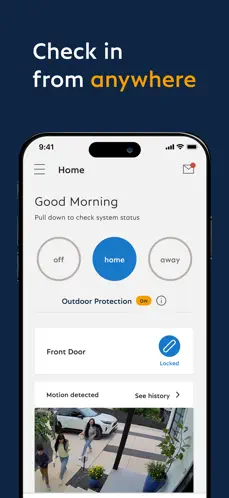 SimpliSafe earns strong reviews and is a pick for renters and homeowners who want to control their SimpliSafe security system from their phone. The app handles live monitoring, remote arm/disarm, camera access, and motion alerts with a clean, no-fuss interface.
Pros:
- No long-term contracts required
- Core features available without a paid subscription
- DIY wireless installation — ideal for renters
Cons:
- Locked to SimpliSafe hardware
- Professional monitoring and video history require a paid plan
Bottom Line
But the right choice depends on your ecosystem: Nest for Google Nest owners, Ring for Amazon users, ADT Pulse for those who want professional monitoring, and Vivint for full smart home integration. All five apps are free to download on the App Store.
If you are looking to boost your overall efficiency while managing multiple devices, check out our roundup of the best iPhone apps for communication and productivity in 2026.
Interested in how Apple’s ecosystem is evolving? Read about what leaks say about the Apple Watch Series 12 and how it might connect with your smart home setup.
Also worth checking out: iPhone Focus Modes: The Complete Guide for 2026.
Is your app on this list? Add a free "Featured on iOS App Lists" badge to your website or press kit.