
Meowdoku! is worth downloading if you like pure logic puzzles: it’s free to download, with in-app purchases, and its one rule (one cat per colored territory, and no two cats sharing a row, a column or even a diagonal touch) gives you Sudoku-style deduction with Minesweeper-style risk. It holds a 4.8-star average on the App Store, but this Meowdoku review comes with one clear catch: the ads, which reviewers describe very differently from the developer.
If you’ve already worn out your usual number puzzles and want something that punishes guessing, this is a good next stop. If ads between levels make you close an app on sight, read the “What could be better” section first.
Jump to a section
Meowdoku! at a Glance


- Price: free to download, with in-app purchases (Meowdoku Premium and Meowdoku Premium Plus, each sold as weekly, monthly or yearly plans)
- Devices: iPhone and iPad, iOS 15.0 or later
- Age rating: 13+, and its App Store age rating includes Contains Advertising
- App Store rating: 4.8 stars
- Developer: OAKEVER GAMES PTE. LTD.
Download Meowdoku! on the App Store
How Meowdoku Works

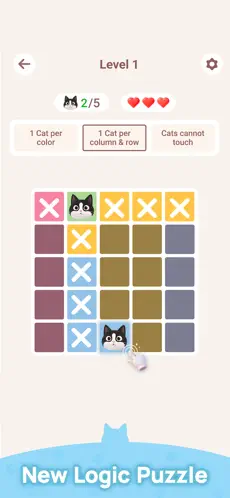
The board is split into colored sections. Your job is to put exactly one cat in each section. That’s the Sudoku half.
The Minesweeper half is the constraint. In the developer’s words, cats “absolutely cannot share the same row, column, or touch each other,” and that means “not even diagonally.” So every cat you place knocks out its whole row, its whole column, and the ring of tiles around it.
You place a cat with a double tap. And you only get 3 chances to make a mistake, shown as hearts. A wrong placement costs a heart. The developer puts the design intent bluntly: “Guessing won’t save you; every single move must be carefully calculated!”
That’s the whole game. No power ups or combo meters show up in the description. Honestly, that simplicity is the point.
What We Like
The deduction loop is the real thing
A lot of “logic” games on the App Store are really tapping games with a puzzle skin. Meowdoku isn’t. Because each cat blocks a row, a column and its neighbors, one correct placement usually forces the next one, and a board that looked impossible opens up in a chain. That moment where three sections suddenly resolve at once is what keeps people coming back.
It also scales nicely. Small territories near the edge of the board are easy footholds; large, snaking territories are where the actual thinking happens.
Hearts make every tap matter
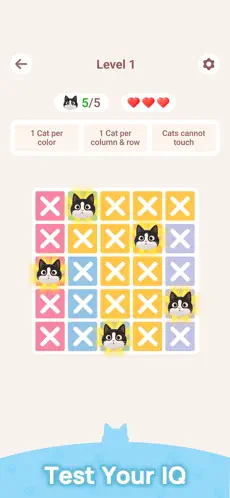
The 3-heart limit changes how you play. In a classic Sudoku app you can scribble, guess and erase. Here, a guess has a cost. That pushes you toward proving each placement before you commit, which is exactly the habit good logic puzzles are supposed to build.
One five-star reviewer says they love it for training their focus. That fits: you can’t half pay attention to a board where a careless double tap burns a life.
It plays offline, with a fresh puzzle every day
The developer says no internet is required, and pitches it for the commute, time spent waiting in line or a morning coffee break. There are also “Daily Puzzles” every day, so there’s a reason to open it even after you’ve cleared a run of levels.
Offline play matters more than it sounds. It’s the difference between a game you can play on a subway and one that spins on a loading screen.
Lighter privacy labels than its closest rivals
Meowdoku’s privacy labels list Identifiers under “Data Used to Track You,” so it isn’t tracking free. But it has no “Data Linked to You” section at all; the rest of what it collects (user content, identifiers, usage data, diagnostics) is listed as not linked to you. Compare that with Sudoku.com and Minesweeper Classic: Retro, which both list data linked to you, and Sudoku.com’s tracking list is longer (purchases, location, identifiers, usage data and other data).
What We’d Change
The ad promise and the reviews don’t match
The listing advertises “Non-Intrusive Ads” with “Zero interruptions to your gameplay.” Two one-star reviewers tell a different story.
One asks “why do I get served an ad after every level,” and says they’d happily pay to remove ads. Another says they’ll delete the app because of the ads, naming one (Solitaire Stash) and saying “It locks my phone up everytime and I have to reboot the game.”
To be fair, both claims can be technically true at once. An ad after every level isn’t an interruption during a puzzle. But if you read “zero interruptions” as “barely any ads,” you’ll be disappointed. Expect an ad between levels, based on what reviewers report.
It isn’t clear what Premium buys
One of those reviewers says there’s no option to pay to get rid of ads. The App Store does list two subscription tiers, Meowdoku Premium and Meowdoku Premium Plus, each in weekly, monthly and yearly plans. What the plan names don’t tell you is whether either one removes ads, or what separates Premium from Premium Plus. Check the in-app store screen carefully before you subscribe, and start with the shortest plan if you’re unsure.
Sudoku.com, by contrast, sells a purchase literally named “Sudoku.com No Ads,” so you know what you’re paying for.
A 13+ rating for a cat puzzle
This one’s minor, but parents will notice it. Meowdoku carries a 13+ age rating, while Minesweeper Classic: Retro is rated 4+. If you’re picking a logic game for a younger kid, that label is worth a look before you hand over the phone.
Tips for Your First Meowdoku Puzzles
None of these are hidden features. They fall straight out of the rules, and they’ll save you hearts.
- Start with one-tile sections. If a colored section is a single tile, the cat goes there. Place it, then cross off its row, column and neighbors.
- Look for sections stuck in one row or column. If a whole section sits inside one row, that section’s cat has to be in that row, so no tile in that row outside the section can hold a cat. Same for columns.
- Pair up sections. If two sections both fit inside the same two rows, those two rows belong to them. Every other section has to put its cat somewhere else.
- Test a tile by its damage. Before you double tap, ask what that cat would block. If it would wipe out every remaining tile of some other section, it can’t be right.
- Don’t tap on a hunch. The hearts are the game telling you to prove it first. If you’re down to a coin flip, scan the board again; there’s usually a forced move you missed.
If you like this style of “one per region” thinking, our roundup of the best puzzle games for iPhone has more grid puzzles worth a try.
Who Should Use This
Get it if you’re a Sudoku or Minesweeper player who wants a new rule set without learning a whole new genre, and you enjoy the feeling of proving a move rather than guessing it. It’s also a good fit if you want something to play offline on a commute, with a daily puzzle as a built-in habit. It’s simple to explain and slow to master.
Who Should NOT Use This
Skip it if ads between levels are a deal breaker and you want a clear, named way to pay them away. In that case, Sudoku.com is the closer match, since it sells a “No Ads” purchase. If you want lots of modes and settings to fiddle with, Minesweeper Classic: Retro has five game modes and tons of settings.
Pricing & Alternatives
Sudoku.com – Number Games

Sudoku.com is the classic numbers version of the same brain workout, with a 4.8-star average. The developer calls it “one of the most downloaded sudoku apps in the AppStore” and says each puzzle has one solution. Sudoku.com gives you help: notes that update themselves as you fill cells, hints, auto check and highlighted duplicates, plus Daily Challenges with trophies and Seasonal Events with medals.
It’s free to download, with in-app purchases, including one called “Sudoku.com No Ads.” Ads are still the common complaint, though. One reviewer says “My last game had 4 ads,” and another says ads “start playing mid game at a certain point.” Its App Store age rating includes Contains Advertising.
Download Sudoku.com on the App Store
Minesweeper Classic: Retro

If the Minesweeper side of Meowdoku is what hooks you, try a dedicated Minesweeper game. Minesweeper Classic: Retro (4.7 stars) has five modes (Easy, Medium, Hard, Extreme and Custom), a Guess Free Mode in beta that removes 50/50 situations, a guess free daily challenge, and more than 50 retro themes you unlock with coins. Your first tap always opens an area. It’s rated 4+ and runs on iOS 13.0 or later.
It’s free to download, with in-app purchases, and its App Store age rating includes Contains Advertising. The reviews are rough on ads: two one-star reviewers complain about ad removal, one writing “Purchased ad removal, still get ads after nearly every game.” Another simply says the font looks “like hieroglyphics.”
Download Minesweeper Classic: Retro on the App Store
For a different kind of calm grid puzzle, see our Woodoku Blast review or our Amaze GO review.
Verdict
Our rating: 4 out of 5. Meowdoku’s rule set is genuinely clever, the 3-heart limit forces real deduction, and offline play plus daily puzzles make it easy to keep around. The ads cost it the last point: the “zero interruptions” pitch doesn’t match what reviewers report, and the Premium plans don’t say whether they fix it. Download it if you love logic puzzles and can live with an ad between levels; pick Sudoku.com if you want a named way to pay ads away.
Prices and Plans at a Glance
| App | Download | In-app purchases (from the App Store listing) | Ads | Last updated |
|---|---|---|---|---|
| Meowdoku! | Free | Meowdoku Premium Plus–Weekly(1Week): $6.99 Meowdoku Premium – Weekly(1 Week): $3.99 Meowdoku Premium Plus–Monthly: $14.99 +3 more on the App Store |
Yes | 2026-11-23 |
| Sudoku.com | Free | Sudoku.com No Ads: $14.99 | Yes | 2026-10-16 |
| Minesweeper Classic | Free | Minesweeper Puzzle Premium: $3.49 3000 Coins: $1.99 Minesweeper 2x Coins: $2.49 +5 more on the App Store |
Yes | 2026-05-05 |
Frequently Asked Questions
Is Meowdoku free?
It’s free to download, with in-app purchases. The App Store lists Meowdoku Premium and Meowdoku Premium Plus subscriptions in weekly, monthly and yearly plans. Its App Store age rating includes Contains Advertising.
Can you play Meowdoku offline?
Yes. The developer says no internet is required, so you can play on a commute or anywhere without a signal.
What are the rules of Meowdoku?
Place exactly one cat in each colored section. Cats can’t share a row or column, and they can’t touch each other, not even diagonally. You double tap to place a cat and get 3 hearts for mistakes.
Does Meowdoku have a lot of ads?
The developer promises zero interruptions to gameplay. Two one-star reviewers disagree: one reports an ad after every level, and another says an ad locks up their phone. Expect ads between levels.
Does Meowdoku work on iPad?
Yes. It runs on iPhone and iPad and needs iOS 15.0 or later.