
Published Jun 11, 2026 · Updated Oct 27, 2026
Most journaling apps die the same death. You install one, write three honest entries, then miss a week and never open it again. The apps that survive past that first month are built around a format you can repeat on a bad day: a five-minute prompt, two taps for a mood, a photo instead of a paragraph.
This list covers eight iPhone journal apps, each aimed at a different kind of journaler. All eight shipped an update in 2026, all eight are free to start, and none of them need a blank page to work. Day One is the deep archive. DailyBean is the one you open when you have no words. Gratitude has the best rating here by a clear margin.
Jump to a section
- Quick Picks
- The Best iPhone Journal Apps in 2026 at a Glance
- Day One: Daily Journal & Diary
- Reflectly: Journal & AI Diary
- DailyBean: Simplest Journal
- Daylio: Journal & Mood Tracker
- Gratitude: Self-Care Journal
- Stoic: Journal & Mental Health
- 5 Minute Journal: Daily Diary
- Journey: Diary, Journal
- How to Make a Journaling Habit Survive
- Which One Should You Pick?
- Frequently Asked Questions
Quick Picks
- Best overall: Day One, the most complete diary on iOS with end-to-end encryption
- Best if you hate writing: DailyBean, log a mood and a day in a few taps
- Best free mood tracker: Daylio, two-step entries with no learning curve
- Best for gratitude practice: Gratitude, 4.9 stars from 44,000+ ratings
- Best fixed routine: 5 Minute Journal, a guided flow for morning and evening entries
- Best for resilience work: Stoic, with morning prep and evening reflection
- Best guided prompts: Reflectly, with prompts that adapt as you write
- Best cross-platform: Journey, with iPhone, Android, and web sync
The Best iPhone Journal Apps in 2026 at a Glance
| App | Best for | Price | Rating |
|---|---|---|---|
| Day One | Long-form diary and photo journals | Free, Premium optional | 4.8 |
| Reflectly | AI-guided prompts and mood tracking | Free, subscription | 4.6 |
| DailyBean | Journaling without typing | Free, Premium optional | 4.8 |
| Daylio | Quick mood and activity tracking | Free, subscription | 4.8 |
| Gratitude | Gratitude journal and affirmations | Free, subscription | 4.9 |
| Stoic | Morning prep and resilience exercises | Free, subscription | 4.8 |
| 5 Minute Journal | A fixed five-minute routine | Free, subscription | 4.8 |
| Journey | Cross-platform journaling | Free, Premium optional | 4.6 |
Day One: Daily Journal & Diary


Free (Premium subscription available) · ⭐ 4.8 (118,000+ ratings) · Updated September 14, 2026
Download on the App Store →
Day One is what a diary looks like when a team has spent a decade on it. Every entry gets stamped with time, date, weather, and location automatically, so you never write “Saturday, raining” at the top of a page again. Version 2026.21 shipped in October. The App Store listing leads with its App of the Year credit and claims over 15 million downloads.
On This Day is the feature that keeps people coming back. It resurfaces entries from the same date in previous years, which turns a static archive into something you actually reread. The other thing worth turning on in your first week is end-to-end encryption, because it protects the entries you haven’t written yet.
Here’s the trade-off. Day One is feature-heavy: an entry composer with more formatting options than most people will ever touch, and photo limits on the free tier that push anyone keeping a visual diary toward Premium fast. If you want a plain text diary, you’re paying in complexity for features you’ll ignore.
The free tier covers unlimited text entries, which is enough for a daily writing habit. Premium is for people attaching photos, videos and audio to everything.
Reflectly: Journal & AI Diary


Free (subscription available) · ⭐ 4.6 (81,000+ ratings) · Updated September 18, 2026
Download on the App Store →
Reflectly’s whole pitch is that it asks the questions. Instead of a cursor blinking at you, you get a short conversation: rate your mood, answer two or three prompts that shift based on what you’ve written before. Positive psychology, mindfulness, and CBT are all in the mix, which reads like a marketing list until you’ve used it for a week and noticed the prompts actually tracking your history.
The habit tracker is the underrated part. Reminders and streaks do more for a journaling practice than anything inside an editor, and Reflectly folds them into the daily flow rather than bolting them on. Version 5.0.5 landed in September 2026, and there’s a statistics view that shows mood over time.
The AI framing oversells what is really a well-designed prompt engine. It reads your last few entries, it doesn’t understand your life. And because every entry runs through the same guided structure, the format starts to feel like a cage the moment you want to write freely in your own shape. For something with more room, the best mental health apps for iPhone cover the wider field.
DailyBean: Simplest Journal

Free (Premium subscription available) · ⭐ 4.8 (70,000+ ratings) · Updated September 17, 2026
Download on the App Store →
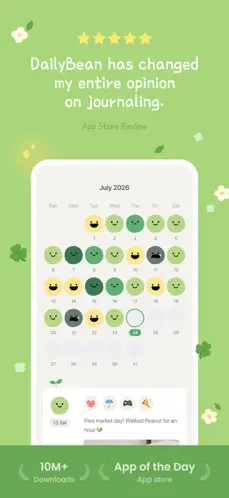
DailyBean is the journal for people who have tried journaling and hated it. There is no blank page, because there is no writing. You pick a mood bean, tap icons for what you did, add a photo if you have one, and you’re finished. The App Store listing calls it a no-writing journal, and that isn’t a gimmick. It’s the entire product thesis.
The visual payoff is what makes it stick. A month of entries becomes a feed of colored beans you can scroll through, so the reward for logging is watching the log fill up. Activities, meals, and routines are all customizable. Version 4.19.2, updated in October 2026.
The trade-off is depth. A year of DailyBean entries tells you what you did and roughly how you felt. It will not tell you what you were thinking.
Daylio: Journal & Mood Tracker


Free (subscription available) · ⭐ 4.8 (61,000+ ratings) · Updated September 10, 2026
Download on the App Store →
Daylio has been the default mood tracker recommendation for years, and 61,000 ratings at 4.8 explains the staying power. Setup takes two steps. Choose a mood, choose your activities, done. There’s no typing anywhere in the core loop.
The part people miss is how far the activity list stretches. Daylio markets itself as a self-care bullet journal, but the same structure works as a food log, a symptom tracker, or an exercise diary. After a few weeks of logging, the correlations screen starts showing which activities line up with your good days. That’s the real payoff, and it needs roughly a month of data before it says anything you didn’t already suspect.
Two things to know going in. The interface is relentlessly cheerful, which can grate on a genuinely bad day, and streak counting can turn a coping tool into one more thing to fail at. Version 1.77.0 shipped October 12, 2026.
Gratitude: Self-Care Journal


Free (subscription available) · ⭐ 4.9 (44,000+ ratings) · Updated September 19, 2026
Download on the App Store →
Gratitude has the highest rating on this list and the narrowest focus. The core is a gratitude journal: you record what went right, the app layers affirmations, a vision board, and daily motivation content around it. That narrowness is deliberate, and it’s why the number is 4.9 instead of 4.6.
It works because gratitude journaling has the clearest research behind it of anything in this category. UC Berkeley’s Greater Good Science Center maintains a plain-language overview of what the practice does and doesn’t do. The app’s reminders are what make it functional in daily life. Entries are short, and short entries don’t happen without a nudge.
The vision board and affirmation sections feel like filler next to the journal itself, and the app leans hard on subscription prompts. If you want gratitude prompts with nothing else attached, 5 Minute Journal does a tighter version of the same job.
Stoic: Journal & Mental Health


Free (subscription available) · ⭐ 4.8 (35,000+ ratings) · Updated September 14, 2026
Download on the App Store →
Stoic is a structured practice rather than a diary. The morning check-in covers intentions and mood, the evening reflection covers how the day went and what you’d change, and the space between is filled with prompts drawn from Stoic philosophy. The listing claims over four million users.
Two features carry it. Guided journals give you something to respond to when you’d otherwise stare at nothing, and mood tracking feeds a long-term trends view that gets more useful the longer you keep it going. Breathwork and a set of exercises for anxiety and stress sit outside the journal entirely, which makes this closer to a daily routine than an app you open once a night. Version 2026.19 landed October 2, 2026.
The philosophy is a frame, and if you don’t want Marcus Aurelius quoted at you during a bad week, the tone wears thin quickly. Take the Stoic branding away and the gap between this and any other guided journal app is narrower than the marketing suggests.
5 Minute Journal: Daily Diary

Free (subscription available) · ⭐ 4.8 (17,000+ ratings) · Updated August 27, 2026
Download on the App Store →
The format is the whole idea. A guided flow for both your morning and evening entries. Same structure every single day. It removes the decision about what to write, which is the thing that kills journaling habits faster than anything else.
The app version is published by Intelligent Change, the company behind the paper journal, and the App Store listing quotes Lifehacker on the appeal of a practice you can do standing in a queue. Photo of the day and streaks round it out. Version 4.3.26, updated October 12, 2026.
Fixed prompts get repetitive by design. After a few months the same questions can start producing the same answers. That constraint is exactly what makes it work for beginners and exactly what makes it a ceiling for everyone else.
Journey: Diary, Journal

Free (Premium subscription available) · ⭐ 4.6 (5,000+ ratings) · Updated April 27, 2026
Download on the App Store →
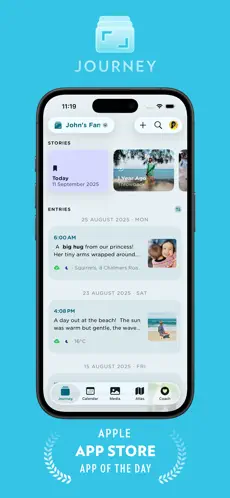
Journey is the one to pick if you don’t want to be tied to an iPhone. It runs on iOS, Android, and the web with entries syncing across all three, which matters more than it sounds if you write on a laptop as often as on a phone.
The editor is the most complete on this list: tables, checklists, colored text, paragraph styles, plus photo, video, and audio attachments. Throwback notifications resurface entries from a week, a month, or a year ago. Mood tracking runs alongside the writing rather than in a separate tab. Shared journals let two people write into the same book, which is rare in this category and genuinely useful for couples or travel.
The caveats are real. 5,000 ratings at 4.6 makes it the least-reviewed app here, so you’re trusting a smaller user base. The last update was April 2026, a slower cadence than everything else on this list, and the feature count makes for a busier interface than Day One’s.
How to Make a Journaling Habit Survive
The research on writing about difficult experiences is consistent about one thing: the benefit comes from the writing, not the app. The American Psychological Association’s overview of expressive writing research found measurable benefits from short, regular sessions rather than long, occasional ones. The University of Rochester’s guide to journaling for mental health makes the same point from the clinical side.
So pick the format you’ll actually repeat. If you pair reflection with a work routine, our best habit tracker apps for iPhone are the natural companion. If you’d rather calm down before you write, the free meditation apps cover that. And if you want to compare against Apple’s own take, we reviewed Apple’s Journal app in full.
Which One Should You Pick?
If you want one app and no compromises, get Day One. Nothing else here matches the automatic metadata or the archive you’ll still be able to read in ten years.
If writing is the barrier, go the other way entirely. DailyBean and Daylio both let you keep a daily record without producing a sentence, and Daylio’s correlations view gives you something back for the weeks you put in.
If you want a practice with a structure, 5 Minute Journal has the least friction and Stoic has the most depth. Gratitude sits between them with the best rating on this list and the simplest promise.
Journey is the pick only if cross-platform sync matters to you. Reflectly is the pick if prompts are what get you writing.
Our pick: Day One. It costs you nothing to start, it does the archival work no other app here matches, and it’s the one journal you won’t have to migrate out of later.
Frequently Asked Questions
What is the best journaling app for iPhone in 2026?
Day One is the best all-round journal: unlimited text entries on the free tier, automatic time, date, weather, and location on every entry, and end-to-end encryption. If mental health is the goal rather than record-keeping, Stoic and Gratitude are better fits. If you want the lowest-friction start, DailyBean and 5 Minute Journal remove the blank page entirely.
Do I have to pay a subscription to journal on iPhone?
No. All eight apps on this list can be used for free, and the free tiers are genuinely usable rather than trials. Day One gives you unlimited text entries free. Subscriptions in this category generally unlock attachments, sync across multiple devices, and deeper analytics, so pay only if you’ve kept the habit for a month.
What’s the difference between a mood tracker and a journal app?
A mood tracker logs how you feel on a scale, usually in seconds, and looks for patterns over time. A journal app captures written reflection. Daylio, DailyBean, and Reflectly sit in the middle: they log mood as the entry point and let you add text if you want to. Day One and Journey are journals first, with mood tracking attached.
How often should I journal for it to actually help?
Consistency beats length. The expressive writing research behind journaling finds benefits from short, regular sessions rather than occasional long ones, so a two-minute daily entry outperforms one 40-minute session a month. Several apps on this list include reminders or streaks for exactly that reason. Pick the format you can repeat on your worst day, not your best one.
Can I export my entries if I switch apps later?
Day One is the strongest here, with export to PDF, plain text, and other formats, which is why it’s the safest place to build a long archive. Journey and Diarium-style apps support export too, though formats vary. The one that’s hardest to leave is DailyBean, because tap-based entries have less text to move. If long-term portability matters, check the export options before you invest a year of entries.
Related: For the app itself, we reviewed Apple’s Journal app in full, including where it still trails Day One.
Is your app on this list? Add a free "Featured on iOS App Lists" badge to your website or press kit.