
Published Jul 26, 2026 · Updated Nov 28, 2026
Managing a rotating roster on paper is miserable. You miss a shift, double-book a family dinner, or spend Sunday night doing arithmetic to figure out what your next pay period is actually worth. A decent schedule app fixes all of that, and your iPhone is already where most shift workers keep the rest of their life.
The catch is that “schedule app” means different things to different people. A nurse on rotating 12s needs something different from a factory worker on a fixed pattern, and both need something different from the manager who builds the roster in the first place. This list splits those use cases apart so you can pick the right tool the first time instead of churning through four apps.
Jump to a section
Best Work Schedule Apps for iPhone — Quick Picks
- Best all-around: My Shift Planner (rotating rosters plus pay tracking)
- Best designed: Supershift (fastest entry, works offline, no account)
- Best for first responders: Spark Shift Calendar (pre-loaded department schedules)
- Best for nurses: NurseGrid (schedule plus a nursing community)
- Best lightweight pick: Shift Work Calendar Planner (simple)
- Best for managers: When I Work (team scheduling and time clocks)
At a Glance
| App | Best for | Price | Rating |
|---|---|---|---|
| My Shift Planner | Rotating rosters + pay | Free (Pro IAP) | 4.8 |
| Supershift | Fast entry, offline | Free (Premium IAP) | 4.9 |
| Spark Shift Calendar | Fire, EMS, police | 30-day trial, then paid | 4.8 |
| NurseGrid | Nurses and healthcare | Free | 4.9 |
| Shift Work Calendar Planner | Simple fixed schedules | Free (Premium IAP) | 4.7 |
| ShiftLife Organizer | Hours and pay logging | Free ($4.99 Full Version in-app purchase) ($4.99 Full Version in-app purchase) ($4.99 Full Version in-app purchase) ($4.99 Full Version in-app purchase) | 4.8 |
| When I Work | Team scheduling | Free (paid plans) | 4.8 |
My Shift Planner — Best All-Around
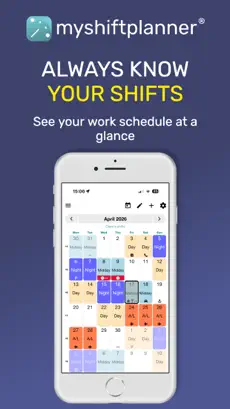


My Shift Planner is the safe default for most shift workers because it doesn’t assume your schedule looks like anyone else’s. Fixed days, rotating patterns, irregular schedules. It handles all of it with color coded calendar views and custom shift types you define yourself.
A standout feature is the pay and overtime tracking in Pro. Calendar sharing lets you keep family or coworkers in the loop on your schedule.
Pay calculation is where the Pro upgrade earns its keep. You enter hourly rates and overtime rules and the app works out what each period is worth. The free version covers basic scheduling. Pro adds pay tracking, automatic overtime calculations, calendar sync, and calendar sharing.
Pricing: Free to download; Pro Pack for pay tracking is $0.99/month, $9.99/year, or $49.99 lifetime.
Downsides: the interface is feature dense, so expect a little poking around the first week. And calendar sharing only helps if the people you share with check it. For a broader look at tools that pair well with a schedule, see our guide to the best calendar apps for iPhone.
Supershift — Best Designed
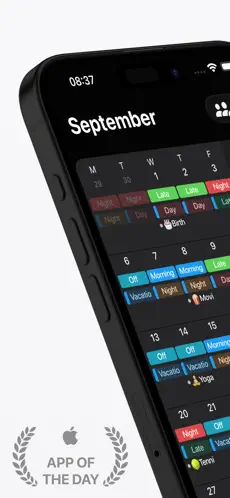

Supershift is the one you recommend to someone who tried a schedule app before and gave up because it was too fiddly. It’s built for speed: open it, tap to add a shift, done. No account required and no internet required, which matters when you’re checking a roster from a hospital basement or a factory floor with spotty signal.
The developers call it the highest rated shift calendar on iOS, and 4.9 stars from over 5,000 ratings backs that up. It’s aimed squarely at nurses, doctors, paramedics, police, firefighters, and transit crews, with templates for the shift patterns those jobs actually run.
It also includes reports that track earnings, overtime, and hours per shift type.
Pricing: Free to download; Supershift Pro ($3.99/month, $9.99/year, or $39.99 lifetime) unlocks calendar export, PDF export, and external calendar integration.
Spark Shift Calendar — Best for First Responders


Spark has been around for over 15 years and spent that time aimed at fire, police, EMS, and other shift workers. The focus shows in setup. It ships with pre-loaded calendars for thousands of shift patterns, so you’re not spending an afternoon manually entering a 24-on-48-off rotation.
Cloud Connect is the feature families care about most. Your schedule syncs across devices and can be shared with a spouse or parent so they’re not guessing when you’re home. It also tracks vacation, sick time, comp time, and shift trades, with a trade log that records what you owe and are owed by specific colleagues.
The trade-off is cost. Spark gives you 30 days free, then asks for a subscription. For a first responder whose family needs to see the schedule, that’s usually worth it. For someone on a simple fixed schedule, it’s overkill.
Pricing: Free 30-day trial, then a paid subscription.
NurseGrid — Best for Nurses


NurseGrid isn’t just a calendar. It’s a scheduling app wrapped around a nursing community, and with over 150,000 App Store ratings, it’s the most-rated app on this list by a wide margin.
The calendar lets you swap shifts with other nurses, see who you’re working with before your shift, and manage multiple worksites. You can share your roster with family and sync it to your smartwatch. What sets it apart is the social layer. You can connect with nursing friends, find colleagues, and browse job openings from inside the app, which turns it into a career tool as much as a planner.
The catch is the audience. If you’re not in healthcare, the nurse specific language and job boards are noise. For nurses, though, it’s the obvious pick and the strongest reviewed option here.
Pricing: Free to download.
Shift Work Calendar Planner — Best Lightweight Option


Some people don’t need pay math or team features. They need a calendar where you enter your shifts and see them. Shift Work Calendar is exactly that, and it doesn’t bury the basics.
The free version covers shift types, quick entry, notes, and a clean monthly view. One genuinely useful quirk: you can save your calendar as an image and set it as your lock screen wallpaper, so your schedule is visible without even opening the app. The Premium tier removes ads, adds iOS Calendar sync, and adds a shift table for viewing other people’s shifts. The widget is included in the base feature list.
It’s the least flashy app here, and that’s the point. If your schedule is simple and stable, this is the least friction way to keep it straight.
Pricing: Free; Premium plans ($2.39/month, $9.59/6 months, $16.90/year) remove ads and add calendar sync and a shift table.
ShiftLife Organizer — Best for Hours and Pay Logging


ShiftLife is for workers who care more about what their shifts add up to than about the calendar itself. It records completed shifts, overtime, hours worked, sick days, holidays, and training days, then calculates your pay from your hourly rate. Apple Watch support means you can glance at today’s schedule from your wrist.
You can set up a full year of shifts in a few seconds with repeating patterns, add notes and custom events, and export or share the calendar. The Day, Week, Month, and Year views let you zoom in or out depending on whether you’re planning tomorrow or arguing about last month’s overtime.
It’s free to download, with a $4.99 Full Version upgrade that includes the current and next year’s calendars; later years are separate in-app purchases. The interface feels a little dated next to Supershift, but for pure record keeping it’s hard to argue with the price.
Pricing: Free to download; Full Version upgrade $4.99, with later calendar years sold as separate in-app purchases.
When I Work — Best for Managers


When I Work is built for the person making the schedule, with employee tools for viewing shifts, swapping and clocking in. If you manage a restaurant, retail store, or clinic, it handles the whole loop: building shifts, assigning staff, collecting availability, and tracking time and attendance.
The company says more than 200,000 workplaces run on it, and it holds third party recognition from Capterra, GetApp, and G2 for scheduling software. Employees get a mobile app to see shifts, request swaps, and clock in. Managers get a dashboard to fill gaps and approve requests without rebuilding the schedule in a spreadsheet every week.
For an individual shift worker, this is more app than you need. For a manager, it’s the answer.
Pricing: Free to download.
Building a Setup That Actually Works
Most shift workers end up with two tools rather than one. Use a calendar app as your source of truth, then layer on a tracker only if you need pay math or hour logging. If you already lean on a to-do list to stay organized between shifts, pair it with our roundup of the best habit tracker apps for iPhone. For handoff notes and shift reminders, the best note-taking apps for iPhone are worth a look, and the productivity apps guide covers the rest of the toolkit.
Which One Should You Pick?
If you work rotating shifts and want one app that does everything, get My Shift Planner. If the app’s speed and design matter most, Supershift is the pick. First responders should grab Spark for the pre-loaded department schedules. Nurses will feel most at home in NurseGrid. On a simple fixed schedule, Shift Work Calendar Planner is all you need. Want your hours to add up to a number, grab ShiftLife. And if you’re the one building the roster, When I Work is built for you.
Our pick: My Shift Planner. It handles rotating rosters and pay tracking in one place, and its free tier covers the core scheduling most people actually need.
Related: Check out our new guide: 7 Best Free iPhone Apps for Blood Pressure in 2026 (What Each One Needs to Work)
Frequently Asked Questions
What is the best work schedule app for iPhone?
My Shift Planner is the most complete option, handling rotating rosters and pay calculation. If you want the fastest, cleanest experience, Supershift is a close second at 4.9 stars.
Do any of these apps calculate my pay?
Yes. My Shift Planner (Pro), ShiftLife Organizer, and Supershift all include pay or earnings tracking. You enter your hourly rate and overtime rules, and the app figures out each period’s earnings.
Can I share my shift calendar with my family?
Spark’s Cloud Connect and My Shift Planner both support sharing your schedule with family. NurseGrid also lets you share your roster with friends and family. Shift Work Calendar Planner’s Premium plan syncs your shifts to iOS Calendar.
Are there free shift calendar apps without subscriptions?
ShiftLife Organizer is free to download, with a $4.99 Full Version upgrade; later calendar years are separate in-app purchases. NurseGrid and the core features of Supershift are also free to use. Spark is the main paid option here, with a 30-day free trial before its subscription kicks in.
Which app is best for nurses specifically?
NurseGrid is built for nurses and healthcare staff, with a 4.9-star rating. It has an Apple Watch app and adds job listings and a nursing community on top of the calendar.
Related: Shift work wrecks your sleep, so pair these with our roundup of the best alarm clock apps for iPhone.
Is your app on this list? Add a free "Featured on iOS App Lists" badge to your website or press kit.