
If you own an Omron cuff, OMRON connect is the best free iPhone app for blood pressure: it’s free to download, with in-app purchases, and it pulls readings off the monitor over Bluetooth so you never type a number. No Omron? BP diary is the pick for a plain log, with no in-app purchases listed and a privacy label that shows no data linked to you.
One thing first, because it trips people up. Your iPhone can’t measure blood pressure. A home cuff does that, and the app is the record you keep and show your doctor. So the useful question isn’t “which app is best” in the abstract. It’s “what does this app need from me to work?” Some pair with one maker’s Bluetooth cuff. Some read from or write to Apple Health. And some just want you to type the numbers in. That’s how this list is organized.
Jump to a section
- Quick Picks
- Comparison Table
- OMRON connect
- Blood Pressure Tracker SmartBP
- Blood Pressure Tracker •
- My Blood Pressure Journal
- BP diary (self-monitoring)
- Blood Pressure Log and Tracker
- Blood Pressure Log, Heart Rate
- Building Your Setup
- Which One Should You Pick?
- Prices and Plans at a Glance
- Frequently Asked Questions
- Can my iPhone measure blood pressure by itself?
- Which blood pressure apps work with Apple Health?
- Is there a free blood pressure app with no in-app purchases?
- Can I share my readings with my doctor?
Quick Picks
- Best if you own an Omron cuff: OMRON connect. Readings sync from the monitor by Bluetooth.
- Best for Apple Watch owners: SmartBP. Puts watch hypertension alerts next to 30 days of readings.
- Best for tracking medications too: Blood Pressure Tracker •. Medication list with dosages, plus PDF reports.
- Best for knowing what a reading means: My Blood Pressure Journal. Sorts each reading into a clinical category.
- Best simple free log: BP diary (self-monitoring). Log, chart and report, no in-app purchases listed.
- Best for skipping typing: Blood Pressure Log and Tracker. Point the camera at your monitor.
- Best for heart rate extras: Blood Pressure Log, Heart Rate. Camera heart rate plus a manual BP log.
Comparison Table
| App | Best For | How readings get in | Price | Rating |
|---|---|---|---|---|
| OMRON connect US/CAN/EMEA | Omron cuff owners | Bluetooth from Omron devices | Free + IAP | ★4.7 |
| Blood Pressure Tracker SmartBP | Apple Watch owners | Typed, Bluetooth cuff, or Apple Health | Free + IAP | ★4.5 |
| Blood Pressure Tracker • | Medication tracking | Typed; writes to Apple Health | Free + IAP | ★4.7 |
| My Blood Pressure Journal | Reading categories | Typed; syncs with Apple Health | Free + IAP | ★4.7 |
| BP diary (self-monitoring) | A simple log | Typed | Free | ★4.9 |
| Blood Pressure Log and Tracker | Camera entry | Camera scan of your monitor, or typed | Free + IAP | ★4.8 |
| Blood Pressure Log, Heart Rate | Heart rate extras | Typed | Free + IAP | ★4.3 |
OMRON connect — Best if You Own an Omron Cuff


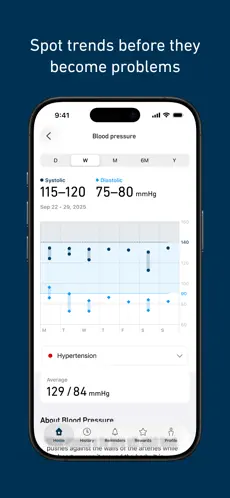
OMRON connect is Omron’s own app, and it only makes sense if you have (or plan to buy) one of its devices. That’s the whole trade. Pair a supported Omron blood pressure monitor and readings sync automatically over Bluetooth, so the number on the cuff and the number in your log can’t drift apart through a typo. It also works with Omron weight scales, thermometers and EKG devices, and it exchanges readings with Apple Health.
The free tier covers the basics: unlimited stored readings, trend views for blood pressure, weight and activity, alerts for notable changes, and sharing with your doctor, a caregiver or family. The developer lists medication tracking, detailed reports for your healthcare provider, and insights connecting blood pressure with sleep, activity and weight as premium features.
Why this one? If you own an Omron monitor, OMRON connect is Omron’s own app for it; Blood Pressure Log and Tracker can scan an Omron’s screen with your camera, but that’s still a step you take each time. If you don’t own an Omron, skip this app entirely.
The limits are real. It needs iOS 18 or later, its App Store age rating includes Contains Advertising, and its privacy label lists Health & Fitness, Contact Info and Sensitive Info as data linked to you. Reviews are mixed on the account side. One reader gave up on pairing, calling it “Way too complicated. Way too many things to agree to.” Another says the app keeps logging them out, and a third says an update wiped years of history.
Pricing: Free to download, with in-app purchases (BP, EKG and combined BP+EKG subscriptions, monthly or yearly).
Blood Pressure Tracker SmartBP — Best for Apple Watch Owners


SmartBP is an Apple Health app at heart. You can type readings in, sync a supported Bluetooth monitor (A&D, Omron, Beurer or Transtek), or let a monitor’s own app put them into Apple Health, and SmartBP picks them up from there. The developer is upfront that SmartBP alone doesn’t measure anything.
The draw here is its new context for Apple Watch hypertension notifications. A recent update added context for Apple Watch hypertension notifications: when your watch flags something, you can review 30 days of blood pressure readings alongside sleep, activity, exercise, nutrition, mindfulness, medication adherence and your own tags. The heart rate card was also reworked to make trends easier to explore. If you live in the Apple ecosystem, that’s a genuinely useful way to see a pattern instead of a single scary number.
Why this one? Pick SmartBP over Blood Pressure Tracker • if the Apple Watch alerts are why you started tracking. Pick Blood Pressure Tracker • if what you really need is a medication list to hand your doctor.
But SmartBP collects more than most. Its privacy label lists Purchases, Identifiers and Usage Data as data used to track you, and its App Store age rating includes Contains Advertising (one of its plans is a “premium ad-free version with cloud services enabled”). Some recent reviews are rough: one says simply “Does not connect to cuff,” and another says readings entered after a few days stopped appearing in the list.
Pricing: Free to download, with in-app purchases (premium monthly, annual and lifetime plans, plus a multi user profile option).
Blood Pressure Tracker • — Best for Tracking Medications Too


Blood Pressure Tracker • (yes, the bullet is part of the name) is a manual log that writes your blood pressure and pulse straight into Apple Health. It goes wider than blood pressure: you can log weight, blood glucose and blood oxygen, and add notes about how you felt, like tired, stressed or anxious, so a high reading has some context later.
The feature worth knowing about is the medication list. You search from a list of medications, add the dosage and notes, and export the whole list as a report. That’s handy at an appointment, or if you’re keeping track for a parent. It also keeps unlimited history, calculates your averages, and builds PDF reports you can send by text or email. One reviewer liked that it shows a weekly average and has room for notes.
Why this one? Its description puts the medication list front and center, while OMRON connect lists medication tracking among its premium features. If you want a dedicated reminder app instead, see our list of the best medication reminder apps for iPhone.
The catch, from that same five-star reviewer: the app is “constantly prompting you to make an account or jump onto a paid account.” Its privacy label lists only Usage Data as linked to you, with health data marked as not linked. It also runs on Apple Watch.
Pricing: Free to download, with in-app purchases (Annual+, Monthly+ and BP+).
Download Blood Pressure Tracker •
My Blood Pressure Journal — Best for Knowing What a Reading Means

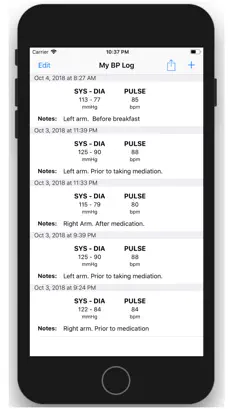
A number like 134/86 means nothing to a lot of people. My Blood Pressure Journal (it calls itself My BP Log inside the description) sorts every reading into a category based on clinical guidelines: Normal, Elevated, Stage 1, Stage 2 or Crisis, each with a colored badge. For someone newly told to keep an eye on it, that label is the most useful part.
Logging is quick: systolic, diastolic, pulse, plus notes and timestamps so you can mark morning versus evening readings or a reading after a workout. Charts cover 7, 30 and 90 days, with averages, your highest and lowest readings, and a breakdown of how readings are distributed. It syncs systolic, diastolic and pulse with Apple Health and exports a summary you can email or print for your doctor. A recent update gave it a refreshed design.
Why this one? Choose it over BP diary if you want the reading interpreted for you. Choose BP diary if you just want a record and can tolerate less hand holding.
Ads are the problem here. Its App Store age rating includes Contains Advertising, and two recent reviewers say the ads make it hard to use; one wrote, “There is no way to shut down the ad without force closing the app.” There is a Remove Ads purchase. Another reviewer says the app started crashing on launch after an update. Its privacy label lists Identifiers, Usage Data and Diagnostics as data used to track you.
Pricing: Free to download, with in-app purchases (Remove Ads).
Download My Blood Pressure Journal
BP diary (self-monitoring) — Best Simple Free Log

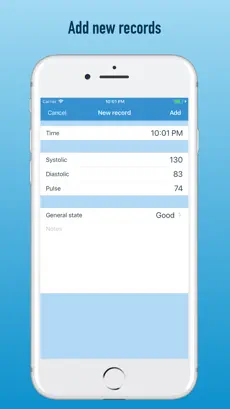
BP diary does one job. You type in your measurements, and it shows the history three ways: as a log, a chart or a report. You can send the report to your doctor or save it as a PDF. That’s about it, and that’s the appeal.
It lists no in-app purchases at all, so there’s no paywall waiting halfway through a month of readings. Its privacy label shows no data linked to you. And it has the highest star average on this list at 4.9. Reviews lean on simplicity: one reader says their doctor asked for the link to share with other patients because it’s “very simple to use especially for seniors.”
Why this one? Pick BP diary over My Blood Pressure Journal if you’d rather avoid in-app purchases and keep the screen simple. Pick My Blood Pressure Journal if you want each reading labeled with a category.
Limits: its App Store age rating includes Contains Advertising, and its App Store age rating is 16+, which is odd for a health log but worth knowing if you’re setting it up on a teen’s phone. The description doesn’t mention Apple Health. One reviewer also asked the developer for more options for how numbers are entered.
Pricing: Free. No in-app purchases listed.
Blood Pressure Log and Tracker — Best for Skipping the Typing


This one sits between a Bluetooth reader and a manual log. Point your camera at your blood pressure monitor and the app captures the reading with AI scanning. The developer says it works with Omron and other monitor brands, so it’s a decent workaround if your cuff has no app of its own. You can still type readings in, and add notes about activity, stress or symptoms.
No account is required. Readings sync through iCloud, and on iOS 26 with Apple Intelligence the developer says the AI features can run fully on the device, offline. Exports come in PDF, CSV, Excel or JSON, and there are home screen widgets for quick entry. The paid side includes a Pro MAP Report with a 7-day average. One reviewer says they export reports and upload them to their primary care doctor and cardiologist before appointments.
Why this one? If your cuff has no app of its own, the camera scan spares you most of the typing. If you do own an Omron, OMRON connect pulls readings directly with no photo step.
The privacy label lists only Usage Data and Diagnostics, both not linked to you. It also lists full Apple Health integration, and readings sync across your devices through iCloud. A recent update added a notice in Settings that explains why entries stopped syncing to iCloud, if they do.
Pricing: Free to download, with in-app purchases (Monthly Premium, Weekly Premium and Pro).
Download Blood Pressure Log and Tracker
Blood Pressure Log, Heart Rate — Best for Heart Rate Extras


Read the name carefully. This app measures heart rate by having you place a finger on the camera. Blood pressure, you log by hand: systolic, diastolic and pulse. At least one reader missed that, leaving a one-star review that just asks, “Where is my blood pressure ??”
Beyond the BP log, it adds stress and energy tracking, heart rate variability figures (RMSSD and SDNN), a blood oxygen log, history and statistics, export, and daily reminders. It also runs on Apple Watch. A five-star reviewer says the history and charts make it easy to see how their recorded numbers changed over time. The developer states plainly that it isn’t intended for medical use and isn’t a medical device.
Why this one? Pick it only if you want the heart rate and stress extras alongside your BP log. For blood pressure alone, BP diary or Blood Pressure Tracker • do the job with less in the way.
Its privacy label lists Location, Identifiers and Usage Data as data used to track you, and Health & Fitness as linked to you. That’s a lot of collection for a log. It needs iOS 17 or later.
Pricing: Free to download, with in-app purchases (weekly and annual subscriptions, plus Unlimited Access).
Download Blood Pressure Log, Heart Rate
Building Your Setup
Start with the cuff, not the app. If it’s an Omron, install OMRON connect and let it feed Apple Health. Then, if you want the reading categories or watch context, add My Blood Pressure Journal or SmartBP on top, since both work with Apple Health. Any other cuff: use Blood Pressure Log and Tracker to scan it, or type into BP diary. If your doctor also has you watching food or weight, our guides to calorie counter apps for iPhone and free intermittent fasting apps pick up where this list stops.
Which One Should You Pick?
- You own an Omron monitor: OMRON connect, Omron’s own app for its monitors.
- Your cuff has no app: Blood Pressure Log and Tracker to scan it, or BP diary to type it.
- You wear an Apple Watch: SmartBP, for the 30 days of context behind a hypertension notification.
- You manage several medications: Blood Pressure Tracker •, for the exportable medication list.
- You’re new to this and want to know if a number is high: My Blood Pressure Journal, if you can live with the ads or pay to remove them.
Prices and Plans at a Glance
| App | Download | In-app purchases (from the App Store listing) | Ads | Last updated |
|---|---|---|---|---|
| OMRON connect US/CAN/EMEA | Free | BP Monthly Subscription: $9.99 BP+EKG Monthly Subscription: $13.49 EKG Monthly Subscription: $4.99 +5 more on the App Store |
Yes | 2026-11-09 |
| Blood Pressure Tracker SmartBP | Free | SmartBP Premium Annual: $39.99 SmartBP Premium monthly: $14.99 premium ad-free version with cloud services enabled: $99.99 +7 more on the App Store |
Yes | 2026-11-17 |
| Blood Pressure Tracker • | Free | Annual+: $39.99 BP+: $29.99 BP+: $6.99 +7 more on the App Store |
— | 2026-10-14 |
| My Blood Pressure Journal | Free | Remove Ads: $1.99 | Yes | 2026-11-16 |
| BP diary (self-monitoring) | Free | None listed | Yes | 2026-02-12 |
| Blood Pressure Log and Tracker | Free | Monthly Premium: $2.99 Weekly Premium: $0.99 Pro: $23.99 |
— | 2026-11-06 |
| Blood Pressure Log, Heart Rate | Free | Weekly Subscription: $9.99 Annual Subscription: $39.99 Unlimited Access: $9.99 +7 more on the App Store |
— | 2026-11-11 |
Frequently Asked Questions
Can my iPhone measure blood pressure by itself?
No. Every app here records readings from a separate cuff. SmartBP’s developer says so directly, and BP diary’s description tells you to take measurements yourself with a suitable monitor. Blood Pressure Log, Heart Rate uses the camera to measure heart rate, not blood pressure, and Blood Pressure Log and Tracker uses it to read the screen of your cuff.
Which blood pressure apps work with Apple Health?
OMRON connect, SmartBP, Blood Pressure Tracker •, My Blood Pressure Journal and Blood Pressure Log and Tracker all describe Apple Health support. Blood Pressure Log and Tracker also lists full Apple Health integration, and BP diary’s description doesn’t mention Apple Health.
Is there a free blood pressure app with no in-app purchases?
BP diary (self-monitoring) lists no in-app purchases. Its App Store age rating does include Contains Advertising. Every other app here is free to download, with in-app purchases.
Can I share my readings with my doctor?
Yes, with all of them in some form. BP diary and Blood Pressure Tracker • make PDF reports, My Blood Pressure Journal builds a summary to email or print, Blood Pressure Log and Tracker exports PDF, CSV, Excel or JSON, and OMRON connect shares readings with your doctor, caregiver or family.
Our pick: OMRON connect if you own an Omron cuff, because readings land in your log without typing. For everyone else, BP diary is the cleanest free record, with no in-app purchases listed.
Is your app on this list? Add a free "Featured on iOS App Lists" badge to your website or press kit.