
Published Nov 14, 2026 · Updated Nov 22, 2026
Live Transcribe is the app to install first if you’re hard of hearing and don’t have hearing aids yet: it turns the conversation around you into live captions and doesn’t depend on any hearing aid brand. It’s free to download, with in-app purchases. If you already wear hearing aids, the right pick is the controller app from your aids’ maker, and the other three apps below only work properly with the matching hardware.
That’s the trap with this category. Search the App Store for apps for hard of hearing users and half the results are remote controls for a specific brand of hearing aid. Download the wrong one and you get a screen that does nothing. So this list is split by job: four hearing aid controllers, one captioning app, and one hearing test.
Jump to a section
- Quick Picks
- Which one should you install first?
- ReSound Smart 3D
- Oticon Companion
- Philips HearLink 2
- Jabra Enhance Select
- Live Transcribe
- Mimi Hearing Test
- Prices and Plans
- Prices and Plans at a Glance
- Frequently Asked Questions
- Do I need hearing aids to use these apps?
- Which app should I install first if I’m hard of hearing?
- Can an iPhone app test my hearing?
- Do these apps work on Apple Watch or iPad?
- Which one should you pick?
Quick Picks
- Best live captions: Live Transcribe, captions the people talking around you.
- Best for ReSound hearing aids: ReSound Smart 3D, program, volume and remote fine tuning.
- Best for Oticon hearing aids: Oticon Companion, volume, programs and an Apple Watch app.
- Best for Philips hearing aids: Philips HearLink 2, same feature set, Philips model list.
- Best for Jabra Enhance Select aids: Jabra Enhance Select, four listening programs and remote adjustments.
- Best hearing test: Mimi Hearing Test, a five minute check you can repeat.
| App | Best For | Price | Rating |
|---|---|---|---|
| Live Transcribe | Live captions of conversations | Free + IAP | ★4.62 |
| ReSound Smart 3D | ReSound hearing aid users | Free | ★4.65 |
| Oticon Companion | Oticon hearing aid users | Free | ★4.61 |
| Philips HearLink 2 | Philips hearing aid users | Free | ★4.49 |
| Jabra Enhance Select | Jabra Enhance Select users | Free | ★4.66 |
| Mimi Hearing Test | Checking your hearing at home | Free + IAP | ★4.75 |
Which one should you install first?
No hearing aids: start with Live Transcribe, then try Mimi Hearing Test if you want a baseline of your hearing. Already wearing hearing aids: install your maker’s app and ignore the rest of the controllers. The hearing aid apps below are free to download, but they’re built to control one maker’s devices, so they’re not interchangeable.
ReSound Smart 3D — Best for ReSound Hearing Aids


ReSound Smart 3D is the most rated app on this list, with 94,708 ratings at 4.65 stars. The developer describes it as a way to control your hearing aids from your phone: change programs, make simple or more advanced sound adjustments and save them as favorites. It can also help you find your hearing aids if you lose them.
The less obvious feature is ReSound Assist. According to the developer, you can ask your hearing care professional to change your hearing aid settings and send new software without a trip to the clinic. It also lists a mute button, speech focus, and noise and wind noise controls through Sound Enhancer, though it says feature availability depends on your hearing aids. The developer points you to ReSound’s compatibility page to check your phone and aids before you rely on it.
Why this one over the others? Saving favorite settings is part of its pitch. The trade-off is that recent reviews are rough. Several recent one-star reviews describe connection drops and pairing trouble. A four-star review is milder, though it says voices still blur together in loud places. The app was last updated in April 2026 (version 1.43.2), and the notes mention performance and stability improvements only.
It runs on iPhone and Apple Watch and needs iOS 12.2 or later. Privacy labels list data not linked to you.
Pricing: Free, no in-app purchases listed.
Oticon Companion — Best for Oticon Hearing Aids


Oticon Companion controls Oticon hearing aids from your phone. You can adjust volume for each aid together or separately, mute your surroundings, switch between programs your hearing care professional set up, and check battery levels. It also streams calls, music and podcasts to the aids, with availability depending on your phone model, and the developer notes the app comes with an Apple Watch app for discreet changes within Bluetooth range. If you live on your wrist, our Apple Watch apps roundup covers what else is worth installing there.
A tip from the description: SpeechBooster, which reduces background noise and enhances speech, is available on most models but not Oticon Zeal, Jet PX, Zircon, Opn or Ruby. Check your model before you count on it.
The version 1.8.0 update from August 9, 2026 added wax filter replacement reminders and a streaming filter for noisy places, both only on compatible devices. Which features you see depends heavily on your hearing aid model, and that’s the main limit here.
Reviewers are split. A two-star review says background noise gets amplified and group conversations are hard to follow. A four-star review says the aids cut in and out when streaming music on walks, even with the phone close by.
It works on iPhone, iPad and Apple Watch and needs iOS 15.0 or later.
Pricing: Free, no in-app purchases listed.
Philips HearLink 2 — Best for Philips Hearing Aids

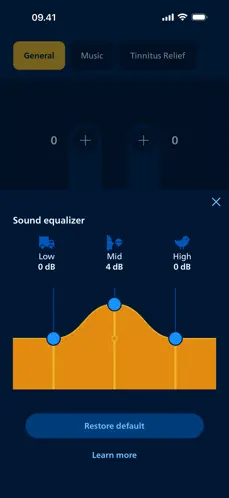
Philips HearLink 2 is, on paper, a close twin of Oticon Companion. Both sit at version 1.8.0 from August 9, 2026, and the controls overlap: volume per ear, mute, programs, battery, streaming, find my hearing aids, and an Apple Watch app. The difference is the model list. The equalizer and the Philips Journal progress tracker are for Philips HearLink 60, 50 and 40, and the Auracast broadcast connection is for HearLink 60 and 50 only.
So the practical advice: if you own a HearLink 00, you’ll get the basics and the streaming equalizer is not included. If you own a 60, you get everything the description lists.
Philips HearLink 2 has 50,096 ratings at 4.49 stars, the lowest rating of the six. Recent reviews are mostly about the hearing aids rather than the app. A five-star review says it’s very easy to use, while a three-star review mentions a failing battery after two years, and another recent review describes difficulty finding a comfortable setting in crowded areas.
Pricing: Free, no in-app purchases listed.
Jabra Enhance Select — Best for Jabra Enhance Select Hearing Aids


The Jabra Enhance Select app gives you control over Enhance Select hearing aids from your phone. There are four listening programs (All-Around, Restaurant, Outdoor and Music), volume for both ears together or separately, and a Sound Equalizer for deeper changes.
The standout is remote adjustment. Customers with access to Jabra’s licensed audiology team can request sound adjustments from the app, download the new programming and apply it to the aids. The description also says all customers can reach US-based customer support from inside the app. See the Jabra Enhance site for the hearing aids themselves.
Reviewers keep coming back to cost. A four-star review is titled “Affordable choice”, and a five-star review says the writer wanted quality hearing aids without the ENT price tag.
Limitations: it’s iPhone only, with no iPad or Apple Watch version, and it’s rated 16+. Its privacy label lists data linked to you, including health and fitness data and contact info, which is a heavier footprint than the other controllers here. Version 5.1.0 (August 6, 2026) improved the Help Center with topic grouping and keyword search.
Pricing: Free, no in-app purchases listed.
Live Transcribe — Best Live Captions for Hard of Hearing Users


The developer pitches it as live captions for Deaf and hard of hearing people, with large bold text for tired eyes, color-coded words to tell speakers apart in a group, and an offline mode for when Wi-Fi or cellular drops. It also says the app works in restaurants and groups, and in dozens of languages. Those are the developer’s claims, not independent numbers.
One thing to know: this is not Google’s app. The description says it’s iOS only and not affiliated with Google.
It also costs money. The App Store lists in-app purchases, including a monthly plan at $4.99 and yearly or starter plans at higher prices, up to $79.99. Its App Store age rating includes “Contains Advertising,” and its privacy labels include data used to track you (purchases and contact info). One recent reviewer asks whether a free trial has turned into an annual subscription, so check what you’ve agreed to in your Apple subscriptions.
Still, the reviews that matter are human ones. A five-star review says relatives were able to read a family member’s service on their phone, which is the exact use case the app is built for. The latest update fixed bugs and made transcription performance improvements. Works on iPhone and iPad with iOS 15.0 or later.
If you also want to keep a record of what was said, see our voice recorder app picks.
Pricing: Free to download, with in-app purchases.
Mimi Hearing Test — Best Hearing Test


Mimi Hearing Test has the highest rating of the six, 4.75 stars from 43,665 ratings. The developer calls it an assessment of your hearing with results in about 5 minutes. It syncs results to Apple Health so you can track changes over time, and exports results as PDFs in certain regions for sharing with family or a professional.
The important caveat is in the developer’s own limitations note: accuracy depends on your headphones and the noise around you. Supported models include AirPods, AirPods Pro, AirPods Max, EarPods, and several Bose, Sony, Samsung, JBL, Beats, Nothing and Skullcandy models. If your headphones aren’t on the list, treat the result with caution.
Reviewers on the App Store back it up as a screening tool. One reviewer says the results lined up with what they found at a professional test, and another says they were consistent with an audiologist’s assessment.
On the downside, its App Store age rating includes “Contains Advertising,” and it lists in-app purchases, with prices from $1.00 to $50.00. It’s rated 13+ and needs iOS 16.0 or later. It runs on iPhone and iPad, not Apple Watch. The last update, version 6.9.0 in February 2026, fixed bugs for iOS 26.
Pricing: Free to download, with in-app purchases.
Prices and Plans
Prices and Plans at a Glance
| App | Download | In-app purchases (from the App Store listing) | Ads | Last updated |
|---|---|---|---|---|
| ReSound Smart 3D | Free | None listed | — | 2026-04-09 |
| Oticon Companion | Free | None listed | — | 2026-08-09 |
| Philips HearLink 2 | Free | None listed | — | 2026-08-09 |
| Jabra Enhance Select | Free | None listed | — | 2026-08-06 |
| Live Transcribe | Free | Starter: $79.99 Live Transcribe Monthly: $4.99 Try Real-Time Transcription: $49.99 +7 more on the App Store |
Yes | 2026-11-19 |
| Mimi Hearing Test | Free | Ultimate Love: $5.00 Ultimate Love: $1.00 Ultimate Love: $2.00 +3 more on the App Store |
Yes | 2026-02-04 |
Frequently Asked Questions
Do I need hearing aids to use these apps?
Only for the four controller apps: ReSound Smart 3D, Oticon Companion, Philips HearLink 2 and Jabra Enhance Select. Live Transcribe and Mimi Hearing Test don’t depend on a hearing aid brand.
Which app should I install first if I’m hard of hearing?
Live Transcribe, for live captions in conversations. Add Mimi Hearing Test if you want a quick check of your hearing, keeping in mind that accuracy depends on your headphones.
Can an iPhone app test my hearing?
Mimi Hearing Test can. The developer says it delivers results in 5 minutes and that accuracy depends on headphone type and ambient noise. Reviewers describe it as a good first screening, not a replacement for a professional.
Do these apps work on Apple Watch or iPad?
Oticon Companion and Philips HearLink 2 list iPhone, iPad and Apple Watch support. ReSound Smart 3D lists iPhone and Apple Watch. Jabra Enhance Select is iPhone only. For other accessibility apps, see our guide for visually impaired users.
Which one should you pick?
Don’t own hearing aids: Live Transcribe. Own ReSound, Oticon, Philips or Jabra Enhance Select aids: the app from that maker. Want to check your hearing before booking an appointment: Mimi Hearing Test.
Our pick: Live Transcribe. It captions the conversation in front of you, whatever brand of hearing aid you wear, or none.
Is your app on this list? Add a free "Featured on iOS App Lists" badge to your website or press kit.