
Published May 12, 2026 · Updated Oct 19, 2026
CARROT Weather is the best Apple Watch app for most people: its Watch complications are the draw, and it’s free to download. If you want sleep data without pressing a button, AutoSleep is the pick, at $9.99 once.
The best Apple Watch apps are the ones that earn their place on your wrist rather than mirroring your phone. That’s a small group. Apple’s own apps cover steps, workouts, heart rate and sleep well enough that a third-party app has to add something the watch can’t do alone: a complication with real data, a workout that runs without the iPhone, a reading you’d otherwise have to dig for.
These nine are the ones worth the space, sorted by what they actually add. One of them runs a whole workout from the Watch. Two turn health data into something you’d act on. And one is a task manager that treats the Watch as a real client instead of a remote control.
What changed in this update (October 2026): Added WorkOutDoors, Heart Analyzer, WaterMinder and Things 3. Kept all five previous picks, each holding a 4.7 or better. Removed the duplicate screenshots that were showing two images per app. Rechecked every price against the App Store.
Jump to a section
- Best Apple Watch Apps: Quick Picks
- Comparison: Which Apple Watch App Fits Your Day
- CARROT Weather: Best Weather App for Apple Watch
- AutoSleep: Best Sleep Tracker for Apple Watch
- WorkOutDoors: Best Workout App for Apple Watch
- Streaks Workout: Best Bodyweight Workouts on the Wrist
- Gentler Streak: Best for Sustainable Training
- Heart Analyzer: Best Heart Data on the Watch
- Atoms: Best Habit Tracker for Apple Watch
- WaterMinder: Best Hydration Tracker
- Things 3: Best Task Manager for Apple Watch
- Getting More Out of the Wrist
- Prices and Plans at a Glance
- Frequently Asked Questions
- Our Pick
Best Apple Watch Apps: Quick Picks
- Best overall: CARROT Weather, for Watch complications and radar maps
- Best sleep tracker: AutoSleep, automatic detection with nothing to start or stop
- Best workout app: WorkOutDoors, offline maps and 800+ data fields on the wrist
- Best bodyweight workouts: Streaks Workout, 30 equipment-free exercises
- Best for resting: Gentler Streak, which counts rest days toward your streak
- Best heart data: Heart Analyzer, charts and alerts built from Apple Health
- Best habit tracker: Atoms, built on the Atomic Habits method
- Best hydration: WaterMinder, a visual water-fill tracker with reminders
- Best task manager: Things 3, a real to-do list on your wrist
Comparison: Which Apple Watch App Fits Your Day
| App | Best for | Price | Rating |
|---|---|---|---|
| CARROT Weather | Weather complications and radar | Free + IAP | 4.7 (87.6K) |
| AutoSleep | Automatic sleep tracking | $9.99 | 4.7 (61.8K) |
| WorkOutDoors | Outdoor workouts with maps | $8.99 | 4.7 (1.7K) |
| Streaks Workout | Bodyweight sessions | $4.99 + packs | 4.8 (7K) |
| Gentler Streak | Training load and rest days | Free + IAP | 4.7 (8.8K) |
| Heart Analyzer | Heart rate trends and alerts | Free + IAP | 4.7 (22.3K) |
| Atoms | Habit streaks | Free + IAP | 4.8 (10.7K) |
| WaterMinder | Water intake reminders | Free + IAP | 4.8 (35.4K) |
| Things 3 | Tasks and projects | $9.99 | 4.8 (28K) |
CARROT Weather: Best Weather App for Apple Watch


Most weather apps treat the Watch as a place to dump a temperature. CARROT Weather’s draw on the Watch is the complication set. That’s a Premium feature, so it’s worth knowing what you’re buying before you install.
On the free tier you get current, hourly and daily forecasts, which is most of what a weather app does. Premium is where the Watch side lives: Apple Watch complications and background updates, weather maps with next-hour radar and radar layers, and notifications for precipitation, weather alerts and lightning strikes where those are available. It also adds data sources (The Weather Channel, AccuWeather and Apple Weather), Lock Screen and Home Screen widgets, Live Activities and a CarPlay app.
It’s also an app with a personality, a homicidal AI you can set from professional to overkill. That’s not a Watch feature, but the app does carry an App Store Editors’ Choice and an Apple Design Award. If you just want a temperature on your wrist, Apple’s own app is free and fine. If you want radar and a complication you control, Premium is what buys it.
Pricing: Free to download, with in-app purchases. CARROT Premium: $4.99 monthly or $19.99 annually. CARROT Premium Ultra: $39.99.
Download CARROT Weather | Developer site
AutoSleep: Best Sleep Tracker for Apple Watch


AutoSleep asks nothing of you. Wear the Watch to bed, wake up, open the app. There’s no start button, no sleep mode to arm, no morning question about how you slept. It works out your night from the Watch’s data and reconstructs it: time asleep, time in bed, sleep stages, and a readiness figure that folds in your physical and mental load.
The historical view is where it earns the money. A single night’s number is noise. A longer history shows you which habits affect your sleep, which is the kind of thing you can act on. AutoSleep also offers Watch complications, so the numbers are available on the face rather than buried two taps deep.
It’s $9.99 once. The limitation is scope rather than quality: no iPad version and no subscription. It tracks your sleep and recommends a latest bedtime based on your habits. If you want to know what actually happened while you were asleep, this is the most direct route.
Pricing: $9.99, one-time purchase. No in-app purchases.
Download AutoSleep | Developer site
WorkOutDoors: Best Workout App for Apple Watch

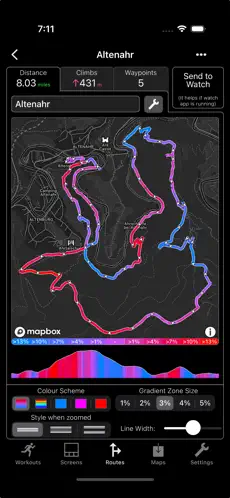
WorkOutDoors is the app Apple’s Workout app would be if Apple let you configure everything. It draws a vector map during your run, ride or hike, with your route on it and turn-by-turn directions if you’ve loaded a route file. It gives you multiple configurable screens built from a pool of 800+ data fields. And it handles alerts: every mile, a heart rate ceiling, a pace floor, a deviation from the route.
You don’t carry the phone. The app is built around the Watch as the computer, and it uses Apple’s workout system, so workouts are saved to Health. Climbs and descents get their own notifications and graphs, which matters more than it sounds if you ride or trail run in hill country.
The trade is setup. You’ll want to spend time building the screens and alerts you want, and the phone app handles interval schedules and workout analysis. It also needs an Apple Watch Series 4 or later, and there’s no iPad version. At $8.99 it’s a one-time purchase with no subscription, and tips are the only in-app purchases. For the mapping side of things, our best running apps for iPhone roundup covers the phone-first alternatives.
Pricing: $8.99, one-time purchase. Optional tips as in-app purchases.
Streaks Workout: Best Bodyweight Workouts on the Wrist


Streaks Workout has its own Apple Watch app and syncs across iPhone, iPad, Watch and Apple TV. You pick one of four fixed lengths (roughly 6, 12, 18 or 30 minutes) or set your own, choose which exercises you want in the mix, and let voice coaching talk you through it. The sessions are built from 30 equipment-free exercises, and the app writes every workout to Apple Health.
What makes it stick is the constraint. No equipment needed: just you, a floor, and a timer. Custom exercises and custom workouts mean it still works when the standard set gets stale, and it plays workout music if you have an Apple Music subscription.
Two things to know before you buy. It needs iOS 17.6 and watchOS 10.6, a higher floor than most apps here. And the base $4.99 is a one-time purchase with no subscription, but the curated Workout Packs cost extra: Iron Core and Silent but Deadly are $2.99 each, and the complete library is $9.99. If your training involves barbells, look at our best workout apps for iPhone instead. This one is bodyweight by design.
Pricing: $4.99, with workout packs from $2.99 and a $9.99 complete library as in-app purchases.
Download Streaks Workout | Developer site
Gentler Streak: Best for Sustainable Training


Most fitness apps assume more is better. Gentler Streak assumes you’ll quit if you keep that up. It reads your key vitals and sleep, then suggests workouts that respond to your readiness, and rest days count as part of keeping your streak alive. When life happens (illness, injury, a vacation), you can adjust your status instead of watching the streak break.
Its on-watch suggestions let you scale a workout up or down, so the decision happens on your wrist before you decide to skip. The app has an award-winning Apple Watch workout component, and your health and fitness data stays on-device via Apple HealthKit with no external processing.
It’s free to download, and Gentler Premium unlocks the advanced analysis and family sharing at $8.99 monthly or $39.99 yearly, with a lifetime option at $89.99. The honest limitation: this is a readiness layer first. If you want configurable workout screens, WorkOutDoors does that. If you want to stop burning out every February, start here.
Pricing: Free to download, with in-app purchases. Gentler Premium: $8.99 monthly or $39.99 yearly. Lifetime: $89.99.
Download Gentler Streak | Developer site
Heart Analyzer: Best Heart Data on the Watch


Heart Analyzer reads your Apple Health data and puts it in charts you can actually interpret: heart rate through the day, resting rate trends, heart rate variability, cardio recovery, sleep heart rate, and ECG trends where your Watch records them.
The alerting is the practical feature. You set your own high and low limits, choose quiet hours, and opt to be told only about sustained changes. There’s also an HRV Center for looking at variability data in context, which is more useful than a single number.
Two catches. It needs iOS 17.5 and watchOS 10.6, so older phones are out. And the deeper features are paid: Data Plus and Analytics Plus are $9.99 each and Complete Premium is $24.99, with subscription options at $3.99 monthly or $19.99 yearly and a lifetime unlock at $49.99. Privacy is the selling point worth noting, since the listing states that no data ever leaves your device and there’s no third-party analytics. We covered it in more depth in our Heart Analyzer review.
Pricing: Free to download, with in-app purchases. Monthly: $3.99. Annual: $19.99. Lifetime: $49.99.
Download Heart Analyzer | Developer site
Atoms: Best Habit Tracker for Apple Watch


Atoms is the app built around James Clear’s Atomic Habits, and the Apple Watch app is there for logging habits on the move. The Apple Watch app lets you log your habits on the move.
The structure goes further than a checklist. You commit to a time and place for each habit, and track your progress over time. That’s the part the book is really about: the streak isn’t the point, the evidence that you’re the kind of person who does this is.
It’s free to download and Atoms Pro is $4.99 monthly or $39.99 yearly. The limitation worth flagging: the app hasn’t had a version update since February 2026, which is a long gap for a habit tracker that depends on watchOS behaviour. If you’re choosing between this and something shipping updates monthly, factor that in. Our best habit tracker apps roundup has the alternatives.
Pricing: Free to download, with in-app purchases. Atoms Pro: $4.99 monthly or $39.99 yearly.
Download Atoms | Developer site
WaterMinder: Best Hydration Tracker


WaterMinder works because the visual is stupidly effective. The character fills as you log drinks, the percentage shows where you are against your goal for the day, and the reminder nudges you when you fall behind. You set the goal by body weight or by hand.
Logging is quick, there are pre-defined cups for one-tap entry, and you can log and create other drink types than water. It syncs with Apple Health, and the app carries 50+ characters to choose from if the default one doesn’t appeal.
Be aware of two things. The listing declares advertising, and the download is large at 573 MB. WaterMinder Premium is $2.99 monthly, with yearly plans also available. If you want a hydration app with no ads at all, keep looking.
Pricing: Free to download, with in-app purchases. WaterMinder Premium: $2.99 monthly, with yearly plans also available.
Download WaterMinder | Developer site
Things 3: Best Task Manager for Apple Watch

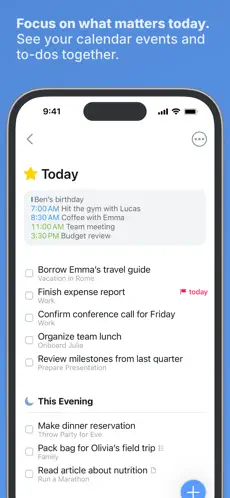
Things 3 is the only task manager here that feels designed for a small screen instead of shrunk onto one. Raise your wrist to glance at your Today list, mark to-dos complete as you go, and dictate new ones on the fly. Everything syncs instantly with your iPhone, iPad and Mac.
The underlying app is the stronger argument. Projects, areas, headings, deadlines, tags and a Today list that pulls in your calendar. Wirecutter’s review, quoted on the App Store listing, called it the best combination of design and functionality of any app it tested, and the Watch app inherits that clarity rather than fighting it.
The catch is the price model: $9.99 once, no subscription, no in-app purchases, and no free tier on iPhone to try first. It’s also iPhone and Watch on mobile, with Mac, iPad and Vision Pro sold separately. If $9.99 up front is a hard no, Apple’s Reminders is free.
Pricing: $9.99, one-time purchase. No in-app purchases.
Download Things 3 | Developer site
Getting More Out of the Wrist
The fastest upgrade isn’t another app, it’s a better face. Several apps on this list offer complications, and a face built from a few of them can replace a stack of app launches. CARROT’s Premium tier alone can fill a face with weather data, AutoSleep puts sleep numbers there, and WaterMinder has its own standalone Watch app.
One watchOS 27 change is worth knowing if you juggle apps. In watchOS 26, double-clicking the Digital Crown jumped between your current app and the last one you used. In watchOS 27 that gesture only opens the new dynamic app grid, which is exactly what a single click does. If your main apps live on the face as complications, you won’t miss it. If you relied on that jump, it’s gone and there’s no setting to bring it back. Our watchOS 27 and Apple Watch Series 12 breakdown covers the rest of what changed.
Prices and Plans at a Glance
| App | Download | In-app purchases (from the App Store listing) | Ads | Last updated |
|---|---|---|---|---|
| CARROT Weather | Free | CARROT Premium (Annual): $19.99 CARROT Premium Ultra: $39.99 CARROT Premium Mini: $6.99 +7 more on the App Store |
— | 2026-10-09 |
| AutoSleep | $9.99 | None listed | — | 2026-09-15 |
| Streaks Workout | $4.99 | Complete Library: $9.99 Iron Core: $2.99 Silent but Deadly: $2.99 +4 more on the App Store |
— | 2026-10-09 |
| Gentler Streak Workout Tracker | Free | Gentler Premium Yearly Family: $29.99 Gentler Premium Monthly: $8.99 Gentler Premium Yearly Family: $59.99 +7 more on the App Store |
— | 2026-10-08 |
| Atoms | Free | Atoms Pro Monthly: $4.99 Atoms Pro Annual: $39.99 |
— | 2026-02-16 |
| WorkOutDoors | $8.99 | Very Generous Tip: $4.99 Generous Tip: $1.99 Massive Tip: $9.99 +2 more on the App Store |
— | 2026-06-26 |
| Heart Analyzer | Free | Data Plus: $9.99 Analytics Plus: $9.99 Complete Premium: $24.99 +4 more on the App Store |
— | 2026-10-14 |
| Water Tracker by WaterMinder® | Free | WaterMinder Premium Yearly: $14.99 WaterMinder Premium Yearly: $29.99 WaterMinder Yearly Offer: $7.49 +7 more on the App Store |
Yes | 2026-10-15 |
| Things 3 | $9.99 | None listed | — | 2026-10-19 |
Frequently Asked Questions
Which Apple Watch app should I install first?
CARROT Weather, because a weather complication is the one thing you’ll look at twenty times a day. The download is free, and the paid tier unlocks the complication library and radar, among other features. After that, AutoSleep if you wear the Watch to bed.
Do these Apple Watch apps work without my iPhone nearby?
WorkOutDoors is the one built for it: the developer states you don’t need your iPhone with you. It also tracks a large set of activities on the Watch itself, so a workout doesn’t stop when the phone does.
Which apps on this list require a subscription?
Five use in-app purchases for their deeper features: CARROT Weather, Gentler Streak, Heart Analyzer, Atoms and WaterMinder. AutoSleep at $9.99 and Things 3 at $9.99 are one-time purchases with no subscription at all, and WorkOutDoors is $8.99 once with optional tips.
What watchOS version do these apps need?
Requirements range from watchOS 9.0 for CARROT Weather, AutoSleep and Gentler Streak up to watchOS 10.6 for Streaks Workout and Heart Analyzer. Atoms and WaterMinder need watchOS 10.0, WorkOutDoors needs 9.2, and Things 3 needs 9.1. Check your Watch model before buying: WorkOutDoors specifically requires a Series 4 or later.
Are any of these worth using on an older Apple Watch?
Yes, with limits. AutoSleep (watchOS 9.0) and Things 3 (watchOS 9.1) have lower watchOS requirements than most apps here. Heart Analyzer needs watchOS 10.6 and WorkOutDoors needs a Series 4 or later, so check those two first.
How does AutoSleep compare with Apple’s own sleep tracking?
AutoSleep adds a readiness figure plus history graphs and trends on top of the Watch’s sleep data. If you only want last night’s hours, Apple’s own tracking is enough. For more options, see our best sleep tracking apps for iPhone.
Our Pick
Our pick: CARROT Weather. It’s the app that changes how you use the face rather than adding another icon to the grid, and the free download lets you decide whether the complications are worth $19.99 a year. Pair it with AutoSleep and you’ve covered the two things a Watch is genuinely better at than a phone: the glance, and the night.
Related: If you’re shopping for the hardware too, our Apple Watch Series 12 and watchOS 27 guide covers what changed this year. Golfers should see our roundup of best free golf GPS apps, several of which put yardages on the Watch.
Is your app on this list? Add a free "Featured on iOS App Lists" badge to your website or press kit.