
Published May 18, 2026 · Updated Oct 27, 2026
Counting calories gets a bad rap, but for most people it isn’t a permanent way of life. It’s a short-term diagnostic. You log your food for a few weeks, learn what a real portion looks like, and suddenly the “mystery” of why the scale isn’t moving evaporates. The catch is that logging only works if it’s fast enough to actually do every day. That’s exactly where the best calorie counter apps for iPhone earn their keep in 2026. Here are the eight worth your attention, ranked by what they do better than everyone else.
Jump to a section
Best Calorie Counter Apps for iPhone — Quick Picks
- Best overall: MyFitnessPal (20.5M+ foods, barcode scan, AI coach))
- Best for weight loss: Lose It! (clean calorie budget that keeps the deficit front and center)
- Best for micronutrients: Cronometer (95+ vitamins and minerals, not just calories)
- Best for serious tracking: MacroFactor (evidence-based coaching that adjusts to your real metabolism)
- Best for keto: Carb Manager (net carbs as the headline metric)
- Best for diabetes: MyNetDiary (glucose, A1c, and medication tracking built in)
- Best for photo logging: Lifesum (snap a meal and let AI do the rough math)
- Best for fasting: Yazio (fasting timers and calorie tracking on a budget)
Calorie Counter Apps Compared
| App | Best For | Price | Rating |
|---|---|---|---|
| MyFitnessPal | Big food database | Free / Premium | 4.7 |
| Lose It! | Weight loss focus | Free / Premium | 4.8 |
| Cronometer | Micronutrient accuracy | Free / Gold | 4.8 |
| MacroFactor | Data-driven coaching | Subscription | 4.8 |
| Carb Manager | Keto and low-carb | Free / Premium | 4.8 |
| MyNetDiary | Diabetes and health | Free / Premium | 4.8 |
| Lifesum | AI photo logging | Free / Premium | 4.6 |
| Yazio | Fasting and budget | Free / PRO | 4.7 |
MyFitnessPal — Best Overall Calorie Counter


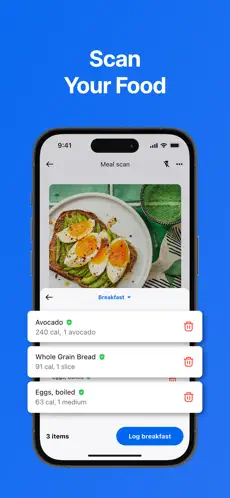
MyFitnessPal is still the default answer, and for one reason above all: the food database. It holds 20.5M+ foods, which means the thing you ate is already in there, whether it’s a drive-thru burger, a grocery store yogurt, or a homemade lentil soup someone else logged first. The barcode scanner makes logging packaged foods quick. Point, scan, done. You can log breakfast in under a minute once the workflow is muscle memory.
The diary gives you your daily budget, remaining calories, and macro split at a glance. Apple Health and Apple Watch sync pull exercise calories into the math automatically, so a morning run raises your budget without any extra taps.
Here’s the honest part: the free tier keeps shrinking. Barcode scanning is now a Premium feature. But the pattern is clear. If you just want the basics, it’s fine. If you want detailed nutrient data, Cronometer’s free tier is more generous. Premium runs roughly $20 a month or $80 a year, and it’s genuinely optional for most people.
Pricing: Free. Premium about $20/month or $80/year. Download MyFitnessPal
Lose It! — Best for Weight Loss


Lose It! is built around a single idea: a calorie deficit you can actually see. Your daily budget sits right on the home screen, remaining calories update with every entry, and and it builds a personalized weight loss plan around your calorie budget. It’s a weight loss app that happens to count calories, not the other way around, and the focus shows.
Snap It is the standout feature. Photograph a plate and the app estimates foods and portions with AI, which saves real time when you’re eating something you didn’t cook yourself. Barcode scanning is quick, the database is large, and exercise sync pulls from Apple Health and Apple Watch like the rest of the category. A free tier covers the core budget and logging; Premium adds meal planning, nutrient goals, and deeper analysis.
The tradeoff is that Lose It! is less interested in micronutrients than Cronometer, and its recipe tools feel a step behind MyFitnessPal’s. But if your only goal is dropping weight and staying accountable to a number, this is the cleanest interface in the group. Premium lands around $40 a year, and it frequently goes on sale.
Pricing: Free. Premium roughly $40/year. Download Lose It!
Cronometer — Best for Micronutrient Accuracy

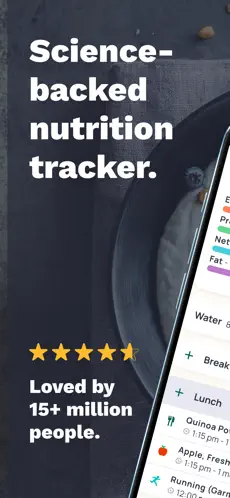
Cronometer tracks 95+ nutrients per food, not just the big four. Calories, protein, carbs, and fat are there, but so are vitamins and minerals, 95+ of them in all. If you’re managing a deficiency, tracking electrolytes on a keto diet, or just want to know whether your “healthy” diet is actually balanced, Cronometer is built for exactly that.
The database favors verified, lab-sourced entries over user-submitted ones, so the numbers are more trustworthy, at the cost of a smaller catalog than MyFitnessPal. The daily nutrition summary compares your intake against your personalized nutrition targets, which turns a wall of data into something you can skim in seconds.
The catch is the learning curve. The interface is more spreadsheet than lifestyle app. Still, the free tier includes full nutrient tracking without a subscription. Gold, about $60 a year, adds a fasting tracker, photo and voice logging, a recipe importer, and an ad-free experience.
Pricing: Free with full nutrient tracking. Gold about $60/year. Download Cronometer
MacroFactor — Best for Serious, Data-Driven Dieters


MacroFactor is the app for people who are done guessing. Instead of asking you to pick a calorie target and hoping, it watches your logged intake against your scale weight and reverse-engineers your actual energy expenditure. If your body burns less than the formula predicted, the app adjusts your targets accordingly. , and it’s why MacroFactor has become the favorite of people who lift, coach, or just want the math done right.
The food logging is fast and the database is solid, but the real magic is the weekly check-in. You weigh in, log as usual, and the app recalibrates. It’s adherence-neutral coaching, which is a fancy way of saying it doesn’t scold you for a bad day. It just updates the plan.
There are two honest drawbacks. First, there’s no permanent free tier, just a trial before a subscription that runs about $12 a month or $72 a year. If you’re serious enough to pay for tracking, it’s the best money in this category.
Pricing: Subscription, roughly $12/month or $72/year after a free trial. Download MacroFactor
Carb Manager — Best for Keto and Low-Carb


Carb Manager puts net carbs, not calories, at the top of every screen. That’s the number that matters on a keto diet, and the app never lets you forget it. The food database covers 1M+ foods, including net carbs and sugar alcohols. A keto calculator tracks your net carbs and macros.
It goes well beyond a simple counter. Intermittent fasting schedules, meal plan templates for different low-carb approaches, and water logging are built in. With over 700,000 ratings at 4.8 stars, it’s a heavily reviewed keto tracker.
The flip side is that it’s a specialty tool. If you aren’t eating low-carb, the net-carb emphasis is noise, and the calorie-first interface of Lose It! or MyFitnessPal will feel more natural. Premium, around $40 a year, unlocks meal planning and advanced analysis, but the free tier handles core net carb tracking fine.
Pricing: Free. Premium roughly $40/year. Download Carb Manager
MyNetDiary — Best for Diabetes and Health Conditions

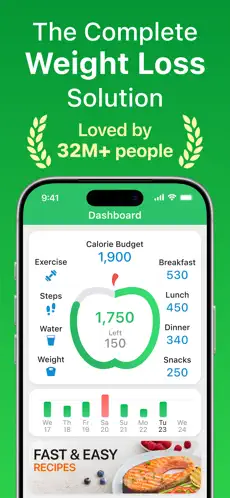
MyNetDiary is the counter that takes health conditions seriously. It tracks calories and macros like everything else here, but the reason it earns a spot is diabetes support: blood glucose logging, A1c tracking, and medication reminders all live in the same app as your food diary. If you’re managing type 2 diabetes or prediabetes, that integration means you can see exactly how a meal moves your numbers instead of juggling two separate apps.
The food database is staff-verified, with over 2 million foods, with a focus on verified brand data and accurate portion sizes. The dashboard is dense but useful, pairing your food intake with weight, glucose, and activity in one view. A built-in coaching system gives you a daily target and nudges you toward it without being preachy.
The interface shows its age in places, and the depth of features can feel like overkill if all you want is a simple calorie budget. That’s the point, though. This is the app for people who need the nutrition data to mean something clinically. Premium runs about $60 a year and adds advanced tracking, including blood glucose and A1C tracking.
Pricing: Free. Premium roughly $60/year. Download MyNetDiary
Lifesum — Best for AI Photo Logging


Lifesum is the best-looking app in this list, and it leans hard into AI photo logging. Snap a picture of your meal and the app estimates the calories and macros without you typing a thing. The accuracy is genuinely useful for rough tracking, though like every photo logger, it struggles with hidden oils, sauces, and exact portions. Treat it as a fast estimate, not a measurement.
Beyond the camera, Lifesum gives you a weekly Life Score based on your nutrition and exercise, plus ratings on the foods you log. The design is friendly where Cronometer is clinical, which matters when the whole point is logging every single day without hating it. Meal plans, recipes, and a large food database round it out.
The downside is that some features sit behind the Premium subscription. If you want pretty, motivating, and fast over exhaustive detail, Lifesum is the pick.
Pricing: Free, with optional Premium. Download Lifesum
Yazio — Best for Fasting and Budget Tracking


Yazio is worth a look for a simple reason: it bundles calorie tracking, macro counting, and intermittent fasting timers into one app. If you’re doing 16:8 fasting and counting calories, Yazio handles both without forcing you into a second subscription.
The app also pushes AI food recognition hard, with photo logging that estimates meals and a barcode scanner for packaged foods. A free tier covers calorie and macro tracking with a reasonable database, while PRO adds in-depth food analysis and custom meal plans.
The food database is smaller than MyFitnessPal’s, and the AI estimates share the same portion-guessing limits as every other photo logger. But as a package with calorie tracking, fasting, and recipes, it’s worth a look.
Pricing: Free. PRO roughly $24 to $48/year. Download Yazio
Which Calorie Counter Should You Pick?
Match the app to your actual goal and the choice gets easy. Chasing weight loss with a clean, motivating interface? Start with Lose It!. Want full nutrient tracking on a free tier? Cronometer is the answer. Serious about the data and willing to pay for it? MacroFactor is the best tracker in the category, full stop. Managing diabetes or a medical condition? MyNetDiary adds diabetes tracking. Keto? Carb Manager. And if you want a big food database, MyFitnessPal still works.
Our pick: Cronometer. Its free tier does more than most paid tiers, and the micronutrient depth is something you’ll actually use once you see it. Cronometer wins on micronutrient depth.
Frequently Asked Questions
What is the best free calorie counter app for iPhone?
Cronometer’s free tier includes full calorie, macro, and micronutrient tracking at no cost. MyFitnessPal’s database holds 20.5M+ foods. Yazio is also worth a look if you want fasting timers alongside calorie tracking.
Which calorie app has the most accurate food database?
Cronometer prioritizes verified, lab-sourced nutrition data, with a curated database of more than 1.1 million verified foods. MyFitnessPal’s database is large, at 20.5M+ foods. For packaged foods, MyNetDiary’s brand-focused data is also strong.
Do calorie counter apps sync with Apple Watch?
Every app on this list has an Apple Watch version, and Cronometer, Lose It!, MyNetDiary, Carb Manager and Lifesum sync with Apple Health. You can also log workouts manually in each app for activities your watch didn’t catch.
Is photo-based calorie logging accurate?
Photo logging from Lifesum, Yazio, and Lose It’s Snap It is a useful estimate, but it’s not precise. Hidden oils, sauces, and portion sizes throw the numbers off. For serious tracking, weigh and measure your portions and enter them manually. The camera is best for rough estimates when you’re eating out.
Is counting calories a healthy long term habit?
Short-term logging to learn portion sizes and identify patterns is broadly considered constructive, and apps like MacroFactor are built around sustainable, adherence-neutral tracking. Long term obsessive counting can become counterproductive for some people. If tracking starts to feel stressful or you have a history of disordered eating, it’s worth talking to a healthcare provider before continuing.
For more on building a healthier routine, see our roundup of the best workout apps for iPhone, our guide to the best habit tracker apps for turning food logging into a routine, and our list of the best sleep tracking apps, because recovery matters as much as the deficit.