
MenuFit is a decent pick if you eat at chain restaurants and want an app to tell you what to order, but it’s free to download only in the sense that the full app sits behind a subscription. This MenuFit review looks at what the app does, where reviewers say it falls down, and when a calorie tracker is the better use of your phone.
The question it tries to answer is a narrow one: you’re standing in a restaurant, you have a goal, and you want one answer. MenuFit’s description focuses on settling the order rather than logging your day. It’s built to settle the order.


MenuFit – Healthy Eating Out · Kosco Digital LLC · 4.76 stars from 54,528 ratings · Version 1.0.54, updated 2026-10-23 · iPhone only, needs iOS 16.4 · App Store | Terms of Use
Jump to a section
What MenuFit Does
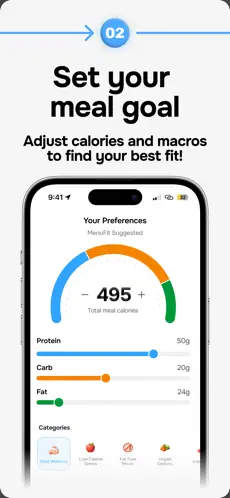
The developer describes MenuFit as “your personalized guide to eating out without sacrificing your goals.” You set your preferences, goals and dietary needs, and the app suggests meals at fast food places, dine in restaurants and bars. It also covers drinks.
The paid feature list, from the developer’s own description, is where the product really lives:
- Meals that match your food preferences and macro goals
- Daily meal suggestions based on your preferences
- Calorie breakdowns that include protein, carbs and fats
- Meals from your favorite restaurants, sorted by what fits your goals
- A “Healthify” option for adjusting a meal toward your goal (the developer’s wording is “Healthify any meal to better align with goal”)
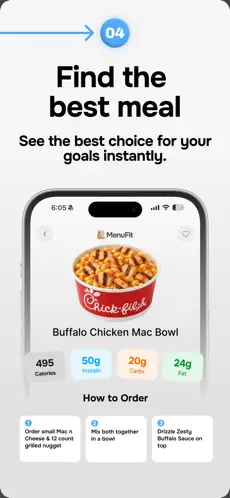
That last one is the most useful idea in the list. Most of us don’t want a different meal, we want the same burrito with a few changes. An app that proposes the swap is solving a real problem, which a food diary never does.
The other notable claim is that it “works even if the menu has no calories or macros listed.” That’s the developer’s own line, and it’s the feature that would set MenuFit apart from a database lookup. We’ll come back to whether reviewers see it working.
How it differs from a tracker
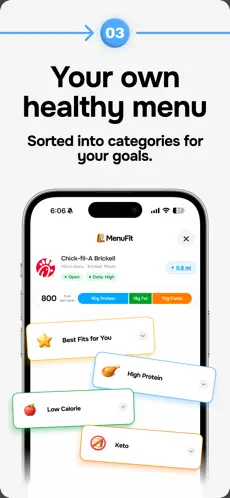
A calorie counter asks you to find the food, weigh it, and log it. MenuFit flips that. You start with the restaurant and get a ranked answer. The trade is that it doesn’t do the rest of what a tracker does, at least not according to its App Store description: there’s no mention of a food diary, a weight chart or workout logging. If you want those, you’re in the next section’s territory.
What Could Be Better
Start with the money, because it’s the biggest thing. The developer is upfront that the app “requires a subscription to access the complete experience.” The download is free, but the premium features listed above are the product. The App Store’s in-app purchase list shows MenuFit Premium at ten entries, ranging from $9.99 to $48.00, and the list doesn’t say which are weekly, monthly or yearly. So the App Store listing alone won’t tell you what a month costs. Check the price on the paywall before you start any trial.
One recent reviewer’s experience is worth reading before you do. A 1 star review from 2026-10-22, titled “Scam”, says they signed up for the free 14 day trial and were charged immediately, did not continue after the trial, and were then told the developer doesn’t issue refunds and that they’d need to go through Apple. That’s one reviewer, and we can’t tell from the brief how the trial was set up on their screen. But it’s a good reason to read the trial terms carefully and set a reminder. Apple’s refund process is the route the developer pointed them to.
Then there’s coverage. Two recent reviewers, both giving 3 stars, point at the same pressure point from different directions:
- On 2026-10-23, a reviewer titled “Suited for chain restaurants” wrote that if you eat at chains where macros or at least calories are listed on the menu, the app picks them up, but that for local places “the program can’t scan the menus correctly.”
- On 2026-10-22, a reviewer titled “Unhappy” said they assumed the app had updated and that it now wasn’t showing calorie counts on a lot of items, and that they preferred the old version.
Those two don’t prove a pattern by themselves, and the developer’s description says the app works without listed nutrition. But they line up with common sense: an app that leans on published menu data is going to be strongest where the data is published. If your regular spots are a Chipotle, a Chick-fil-A and a Panera, that’s good news. If they’re a family-run diner and a neighborhood bar, expect more guessing.
The version history doesn’t clear things up. The current release notes for version 1.0.54 say only “Fixed bugs throughout the app for a better MenuFit experience.” Fine, but not informative.
Privacy
Worth a look because the privacy labels are longer than you might expect from a menu app. The App Store lists three groups for MenuFit:
- Data used to track you: identifiers, usage data and diagnostics
- Data linked to you: location, contact info, identifiers and usage data
- Data not linked to you: diagnostics
You’ll find the tracking and location entries on the App Store page under App Privacy if you want to weigh them yourself.
Who Should Use MenuFit
Get it if you eat out often at chains, you have a clear goal (the developer mentions cutting and bulking), and you’d pay a subscription to skip the menu math. The best case is the person who stands at a counter reading a nutrition PDF on their phone. MenuFit is meant to replace that.
It also suits people who are picky about format. The app is built to give you a ranked answer for the restaurant you pick, rather than a food diary.
Who Should Skip It
Skip it if your goal is to log everything you eat. A tracker will do that job better, and one of them has a free tier. Skip it if you mostly eat at independent restaurants, given the reviewer comments above. And skip it if you’re not ready to enter a subscription: the paid features are the headline.
It’s also iPhone only according to the App Store listing, so there’s no iPad or Apple Watch version.
MenuFit Alternatives
If you decide you want logging more than ordering, the two obvious comparisons are the biggest calorie counters. Both are built around logging what you eat, so think of them as a different tool rather than a swap. Our best calorie counter apps for iPhone list ranks more of them.

MyFitnessPal: Calorie Counter has the larger audience: 4.71 stars from 2,384,064 ratings. The developer calls it a calorie counter and nutrition tracker with a built in AI Coach, and says users have created “over 100 billion food logs” (that’s the developer’s own claim). It covers iPhone, iPad and Apple Watch, and it declares advertising. Premium prices in the App Store list run from $9.99 to $79.99. Recent reviews are mixed: one 4 star reviewer says it keeps logging them out, one 1 star reviewer says most of the data is wrong and that barcode scanning is a paid feature that usually doesn’t work, and another 1 star reviewer says the interface now takes too many taps. App Store.

Lose It! – Calorie Counter is the other major option, at 4.77 stars from 782,488 ratings. It’s the stronger pick if you care about price transparency, because the App Store lists lifetime options (Lose It! Premium Lifetime at $49.99 and $59.99) alongside the other Premium entries, which range from $9.99 to $79.99. It also declares advertising and works on iPhone, iPad and Apple Watch. A 2 star reviewer from 2026-10-24 complained that the app wanted to charge them $79.99 for the year when their wife had paid $23 for the same premium. Another 2 star reviewer from the same day said it was frustrating and difficult to use and that sometimes it wouldn’t scan. A 5 star reviewer that day said they’ve lost 60 pounds over two years. App Store.
The sensible comparison: MyFitnessPal has the biggest rating count, Lose It! has the best rating of the three and the lifetime plans, and MenuFit is the only one of the three built around the “what do I order” moment. If you work in restaurants rather than eating in them, our guide to apps for restaurant servers and line cooks is a different shelf entirely.
If part of your plan is exercise, you’ll want a separate app for that, since MenuFit doesn’t claim to cover workouts. See our best workout apps for iPhone.
Prices and Plans at a Glance
| App | Download | In-app purchases (from the App Store listing) | Ads | Last updated |
|---|---|---|---|---|
| MenuFit | Free | MenuFit Premium: $48.00 MenuFit Premium: $32.00 MenuFit Premium: $14.99 +7 more on the App Store |
— | 2026-10-23 |
| MyFitnessPal | Free | MyFitnessPal Monthly Premium: $19.99 MyFitnessPal Yearly Premium: $79.99 MyFitnessPal Premium: $9.99 +7 more on the App Store |
Yes | 2026-10-20 |
| Lose It! | Free | Lose It! Premium Features: $39.99 Lose It! Premium: $19.99 Lose It! Premium: $29.99 +7 more on the App Store |
Yes | 2026-10-26 |
Verdict
MenuFit earns 3.5 out of 5 from us. The idea is good, the Healthify option is the best part, and a 4.76 rating across 54,528 ratings says a lot of people like it. The subscription, the questions about local restaurants and the recent refund complaint all keep it from a higher score.
Download it if chains are where you eat and a guided order beats scanning a menu. Otherwise, start with a tracker.
Frequently Asked Questions
Is MenuFit free?
It’s free to download, but the developer says the app requires a subscription for the complete experience. The App Store lists MenuFit Premium at several prices, from $9.99 to $48.00.
Does MenuFit work at every restaurant?
The developer says it suggests meals from any kind of restaurant and works even when a menu lists no calories or macros. One recent reviewer said local places didn’t scan correctly, so results may be weaker outside chains.
Does MenuFit track what I eat?
Nothing in the developer’s description mentions a food diary or logging. It’s described as a guide for what to order. If you want a log, MyFitnessPal and Lose It! are built for that.
Does MenuFit have ads?
MyFitnessPal and Lose It! both declare advertising on their App Store listings. MyFitnessPal and Lose It! both declare advertising.