
Bobby Approved is the best food scanner app for iPhone for most shoppers: it has the highest rating in this group (4.86 from 165,495 ratings) and the App Store lists no in-app purchases for it. If you want a 0 to 100 style score built on nutrition, additives and organic status, Yuka is the pick, and if you shop around allergies or a medical diet, Fig is built for that.
Here’s the catch with every app on this list: a food scanner doesn’t read your food, it reads a database. Each one reaches its verdict a different way, so the same box of cereal can look fine in one app and bad in another. This guide sorts the six by how they decide, shows where each method breaks, and spells out what each one charges, because most are free to download but not free to use.
None of these scores is medical or nutritional advice. Treat them as a fast first filter, then read the label yourself when it matters.
Jump to a section
- Quick Picks
- How these apps decide
- Bobby Approved
- Yuka
- Exposr
- Ivy: Processed Food Scanner: Best for Cutting Processed Food
- Fig: Food Scanner & Recipes: Best for Allergies and Diets
- MenuFit
- Which one should you pick?
- Prices and Plans at a Glance
- Frequently Asked Questions
- Are food scanner apps accurate?
- Which food scanner apps need a subscription?
- Which app is best for food allergies?
- Is there an app for restaurant food?
Quick Picks
- Best overall: Bobby Approved, a barcode scan with harmful ingredients flagged in red
- Best for a product score: Yuka, rates food from three criteria and scores cosmetics by ingredient risk
- Best for allergies and diets: Fig, filters by restriction and condition
- Best for processed food and seed oils: Ivy, plus allergen and diet matching
- Best for a quick health score: Exposr, additives and seed oils in one breakdown
- Best for restaurants: MenuFit, picks what to order when there’s no barcode
| App | Best For | Price | Rating |
|---|---|---|---|
| Bobby Approved | Ingredient flags on groceries | Free | ★4.86 |
| Yuka | Scored food and cosmetics | Free + IAP | ★4.82 |
| MenuFit | Eating out | Free + IAP | ★4.76 |
| Ivy | Processed food, allergens | Free + IAP | ★4.76 |
| Exposr | Additive and seed oil score | Free + IAP | ★4.72 |
| Fig | Allergies and diets | Free + IAP | ★4.71 |
How these apps decide
Three methods show up here. Some apps grade the product from its nutrition and additive data (Yuka, Exposr). Some apply a rule list, flagging ingredients the developer considers harmful (Bobby Approved). Some filter by you, checking a product against your allergies or diet (Fig, Ivy). MenuFit is the odd one out: it works on restaurant menus, where there’s nothing to scan.
The weak spot is the same for the first two. A grade is only as good as the database behind it and the opinion baked into the formula. A rule list reflects one person’s standards. If you disagree with the standard, the verdict won’t help you.
For a wider look at tracking what you eat once you’ve picked your groceries, see our guide to the best calorie counter apps for iPhone.
Bobby Approved – Food Scanner: Best Overall


Bobby Approved is the simplest of the six. Point the camera at a barcode and it tells you whether the product is “Bobby approved” and why. Ingredients it dislikes are highlighted in red, and tapping one explains its health impact. If a product fails, the app suggests healthier alternatives, and you can also search products and ingredients or browse by store.
The method is a rule list. The developer says it covers over 100 harmful ingredients, researched by Bobby himself. That’s a clear, readable standard, but it’s his standard, not a neutral grade. Pick Yuka instead if you want a numeric score across a product’s nutrition, not just a pass or fail on ingredients.
Several recent reviewers are happy with it. Three five-star reviews from October 28 to 30, 2026 call it informative, easy to use and a change in how they pick products.
The limits: it’s about groceries, not restaurants, and the privacy label lists Contact Info, User Content and Identifiers as data linked to you. Version 1.3.9 shipped on September 25, 2026 with “Scanner improvements”.
Pricing: Free to download. The App Store lists no in-app purchases.
Yuka – Food & Cosmetic Scanner: Best for a Product Score

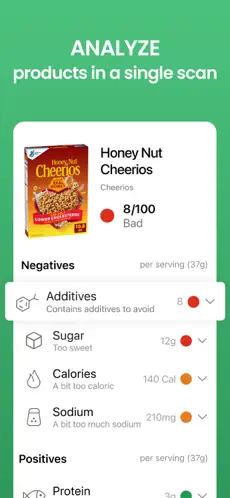
Yuka scans food and personal care barcodes and gives a rating plus a detailed breakdown. For food, the developer says each product is judged on three criteria: nutritional quality, presence of additives, and whether it’s organic. Cosmetics are scored by assigning each ingredient a risk level. When a product scores badly, it recommends similar, healthier ones.
The developer describes Yuka as independent, with no in-app advertising, and points to yuka.io for how it makes money. It claims a database of 4 million food products and 2 million cosmetic products. Those are the developer’s numbers.
It’s also the only app here that lists iPad support alongside iPhone, and it carries the Editors’ Choice flag.
Where it falls short is flexibility and access. The recent reviews are mostly five stars, but two one-star entries in September complain about needing an account, titled “Account Required” (September 17) and “Misleading and Requires Account” (September 27). A handful of reviews isn’t a trend, but if you would rather not sign up before scanning a barcode, that is the thing to check first.
Pricing: Free to download, with in-app purchases. Yuka Premium Member appears in the App Store list at $10.00, $15.00 and $20.00.
Exposr – Food Product Scanner: Best for a Quick Health Score

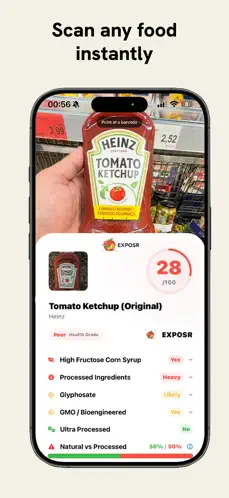
Exposr targets one worry: hidden additives, seed oils and artificial ingredients. Scan a product and it returns a health score with a simple breakdown, then suggests cleaner alternatives. The method is grading, like Yuka, but narrower in what it looks for.
It needs iOS 18.0 or later, the highest requirement on this list, and the developer’s description says a subscription is required for full features, including unlimited scanning. That’s where reviewers push back. Two one-star reviews, on October 28 and October 21, 2026, say it asks for payment details or a purchase before you can really use it. A third, from October 29, tells readers to use Yuka instead.
The privacy label lists Identifiers and Usage Data as data used to track you.
Pricing: Free to download, with in-app purchases. Listed plans include Weekly Premium at $4.99, Monthly Premium at $9.99 and Annual Premium at $29.99, $39.99 and $49.99.
Ivy: Processed Food Scanner: Best for Cutting Processed Food


Ivy mixes two methods. It flags what the developer calls processed food markers, listing seed oils, additives, pesticides, heavy metals and microplastics, and it matches scans against your diet or allergens. You can set Vegan, Vegetarian, Pescatarian, Keto or Pork-Free, and pick allergens such as gluten, peanuts, tree nuts, egg, soy and sesame.
The developer says the database holds over 3 million products. As with the others, that’s its claim.
The trade-off is access. The developer’s description says Ivy Pro is required for full access, and two one-star reviews from October 18, 2026 say you can’t use the app without subscribing. Another one-star review from October 29 describes being charged twice around a free trial cancellation. Read the trial terms before you start one.
Privacy is the heaviest here: the label lists Health & Fitness and Sensitive Info among data linked to you.
Pricing: Free to download, with in-app purchases. Pro Access appears in the App Store list at several prices, including $5.99, $19.99 and $39.99.
Fig: Food Scanner & Recipes: Best for Allergies and Diets


Fig works backwards from you. You enter allergies, intolerances or a diet, then scan to see whether a product fits. The developer says it supports 2,800+ options including Low FODMAP, Gluten-Free, Vegan, Low Histamine and Alpha-Gal, and calls itself the only app supporting every dietary restriction and allergy. That’s a developer claim, and a bold one, so confirm your own restriction is covered before relying on it.
The version 4.166.0 notes (November 2, 2026) say it now supports more medical conditions. Recent reviewers on October 21 and 29, 2026 describe it making grocery trips easier after a diagnosis or with several restrictions.
The catch is the subscription. One one-star reviewer on October 31, 2026 says cancelling after the free trial was difficult. Check your cancellation path before you start a trial. Fig also needs iOS 16.4 and lists Location among data used to track you.
Pricing: Free to download, with in-app purchases. Fig+ appears at several prices, including Monthly Fig+ Access at $5.99 and $7.49.
MenuFit – Healthy Eating Out: Best for Restaurants

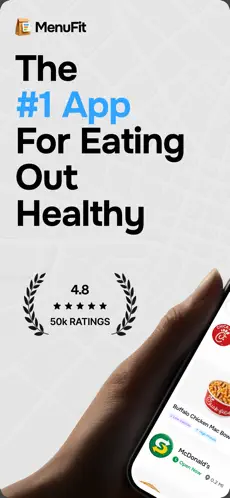
MenuFit is for the meal with no barcode. You set a goal, such as cutting or bulking, and it suggests what to order at fast food, dine-in and bar menus. The developer says it works even when a menu lists no calories or macros. A recent update lets you share an Instagram, TikTok, YouTube or Facebook post, or any web page, and it finds the meals with calories and macros and saves them to Favorites.
We have a full write-up in our MenuFit review.
Its description says the app requires a subscription for the complete experience. Reviewers aren’t kind: one-star reviews on October 28 and 29, 2026 object to paying for a food app, call the trial a waste of time, and say the latest update made it worse. The privacy label lists Identifiers, Usage Data and Diagnostics as data used to track you. It’s rated 16+ and iPhone only.
Pricing: Free to download, with in-app purchases. MenuFit Premium appears in the App Store list at several prices, including $9.99 and $14.99.
Which one should you pick?
- You want one simple answer and no subscription: Bobby Approved.
- You want a numeric score on food and cosmetics: Yuka.
- You have allergies or a medical diet: Fig, with the subscription terms in mind.
- You want to cut processed food and match a diet: Ivy.
- You mostly want an additive and seed oil score: Exposr, if iOS 18 and a subscription suit you.
- You eat out a lot: MenuFit.
Our pick: Bobby Approved. It has the top rating here and lists no in-app purchases, so you can judge it on the scan alone.
Prices and Plans at a Glance
| App | Download | In-app purchases (from the App Store listing) | Ads | Last updated |
|---|---|---|---|---|
| Bobby Approved | Free | None listed | — | 2026-09-25 |
| Yuka | Free | Premium Member: $10.00 Premium Member: $15.00 Premium Member: $20.00 |
— | 2026-10-08 |
| Exposr | Free | Annual Premium: $39.99 Annual Premium: $29.99 Monthly Premium: $9.99 +7 more on the App Store |
— | 2026-10-23 |
| Ivy | Free | Pro Access: $39.99 Pro Access: $19.99 Pro Access: $34.99 +7 more on the App Store |
— | 2026-10-14 |
| Fig | Free | Annual Fig+: $50.00 Annual Fig+: $59.99 Monthly Fig+ Access: $7.49 +7 more on the App Store |
— | 2026-10-28 |
| MenuFit | Free | MenuFit Premium: $48.00 MenuFit Premium: $32.00 MenuFit Premium: $14.99 +7 more on the App Store |
— | 2026-10-29 |
Frequently Asked Questions
Are food scanner apps accurate?
They’re as accurate as their databases. One recent Yuka reviewer says it lists ingredients that aren’t in a product. When a score surprises you, read the label on the package.
Which food scanner apps need a subscription?
Ivy’s description says Pro is required for full access, Exposr’s says a subscription is needed for full features, and MenuFit’s says one is needed for the complete experience. Bobby Approved lists no in-app purchases, and Yuka describes itself as a free app with optional Premium Member purchases.
Which app is best for food allergies?
Fig is built around allergies and diets, and Ivy also matches scans to allergens you pick. Neither replaces a doctor or the label.
Is there an app for restaurant food?
MenuFit suggests what to order at restaurants, even when the menu lists no calories or macros, according to its developer.
title: 6 Best Food Scanner Apps for iPhone in 2026
yoast_seo_title: 6 Best Food Scanner Apps for iPhone in 2026
yoast_meta_desc: Six food scanner apps for iPhone compared by how they judge food: Bobby Approved, Yuka, Fig, Ivy, Exposr and MenuFit, and what each charges for.
slug: best-food-scanner-apps-iphone
excerpt: Six iPhone food scanner apps sorted by how they reach a verdict: ingredient rules, product scores, diet filters and restaurant menus, with what each one charges.
categories: Health & Fitness, Lists
tags: food scanner, barcode scanner, Yuka, Bobby Approved, Fig, Ivy, Exposr, MenuFit, healthy eating
focus keyphrase: food scanner apps iphone
featured_app_id: 1571725006
featured_app_name: Bobby Approved – Food Scanner
featured_app_ratings: 165495