
Published Jun 1, 2026 · Updated Oct 27, 2026
Disclosure: This article contains affiliate links. If you buy or sign up through one of them we may earn a commission, at no extra cost to you. It never affects which apps we recommend or what we say about them.
Investing from your iPhone is no longer a workaround — it’s become the primary way millions of people manage and grow their money. Commission-free trading, automated portfolios, and round-up investing have all arrived on mobile, and the best investment apps for iPhone now rival what you’d get from a desktop brokerage.
Jump to a section
Robinhood: Trading & Investing


Free (Gold subscription available) · ⭐ ⭐ 4.3 (4,700,000+ ratings)
 Robinhood offers commission-free trading on stocks, ETFs and their options, and with over 4.7 million App Store ratings it has over 4.7 million App Store ratings. The premise is simple: buy and sell stocks, ETFs, options, and crypto without paying a commission (other fees may apply).
The interface prioritises clarity — advanced charts, technical indicators and custom price alerts are built in. For someone opening their first brokerage account, Robinhood is still the most approachable starting point available. The onboarding is fast, the learning curve is shallow, and the free tier covers everything a casual investor actually needs.
Robinhood Gold ($5/month) adds higher interest on uninvested cash, larger Instant Deposits, and margin investing. It’s worth it if you’re an active trader; unnecessary if you’re buying and holding index funds. Either way, the core platform is free and fully functional without it.
Note: options trading carries significant risk and isn’t appropriate for all investors.
Acorns: Invest For Your Future

Free to download, subscription required (Bronze $4/month · Silver $8/month · Gold $12/month)) · ⭐ ⭐ 4.7 (946,000+ ratings)
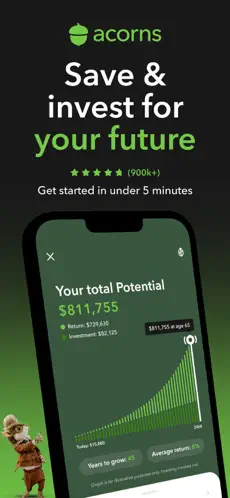 Acorns takes a fundamentally different approach to investing: instead of requiring active decisions about when or how much to invest, it invests in the background automatically. The core feature is Round-Ups — every time you make a purchase, Acorns rounds it up to the nearest dollar and invests the difference into a diversified ETF portfolio built by financial experts.
For people who struggle to invest consistently, this is genuinely effective. You don’t have to think about it. The money moves automatically, and over months and years those small amounts compound meaningfully. You can layer on top of that with Recurring Investments on a schedule you choose, accelerating growth without adding complexity.
Beyond the investing account, Acorns now offers a Roth or Traditional IRA, a custodial investment account for kids (UTMA/UGMA), and a checking account that automatically invests a portion of your paycheck. The subscription fee matters though — the entry Bronze plan at $4/month is $48/year. That’s significant if your balance is small, so Acorns makes more sense as your invested amount grows.
M1: Invest & Bank Smarter

Free) · ⭐ ⭐ 4.7 (71,000+ ratings)
 M1 Finance occupies an interesting middle ground between a robo-advisor and a self-directed brokerage. You build a portfolio called a Pie — choosing any combination of stocks and ETFs and assigning each a percentage weight. M1 then automatically buys and rebalances your holdings to maintain those exact weights every time you add funds.
The elegance of this approach is that you retain full control over what you own while the mechanics of portfolio maintenance are completely automated. You decide the strategy; M1 executes it without you having to micromanage individual purchases. For long-term, buy-and-hold investors who have a clear view of the portfolio they want, this is one of the most efficient ways to manage it on iPhone.
M1 also offers high-yield cash accounts and lets you borrow against your portfolio with built-in margin. The free tier is genuinely strong for buy-and-hold investors. Use this referral link to sign up.
Wealthfront: Save and Invest

Free to download (0.25% annual advisory fee) · ⭐ ⭐ 4.8 (17,000+ ratings)
 Wealthfront is the highest-rated app on this list at 4.8 stars, and it earns that rating with the most polished hands-off investing experience available on iPhone. It’s a full robo-advisor: answer a few questions about your financial goals and risk tolerance, and Wealthfront constructs a diversified portfolio and manages it entirely on your behalf.
The automated features go well beyond basic rebalancing. Wealthfront runs tax-loss harvesting on your portfolio, looking for opportunities to sell positions at a loss to offset gains elsewhere — a strategy that typically more than covers the 0.25% annual advisory fee for accounts of moderate size. Dividend reinvestment, rebalancing after deposits, and personalisation based on your timeline all happen automatically.
Wealthfront also offers a high-yield cash account, and 529 college savings accounts. The wealth planning tools built into the app let you model different scenarios — retiring earlier, buying a house, taking time off — and see the impact on your long-term projections. For investors who want professional-quality portfolio management without human advisor fees, Wealthfront is the best option on this list. Use this referral link to sign up.
Webull: Investing & Trading

Free · ⭐ ⭐ 4.7 (331,000+ ratings)
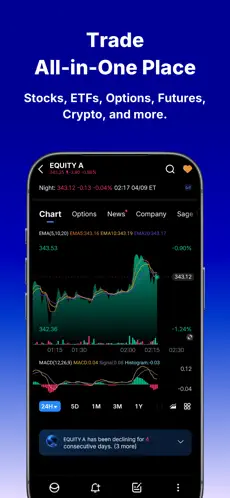 Webull is built for more active investors who want the depth of a desktop trading platform in their pocket. Where Robinhood simplifies, Webull deepens — the charting tools are substantially more capable, with dozens of technical indicators, fully customisable chart types, and Level II market data available. If you trade based on technical analysis, Webull offers 60+ technical indicators and 17+ charting tools.
Despite the added complexity, Webull offers $0 commissions on stocks, ETFs, and options. Regulatory fees, exchange fees and some option contract fees may still apply. Extended hours trading (pre-market and after-hours), fractional share investing, and IRA accounts are all included. Cryptocurrency trading is also built in across major tokens.
Webull also offers paper trading — a simulated account where you can practice strategies with fake money before committing real funds. For newer investors who want to learn before risking actual capital, this is a genuinely useful feature.. The learning curve is steeper than Robinhood, but experienced traders find the platform substantially more capable. Use this referral link for free stocks when you sign up.
Trust Wallet: Crypto & Bitcoin Wallet

Free · ⭐ ⭐ 4.7 (196,000+ ratings)
 Trust Wallet is different from every other app on this list: it’s a self-custody crypto wallet rather than a brokerage. That distinction is important. When you hold crypto through Robinhood or Webull, the platform holds your assets on your behalf — you own it on paper, but you depend on them to maintain custody. Trust Wallet puts the private keys directly in your hands, meaning you own the crypto outright with no intermediary.
The wallet supports 100+ blockchains and millions of assets — Bitcoin, Ethereum, Solana, BNB, and most ERC-20 and BEP-20 tokens are all supported. You can also access decentralised finance (DeFi) platforms, stake supported tokens directly in the app to earn yield, and manage NFTs. An integrated buy feature lets you purchase crypto via third-party providers without leaving the app.
Trust Wallet is the right choice if you want to hold crypto outside of a centralised exchange — for security, to interact with DeFi applications, or simply because you prefer direct ownership. It doesn’t replace a brokerage for traditional investing, but for anyone holding meaningful amounts of cryptocurrency, self-custody through Trust Wallet gives you control of your own keys.
Frequently Asked Questions
What is the best investment app for beginners on iPhone?
Acorns is the easiest entry point if you want something fully automated — the Round-Ups feature requires almost no active decisions and gets you invested without thinking about it. Robinhood is better if you want to choose individual stocks or ETFs but prefer a clean, simple interface with commission-free trading.
Are these investment apps free?
Robinhood, Webull, and Trust Wallet are free to download, though Robinhood Gold and some Webull market-data add-ons cost extra. M1 Finance has a solid free tier covering all core investing features. Wealthfront charges a 0.25% annual management fee on your invested balance. Acorns requires a subscription, starting at $4/month for Bronze.
Are my investments protected if the app shuts down?
Robinhood, Acorns, M1, and Webull are all SIPC members, which means your investments are protected up to $500,000 (including $250,000 in cash) if the brokerage fails. Wealthfront cash accounts are FDIC-insured. Trust Wallet is self-custody, meaning your protection depends entirely on securing your own seed phrase — there’s no company holding your assets to fail.
What’s the difference between Robinhood and Webull?
Both offer commission-free stock, ETF, and options trading. The key difference is depth: Robinhood is designed for simplicity and works well for beginners and passive investors. Webull has advanced charting, Level II quotes, technical indicators, and paper trading — it’s aimed at more active traders who want desktop-grade tools on their phone.
Should I use a robo-advisor or pick my own stocks?
For most people, a robo-advisor like Wealthfront suits people who want a hands-off approach, since it handles trades and tax-loss harvesting automatically. Self-directed investing through Robinhood or Webull makes sense if you have specific views on individual companies, want to learn about markets, or are comfortable managing your own allocation.
If you’re looking for tools to track your day-to-day spending alongside your investments, our best checkbook apps for iPhone covers the budgeting side. And if you want a single app that pulls your investments, bank accounts, and spending into one dashboard, take a look at our review of the Copilot finance app.
Is your app on this list? Add a free "Featured on iOS App Lists" badge to your website or press kit.