
Published Jun 9, 2026 · Updated Oct 28, 2026
Flightradar24 is the best flight tracking app for most iPhone owners. It is free, it runs a live global radar map with aircraft you can tap for route, altitude, and speed, and it carries more than 670,000 ratings on the App Store. If you fly often and want delay alerts before the airline sends them, Flighty is the pick instead.
What changed in this update (October 2026): Added Planes Live, AirNav Radar and Flight Board. Rechecked every price against the App Store. Flightradar24, FlightAware, Flighty, Flight Tracker+ and Plane Finder all stay on the list.
The gap between a good flight tracking app and a bad one shows up at the worst possible moment: the airline’s app still says “on time” while your inbound aircraft is already two hours behind somewhere over Kansas. Flight trackers watch the plane, not the schedule. That is the whole trick, and it is why the app you pick matters more than the notification settings you fiddle with.
One thing to know before you choose: nearly every app here is free to download and pushes you toward a subscription. The free tiers differ wildly in how much they give away.
Jump to a section
Quick Picks
- Best overall: Flightradar24, free live global radar with the deepest feature set
- Best free for US flights: FlightAware, free flight status alerts at no cost
- Best for frequent flyers: Flighty, fastest delay alerts and no ads
- Best for airport pickups: Flight Tracker+, terminal, gate and baggage claim belt
- Best for plane spotters: Plane Finder, 3D tracking and an AR camera mode
Comparison Table
| App | Best For | Price | Rating |
|---|---|---|---|
| Flightradar24 | Overall tracking and live radar | Free + IAP | 4.84 |
| FlightAware | Free US flight data and alerts | Free + IAP | 4.86 |
| Flighty | Frequent flyers who want early warnings | Free + IAP | 4.85 |
| Flight Tracker+ | Airport pickups and family sharing | Free + IAP | 4.73 |
| Plane Finder | Plane spotting and 3D views | Free + IAP | 4.74 |
| Planes Live | Free radar with airport detail | Free + IAP | 4.62 |
| Flight Board | Departure and arrival boards | Free | 4.67 |
| AirNav Radar | Independent global receiver network | Free + IAP | 4.70 |
Flightradar24 — Best Overall Flight Tracker


 Flightradar24 is the app most people mean when they say “flight tracker.” Open it and the map fills with aircraft in real time, each one tappable for route, estimated arrival, actual departure, aircraft type, speed and altitude. Point the camera at the sky and it identifies the plane overhead, photo included.
The free tier is unusually generous. Live tracking, the augmented reality mode, airport arrival and departure boards, delay stats, weather conditions, historical playback, and search by flight number, airport or airline all work without paying. That last point matters, because a lot of “free” trackers lock basic search behind a paywall.
What the paid tiers actually add is depth, not access. Silver brings 90 days of flight history, serial numbers and aircraft age, vertical speed and squawk codes, filters and alerts, and weather at more than 3,000 airports. Gold stacks 365 days of history, cloud and precipitation layers, aeronautical charts, oceanic tracks, and air traffic control boundaries on top. The network behind it runs about 50,000 ground stations.
The catch is the advertising. The free tier is ad-supported, and several reviewers complain about the ads.
Price: Free with ads. Silver from $2.99/month or $12.99/year; Gold from $3.99/month or $34.99/year.
FlightAware — Best Free Data for US Flights

 FlightAware is the one to install if you care about accuracy on domestic US routes more than you care about a pretty map.
Free features include live tracking worldwide, flight status alerts for departures, arrivals, cancellations, gate changes, delays and diversions, weather radar, saved aircraft and airports, and the “Where is my plane?” view that traces the inbound aircraft behind your flight. Finding out that your 6 p.m. departure depends on a plane still sitting in Denver is genuinely useful, and it costs nothing here. The app tracks any plane around the world, from small aircraft to freight planes.
Where it falls short is presentation. The interface is functional rather than beautiful. Beyond ad removal, the paid tiers are aimed at pilots flying piston-engine aircraft, so most travelers never need them.
Price: Free with ads. Ad removal from $1.49/month or $8.99/year; Aviator from $9.99/month or $99.99/year; Aviator+ from $19.99/month or $199.99/year.
Flighty — Best for Frequent Flyers

 Flighty is the app for people who fly enough that a two-hour delay ruins a day. It is a former Apple Design Award winner, and the reason is speed: the developer claims its delay alerts land 2 to 90 minutes ahead of the airline’s own app and that cancellations surface 24 to 48 hours earlier.
What makes that possible is data depth. Flighty uses FAA and Eurocontrol feeds, tracks the actual inbound aircraft, and layers on delay and gate predictions rather than reporting the schedule and hoping. It also explains why a flight is late instead of just announcing the new time. Around that it wraps a set of features you will only appreciate after a few trips: automatic calendar sync, email forwarding for itineraries, a personal flight map, and Dynamic Island countdowns while you wait at the gate. Two people flying together can share a trip privately.
Two honest caveats. It runs on iPhone, iPad, Mac and Apple Watch. And the free trial runs out into one of the pricier subscriptions here, though a pay-as-you-go option exists for people who fly once or twice a year.
Price: Free to download with no ads. Pay-As-You-Go $4.99; Flexible Monthly $9.99; Pro Annual Savings $59.99; Lifetime $299.
Flight Tracker+ — Best for Airport Pickups

 If your job is standing in a cell phone lot waiting for someone to land, Flight Tracker+ is built for you. It answers the three questions that actually matter at that moment: which terminal, which gate, and which baggage belt.
It has been around since 2012, which is a long time in this category, and the recent updates have kept it current. Live Activities and Dynamic Island show status on your Lock Screen without opening anything, and and recent updates made flight sharing easier, so the person picking you up can follow your flight without texting you for updates. Alerts cover delays, cancellations, gate changes, departures and arrivals, and the Unlimited upgrade lets you monitor multiple flights in one place. It works on iPhone, iPad and Apple Watch.
The subscription is the weak point, since an ad-free experience sits behind the paywall.
Price: Free with ads. Premium Membership $2.79/month; Premium Tracking $11.99/year or $10.49/half-year; Flight Tracker Unlimited $49.99.
Plane Finder — Best for Plane Spotters

 Plane Finder leans into the hobby side of tracking, and it does it better than anyone else on this list. The 3D mode lets you swing around an aircraft or an airport and watch traffic move through the volume around it. The augmented reality camera works the same way as the competition, pointing at the sky to name whatever is overhead.
The feature spotters actually use is the heads-up alert. Set an alert on a particular flight and the app pings you when it is heading your way, which is the practical way to catch something rare without staring at a map all afternoon. Airport pages carry live arrivals and departures plus weather for hundreds of airports, and the whole thing supports Dark Mode properly, so it is usable for night flights.
Plane Finder’s own listing is blunt about this: the listing carries a disclaimer about how its data may be used. Treat it as a hobby tool, which is exactly what it is built for.
Price: Free with ads. Plane Finder Premium $3.49/month or $19.99/year.
Planes Live — Best Free Radar With Airport Detail

 Planes Live is the quiet one. It has fewer reviews than the big three and it does not have a marquee feature, but it covers a lot of ground for free: worldwide plane tracking, alerts for schedule changes, cancellations and new departure or arrival times, and detailed aircraft information with pictures.
The airport side is where it stands out at this price. Coverage includes accurate departures and arrivals boards, airport timezones and local time, location, and a weather forecast for the field. The “My Places” feature keeps the airports you actually use one tap away instead of making you search every time. There is also a spotting mode where you set a distance radius and watch what is flying near you, plus filters by aircraft model, airline or altitude.
The tradeoff is polish. The interface is busier than Flightradar24’s and the app carries a higher age rating than Flightradar24’s 4+, though support for older iPhones is good since it still runs on iOS 13.
Price: Free with ads. Planes Live Premium and the weekly subscription with free trial are $9.99; one-month premium tiers start at $1.99.
Flight Board — Best for Departure and Arrival Boards

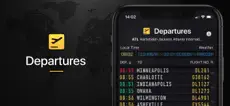 Flight Board does one job and skips everything else: departures and arrivals. You pick an airport and get a realistic departures or arrivals board that refreshes every minute, with search by destination or flight number and a slick way to flip between the two boards.
That narrowness is the point. When you are meeting someone and all you want is the arrival time without parsing a map covered in aircraft icons, a clean board loads faster and reads quicker. Coverage runs to more than 16,000 airports and 1,400 airlines, and it is optimized for both iPhone and iPad.
The limitation is real: some charter flights are not listed. It is a companion app, not a tracker, and it is worth having both. The good news is that it is the only app on this list with no subscription at all.
Price: Free with ads. No in-app purchases listed on the App Store.
AirNav Radar — Best Independent Global Coverage

 AirNav Radar comes from AirNav Systems, which operates a global network of over 36,000 receivers. The app blends ADS-B with multilateration, satellite and oceanic data to fill gaps over water and remote ground.
For everyday use the experience is familiar: track any flight live, get notifications for status changes, watch an interactive radar map, and see a “most tracked flights” list alongside any aircraft squawking an emergency. The emergency traffic view is the genuinely distinctive piece.
The honest problem is adoption. It has around 1,300 ratings against Flightradar24’s 670,000, which means fewer people have stress-tested it. If you already know the AirNav name from the desktop site, it is a natural fit. If not, start with Flightradar24 and treat this as the second opinion.
Price: Free with ads. Spotter $3.99/month or $26.99/year; Pilot $4.49/month or $29.99/year; ads-free $2.99/month or $15.99/year.
Which One Should You Pick?
Start with Flightradar24 if you want a free app that does nearly everything and you can live with ads. Install FlightAware alongside it if you fly domestically in the US and want alerts at no cost, because two free apps take up less space than one subscription. Frequent flyers should pay for Flighty, and it is not close: the early warning on a delay is worth more than every map feature combined. If someone else is picking you up, send them Flight Tracker+, since it answers the gate-and-belt question faster than a radar screen ever will.
Our pick: Flightradar24. It is free, it has the largest rating base of any app on this list, and the paid tiers are optional rather than mandatory.
Prices and Plans at a Glance
| App | Download | In-app purchases (from the App Store listing) | Ads | Last updated |
|---|---|---|---|---|
| Flightradar24 | Free | Gold Plan – Monthly: $7.99 Silver Plan – Annual: $17.99 Gold Plan – Annual: $39.99 +7 more on the App Store |
Yes | 2026-10-13 |
| FlightAware Flight Tracker | Free | Ad Remove – Yearly: $8.99 Ad Remove – Monthly: $1.49 Aviator – Monthly: $9.99 +3 more on the App Store |
Yes | 2026-09-25 |
| Flight Tracker + | Free | Flight Tracker Flex: $5.99 Premium Membership Monthly: $2.79 Flight Tracker Unlimited: $49.99 +7 more on the App Store |
Yes | 2026-10-13 |
| Flighty | Free | Pay-As-You-Go: $4.99 Pro Annual Savings: $59.99 Flexible Monthly: $9.99 +5 more on the App Store |
— | 2026-09-17 |
| Plane Finder ⁃ Flight Tracker | Free | Plane Finder Premium – Monthly: $3.49 Plane Finder Premium – Annual: $19.99 Legacy Users: $19.99 |
Yes | 2026-09-29 |
| Planes Live | Free | Planes Live Premium: $9.99 Flight Tracker & Weather Radar: $9.99 Weekly Sub with Free Trial: $9.99 +7 more on the App Store |
Yes | 2026-09-23 |
| AirNav Radar | Free | Spotter (monthly): Flight Radar: $3.99 Pilot (monthly): Flight Tracker: $4.49 Spotter (yearly): Track Planes live: $26.99 +7 more on the App Store |
Yes | 2026-10-07 |
| Flight Board | Free | None listed | Yes | 2026-06-29 |
Frequently Asked Questions
Is Flightradar24 free?
Yes. Live tracking, the augmented reality camera, airport boards, weather conditions and flight search all work without paying. The app is ad-supported, and Silver and Gold subscriptions add flight history, extra aircraft detail, weather layers and aeronautical charts. Silver starts at $2.99/month or $12.99/year.
Which flight tracking app has the fastest delay alerts?
Flighty, by its own measure. The developer states its alerts arrive 2 to 90 minutes ahead of airline apps and that cancellations surface 24 to 48 hours earlier. FlightAware is a strong free option for US flights, since it gives flight status alerts away at no cost.
Can I track a flight without knowing the flight number?
Yes. Most apps here let you search by airport, airline or flight number, and Flightradar24 also supports search by airport or airline. Flightradar24 and Plane Finder also let you point your camera at a plane overhead and identify it that way, which is handy when you have no idea what you are looking at.
Do flight tracking apps work for private jets?
Often, yes, but not always. FlightAware tracks any plane around the world, and the others show most aircraft broadcasting ADS-B. What they cannot show is anything with its transponder data blocked, which is why some private flights never appear on a map at all.
Why is my flight not showing on the map?
Three usual reasons. The aircraft may not be broadcasting ADS-B, the flight may be blocked from public tracking at the operator’s request, or your app’s data feed may lag. Charter flights in particular often fail to appear on airport boards, which is a limitation Flight Board notes in its own App Store listing.
Tracking works best as a habit rather than a rescue. Save the flights you take regularly, set alerts on the ones that matter, and check the inbound aircraft the night before you fly. Nearly every delay on a tracker is visible hours before the airline admits it.
Related: if you fly rather than track, our ForeFlight review. For the trip around the flight, see our picks for business travel apps and the wider best iPhone travel apps. If you want the map on your dash, our CarPlay apps guide and the roundup of best navigation apps cover that.
Is your app on this list? Add a free "Featured on iOS App Lists" badge to your website or press kit.