
Published Apr 7, 2026 · Updated Oct 25, 2026
AnyList is the best grocery list app for most iPhone users: it sorts items into store sections as you type, syncs a shared list to everyone in the house in real time, and costs nothing unless you want the recipe and meal-plan tools. If you refuse to pay anything, Our Groceries does the same core job for free. And if you would rather someone else walk the aisles, Instacart is the one that actually does the shopping.
The reason this matters has less to do with typing speed than with who else is in your kitchen. A list that only one person can edit means somebody stands in the dairy aisle texting a photo of the fridge. Most apps below handle shared lists; the differences are in how the list gets built, how it sorts, and what it costs after the free trial runs out.
Nine apps, all live on the App Store as of October 2026, all rated 4.7 or higher. Here is what each one is actually good at.
Jump to a section
Quick Picks
- Best overall: AnyList — aisle sorting, live sharing, free core
- Best free: Our Groceries — free to download, unlimited lists
- Best for delivery: Instacart — someone else shops and drives it over
- Best for sale prices: Flipp — weekly flyers in one place
- Best meal plan to list: Samsung Food — recipes consolidate into one list
- Best one-time purchase: Paprika Recipe Manager 3 — $4.99, no subscription
- Best shared list design: Bring! — the prettiest shared list on iOS
- Best for fast entry: Listonic — suggestions, voice input and automatic sorting
- Best for the whole family: Cozi Family Organizer — list plus calendar plus chores
The Best Grocery List Apps for iPhone in 2026
| App | Best For | Price | Rating |
|---|---|---|---|
| AnyList | Aisle sorting and shared lists | Free, Complete $9.99/yr | 4.87 |
| Our Groceries | Free | Free | 4.82 |
| Instacart | Delivery | Free, Instacart+ membership | 4.82 |
| Flipp | Flyers and price matching | Free | 4.78 |
| Samsung Food | Meal planning to list | Free | 4.78 |
| Paprika Recipe Manager 3 | One-time purchase | $4.99 | 4.90 |
| Bring! | Shared list design | Free | 4.80 |
| Listonic | Fast entry | Free | 4.70 |
| Cozi Family Organizer | Whole-family logistics | Free, Gold subscription | 4.81 |
AnyList — Best Grocery List App Overall


 Start typing “milk” and AnyList drops it under Dairy. Type “apples” and it files them under Produce. The categorisation is not a suggestion you have to accept either. Once you have shopped a store a few times you can reorder the categories to match the actual route you walk (produce first at one supermarket, last at another), and the list re-sorts itself around that layout. It is the single feature that most separates AnyList from a shared note.
The other half is the household sync. Everyone you invite sees the same list and the same checkmarks, so two people shopping the same store at once do not end up with four pints of cream. You can keep separate lists for separate stores, and the app switches between them without hunting through a menu. Version 7.1 landed in September 2026 and requires iOS 18 or later, which is worth knowing if you are passing an older iPhone down to someone in the household.
Where it falls short: the free tier is a genuine list app, but recipe import, meal planning, and AnyList for the Web sit behind Complete. At $9.99 a year for one person or $14.99 a year for a household, it is cheap, though it is still a subscription in a category where the leading competitor gives the same core away.
Pricing: Free. AnyList Complete $9.99/year individual, $14.99/year household).
Download AnyList | AnyList website
Our Groceries — Best Free Grocery List App for iPhone

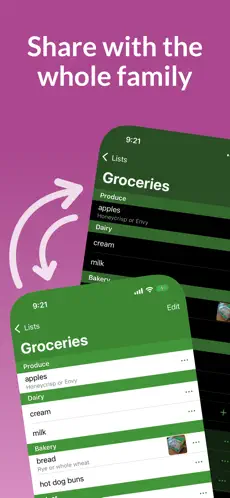 Our Groceries has one of the oldest ratings bases of any app on this list, 85,378 reviews at 4.82 stars. You can create as many separate lists as you wish. Create one for the supermarket, one for the hardware store, one for the pharmacy, and they all stay separate.
The sharing model is what makes it stick. Add a household member by email and every device updates instantly, with no account creation required for the second person if they would rather not. You can add photos to items so your partner picks up exactly the right variety. Version 7.2.1 shipped in September 2026.
Where it falls short: it looks like 2013. If you want a full meal planner built in, Paprika or Samsung Food has one.
Pricing: Free, ad-supported, with optional Remove Ads purchases.
Download Our Groceries | Our Groceries website
Instacart — Best for Grocery Delivery

 Instacart is the other model of grocery list: instead of telling you what to buy, it buys it. The company was founded in 2012 and now works as the delivery layer for a long list of US chains including Costco, Aldi, and most regional supermarkets (see its Wikipedia entry for the history). You build a cart, a shopper picks it, and the app pings you when a substitution is needed so you can approve or reject it from the couch.
You can reorder your favorite products. Instacart+ is the paid membership tier.
Where it falls short: reviewers complain about extra fees, so the convenience is not free, so the convenience is not free even after you pay for it. For a household that mostly cooks from scratch, a plain list app plus your own legs will cost less.
Pricing: Free to order. Instacart+ is a paid membership.).
Download Instacart | Instacart website
Flipp — Best for Weekly Deals and Price Matching

 Flipp does not pretend to be a list app first. It is a flyer browser, and the shopping list is the thing that falls out of using it. You clip the offers you want from this week’s circulars, Flipp assembles them into a list, and the price is attached to each item so you know what you agreed to pay before you get to the till.
The price-match angle is the real reason to install it. Search an item and Flipp shows which nearby stores have it on offer and at what price, which is what you need for a price-match request at the customer service desk. Version 112.0.0 arrived in October 2026.
Where it falls short: coverage depends entirely on whether your local retailers publish digital circulars. The app is also ad-supported, which means it is selling the same attention it is built to save you from.
Pricing: Free, ad-supported.
Download Flipp | Flipp website
Samsung Food — Best Meal Planner That Builds the List

 Samsung Food, formerly Whisk, is the app to pick when the list is downstream of a meal plan. You choose what you are cooking this week and it generates one consolidated shopping list, adding up duplicate ingredients across recipes instead of telling you to buy onions three times.
Recipe capture is the strongest part. Save a recipe from any website and it can feed the list. It runs on iPhone and iPad, despite the Samsung name.
Where it falls short: the ratings base is the thinnest here at 6,378, and version 5.56.0 dates to May 2026, so this is not the fastest-moving app in the roundup. If you are stacking it against AnyList on list mechanics alone, AnyList wins.
Pricing: Free, with a paid Premium tier for advanced meal planning.
Paprika Recipe Manager 3 — Best One-Time Purchase

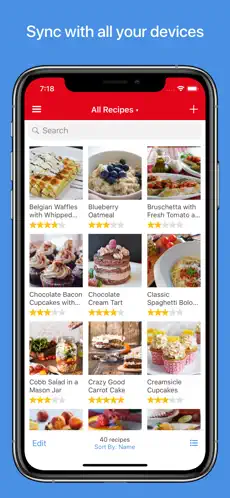 Paprika is a one-time purchase. Five dollars, no subscription, and your recipe data is stored locally on your device. For anyone who has been burned by a recipe service folding and taking the library with it, that is the pitch. Version 3.8.5 shipped in July 2026 and it still runs on iOS 12, which is remarkable for an app of its age.
It is a recipe manager that happens to produce excellent grocery lists. Every recipe you store carries a structured ingredient list, so adding a week of dinners to the shopping list is a multi-select rather than a retype. The pantry feature tracks what you already have. The whole thing works with no network connection, which matters in the basement aisle of a large supermarket.
Where it falls short: it is the least modern-looking app on this list and it is built for one cook, not a household of five.
Pricing: $4.99 one-time. No in-app purchases.
Download Paprika Recipe Manager 3 | Paprika website
Bring! — Best Looking Shared List

 Bring! treats the list as a design object, and it works. Items arrive with product artwork instead of plain text, so the list reads at a glance instead of needing to be read. Household members get a notification when something is added, which sounds irritating and turns out to be the most reliable way to stop the “we are out of coffee” conversation entirely.
Beyond the visuals it does the practical things: recipe import, a store-mode layout, and retailer offers tied to the items you have added. Version 4.112.0 landed in October 2026 for iOS 17 and later.
Where it falls short: the offers side of the app is built around European retailers and is thin in the US, so treat the coupon features as a bonus rather than the reason to switch. The list itself is the argument.
Pricing: Free, with optional Bring! Premium subscriptions.
Download Bring! | Bring! website
Listonic — Best for Fast Entry

 Listonic’s whole personality is speed. Suggestions come from a product catalog and your shopping history;; sort into store categories automatically. If your grocery list gets written standing in the kitchen with one hand while the other holds a fridge door, this is the flow that keeps up.
It also tracks prices per item, so the list doubles as a running estimate of what the shop will cost before you get to the checkout. Version 6.11.0 shipped on 10 October 2026, one of the freshest updates in this roundup.
Where it falls short: the App Store lists the download at over 400MB, which is absurd for a list app and noticeable on a phone that is nearly full. It is also ad-supported on the free tier.
Pricing: Free, ad-supported. Listonic Premium removes ads.
Download Listonic | Listonic website
Cozi Family Organizer — Best When the List Is One Part of the Week

 Cozi is the app for the household where the shopping list is not the whole problem. It combines a shared family calendar, a colour-coded calendar, to-dos, and a meal planner. Cozi offers the list alongside shared calendars and chore checklists, which is exactly the trade you are making: less depth on the grocery flow, more of the week in one place.
That breadth is why it has more than 400,000 ratings. The grocery list updates in real time for everyone in the family, and it plugs into the meal planner so a planned week drops straight into the list.
Where it falls short: the free tier is ad-supported and the ads sit inside the app you are reading in the supermarket. Cozi Gold removes them and unlocks extra features, which pushes the effective price above the $9.99 a year AnyList charges for a cleaner, more focused list.
Pricing: Free, ad-supported. Cozi Gold subscription for ad removal and added features.
How to Choose: Which Grocery List App Should You Actually Install?
Pick by the constraint you actually have, not by feature count. Four honest answers cover almost everyone.
- You shop for one household and share the list: AnyList. The aisle sorting alone saves a lap of the store every week.
- You want free and nothing else: Our Groceries.
- Your list is really a meal plan: Samsung Food for free, Paprika if you would rather pay once and own it offline.
- You do not want to shop at all: Instacart.
If you already use the iPhone’s built-in Reminders app, be honest about whether it is failing you. A shared Reminders list with a grocery template covers the basics at zero cost and zero installs, and for a single person who shops once a week it is genuinely enough. The apps above earn their place when the store route matters, when multiple people edit the same list, or when the list has to come out of a recipe.
Our pick: AnyList. It is the only app in this roundup that is best in class at both halves of the job, building the list and shopping it, and the free tier is usable indefinitely if you never need the recipe tools.
Frequently Asked Questions
What is the best free grocery list app for iPhone?
Our Groceries. It is free to download and has no limit on the number of lists. AnyList’s free tier is also strong if you only need one shared list.
Can two people share a grocery list on iPhone?
Yes, AnyList, Our Groceries, Bring!, Listonic and Cozi all support it. AnyList, Our Groceries, Bring!, and Cozi all sync in real time, so additions and checkmarks appear on both phones within seconds. Apple’s built-in Reminders app also does this for free through a shared list.
Which grocery list app sorts items by aisle?
AnyList, Our Groceries, Paprika, Listonic and Bring! all group items by store section or aisle.
Do these apps work with Siri and Alexa?
AnyList supports Siri, so you can add items by voice, and it also works with Alexa. Our Groceries supports Siri and Alexa. Bring! also lets you add items by voice command.
Is a paid grocery list app ever worth it?
Recipe import with meal planning is the main reason to pay, or removing ads. AnyList Complete at $9.99 a year covers the first, and it is roughly the price of one forgotten item per year. If neither applies, the free tiers are not crippled enough to justify paying.
What about the apps that were not included?
Several other list apps in the App Store fall below the 100-rating threshold or have not been updated in over a year, which is a poor signal for an app you will rely on every week.
If you are building the list from recipes rather than from habit, our roundup of the best recipe apps for iPhone covers the capture side. If the problem is keeping a household’s tasks straight, the best list-making apps for iPhone go wider than groceries, and budget apps for iPhone handle what the shopping trip actually costs. Couples splitting the shopping can start with the best apps for couples with shared lists.
Is your app on this list? Add a free "Featured on iOS App Lists" badge to your website or press kit.