
Published Jul 8, 2026 · Updated Nov 1, 2026
Darkroom is a strong pick for iPhone and iPad photographers who want RAW editing without leaving Apple Photos, but this Darkroom app review comes with a catch: the download is free and the serious tools sit behind a subscription ($9.99 monthly or $39.99 yearly per its App Store list). It holds a 4.78 rating from 29,373 ratings, and it’s the one to try first if Lightroom’s cloud storage plans have started to feel like a tax on your workflow.


Here’s what matters before you download. Darkroom’s developer says the app works directly with your Apple Photos library, with no importing and no exporting. That is a different way of working from Lightroom, which sells storage tiers alongside the editing tools. The rest of this review covers what that changes, what the toolset covers, where the paywall bites, and who should stay put.
What changed in this update (October 2026): Added App Store cards and a screenshot for each comparison app (Lightroom, Snapseed, VSCO, Photomator), a prices and plans table, and current pricing for Darkroom. Rechecked every price against the App Store.
Jump to a section
What Darkroom Does Well
It edits where your photos already live. According to the developer’s description, Darkroom reads and writes inside your Apple Photos library. Your shots stay in your Apple Photos library. For anyone who shoots on an iPhone and never wanted a second photo library to manage, that’s the whole pitch. If you’re still deciding whether you need a Lightroom type app at all, our guide to editing iPhone photos without Lightroom walks through the free options first.
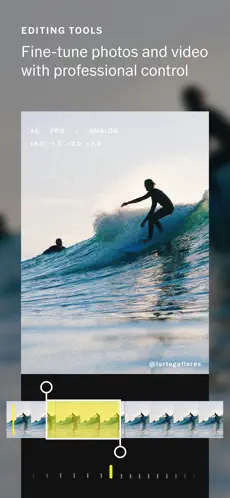
 The toolset covers the basics a Lightroom user expects. The developer lists professional curves, selective color adjustments, batch photo editing, film inspired LUT presets and 4K video color grading. It also lists support for RAW and Apple ProRAW files, and says every edit is nondestructive, so you can undo any adjustment later. Those are the developer’s claims, not something this review has measured, but they line up with what the App Store listing shows: an app aimed at people who care about curves and color, not one-tap filters.
 Masking has gotten an upgrade: the developer’s site describes a new Magic Select mask type. Per the developer’s site, you tap, draw or drag to select an object, with new edge tools to refine the result. That’s the kind of feature that used to separate desktop editors from mobile ones. Because it shipped one day before this was written, there aren’t enough reviews yet to say how well it behaves on difficult edges.
The privacy label is cleaner than Lightroom’s. Darkroom’s App Store privacy label lists only Purchases, Usage Data and Diagnostics, all under “Data Not Linked to You”. It declares no advertising. Lightroom’s label, by contrast, lists data linked to you across eight categories and Identifiers used to track you. If that matters to you, it’s a real point in Darkroom’s favor.
Reviewers like the editing itself. One 5★ reviewer (October 21, 2026) called it “Easy peasy editing” and said that spending more than 10 minutes on a photo can turn into an amazing result. That’s a single review, so treat it as color, not consensus.
What Could Be Better
The subscription gates the good stuff. The App Store list shows a Monthly Subscription at $9.99, a Yearly Subscription at $39.99, and Unlock Everything Forever at $99.99. It also still lists a run of older “Legacy” one time unlocks, such as Legacy – Unlock Everything and Legacy – All Tools, which hints at how the pricing has shifted over the years. If you already own one of those, you may be set. If you don’t, the one time option costs about two and a half years of the yearly plan, so it’s a bet that you’ll still be editing in 2029.
Recent reviews flag two bugs. A 1★ reviewer (October 19, 2026) wrote that the exposure slider stopped working with RAW images. A separate 5★ reviewer (October 21, 2026) said that exporting to PNG sometimes produces an image that looks like a negative of the correct colors. These are two separate complaints, and a few older reviews also mention RAW crashes. But RAW exposure and export are core to this app, so they’re worth watching in the next release notes.
It needs a recent iOS. The listing shows a minimum of iOS 18.4. If your iPad is stuck on an older release, you can’t install it.
Who Should Use Darkroom
If you shoot RAW or ProRAW on an iPhone, keep your library in Apple Photos, and want curves, selective color and masking without a separate catalog, Darkroom fits. It’s also a sensible choice if you’re on an iPad, since the listing shows iPhone, iPad and Mac support. For ideas on where it sits among camera and editing apps, see our roundup of the best iPhone photography apps.
Who Should Skip It
Stay with Lightroom if you already pay Adobe for storage and rely on its workflow. Skip Darkroom too if you only need quick fixes: Snapseed, below, covers that for free, with no in-app purchases listed.. And if you’re on an iPad, our best photo editing apps for iPad list has more options to compare.
Darkroom vs the Alternatives
Lightroom Photo Editor & Video


Lightroom has the largest audience here: a 4.77 rating from 338,842 ratings. It’s free to download, with in-app purchases for storage plans (Premium yearly 100GB is $49.99, for example) and a separate AI Photo Enhancer & Blur purchase. Adobe’s description highlights Quick Actions, Adaptive Presets, Generative Remove and Generative Expand. The App Store platform list for this listing shows iPhone and Apple TV; Adobe publishes a separate Adobe Lightroom for iPad listing. Choose Lightroom if you want Adobe’s AI tools and storage plans, and don’t mind the tracking and linked data on its privacy label.
Snapseed: Photo Editor, Camera


Snapseed is the budget answer: free, no in-app purchases listed, and a 4.86 rating from 29,930 ratings. Google’s description lists 30+ tools, smart masking, batch editing, RAW support and film simulations. One 3★ reviewer (October 26, 2026) complained that “Save to original” creates a new file without editable layers. Its privacy label lists data linked to you. Pick it when price is the deciding factor.
VSCO: Photo & Video Editor

VSCO leans toward presets and community: its description lists 200+ presets and pasting an edit onto up to 100 photos. It carries a 4.69 rating from 278,226 ratings, and the listing declares advertising. Plans on its App Store list include Yearly Plus at $39.99 and Yearly Pro at $69.99. A 2★ reviewer (October 26, 2026) complained about the price of paying for Pro. Choose VSCO for the look of its presets, not for a Lightroom style workflow.
Photomator – Photo Editor


Photomator, published by Apple, is the closest rival on features: RAW support for over 750 formats, AI selections, Repair and Denoise per its description. It has a 4.55 rating from 3,834 ratings. Its list includes a Yearly Subscription at $29.99 and a Lifetime option at $119.99. Recent 1★, 2★ and 3★ reviews (October 18 to 21, 2026) describe bugs, slow previews and an iPad rating problem, so its newest reviews are rougher than Darkroom’s.
Which One Should You Pick?
- Edit RAW inside Apple Photos: Darkroom.
- Already in Adobe’s ecosystem: Lightroom.
- Zero budget: Snapseed.
- Preset look and community: VSCO.
- Closest feature match, with caveats: Photomator.
Prices and Plans at a Glance
| App | Download | In-app purchases (from the App Store listing) | Ads | Last updated |
|---|---|---|---|---|
| Darkroom | Free | Monthly Subscription: $9.99 Yearly Subscription: $39.99 Legacy – Unlock Everything: $9.99 +7 more on the App Store |
— | 2026-10-28 |
| Lightroom Photo Editor & Video | Free | Premium Monthly 100GB: $6.99 Premium yearly 100GB: $49.99 Premium Monthly 100GB: $7.99 +7 more on the App Store |
— | 2026-10-28 |
| Snapseed | Free | None listed | — | 2026-10-20 |
| VSCO | Free | Yearly Plus: $39.99 Monthly Plus: $9.99 The Aesthetic Series: $0.00 +7 more on the App Store |
Yes | 2026-10-28 |
| Photomator | Free | Yearly Subscription: $29.99 Monthly Subscription: $7.99 Lifetime: $119.99 +5 more on the App Store |
— | 2026-08-27 |
Frequently Asked Questions
Is Darkroom free?
Darkroom is free to download, but it has in-app purchases. The App Store list shows a $9.99 monthly subscription, a $39.99 yearly subscription and a $99.99 one time unlock.
Does Darkroom work with RAW and ProRAW files?
The developer says it imports and edits RAW and Apple ProRAW files and that all edits are nondestructive. One recent 1★ review says the exposure slider stopped working on RAW images, so check the latest version notes.
Is Darkroom better than Lightroom?
It depends on your workflow. Darkroom edits inside Apple Photos and shows a cleaner privacy label. Lightroom has far more ratings and Adobe’s AI tools. Both have a rating near 4.8.
Does Darkroom work on iPad?
Yes. The App Store listing shows iPhone, iPad and Mac support, and it requires iOS 18.4 or later.
The Verdict
Our pick: Darkroom. It’s the best fit for iPhone and iPad photographers who want RAW editing without a second library, as long as you’re comfortable with the subscription. Rating: 4.5 out of 5.
Is your app on this list? Add a free "Featured on iOS App Lists" badge to your website or press kit.