
Published Nov 3, 2026 · Updated Nov 21, 2026
Dazz Cam is the best film look camera app for iPhone for most people: free to download, 4.75 stars from 117,097 ratings, and built so the look is applied as you shoot. If you want the look built from raw image data instead of laid over a finished photo, Chromagraph Camera is a $12.99 upfront purchase, though it has only a small number of ratings so far.
That split is the real decision. Some of these film look camera apps for iPhone render the look when you press the shutter. Others are filter libraries with a camera screen attached. Both can give you grain, light leaks and faded color. They differ in what you see before you shoot, what you can change afterwards, and how much of the app sits behind a paywall. Two of the seven also have nearly identical names, so we sort that out below.
Jump to a section
- Quick Picks
- Comparison Table
- Dazz Cam
- DAZE CAM
- VNTG
- Chromagraph Camera
- 1998 Cam
- OldRoll
- ism
- Building Your Setup
- Frequently Asked Questions
- Which film look camera app for iPhone is cheapest?
- How do I tell Dazz Cam and DAZE CAM apart?
- Which apps carry Apple’s “Contains Advertising” label?
- Which collects the least data?
- Prices and Plans at a Glance
- Which One Should You Pick?
Quick Picks
- Best overall: Dazz Cam: free download, huge camera collection, huge rating count
- Best for a subscription camera and editor: DAZE CAM: presets, camcorder looks, Premium tiers
- Best for instant and disposable cameras: VNTG: shoot through a viewfinder, free starter cameras
- Best not-a-filter approach: Chromagraph Camera: $12.99 once, no data collected
- Best for ’90s point and shoot looks: 1998 Cam: 100+ filters, but reviewers report ads
- Best for lots of camera styles: OldRoll: instant, fisheye and Super 8mm styles
- Best for presets and Y2K digicam: ism: 500+ presets and an in-app digicam
Comparison Table
| App | Best For | Price | Rating |
|---|---|---|---|
| Dazz Cam | Most people | Free + IAP | ★4.75 (117,097 ratings) |
| DAZE CAM | Camera plus editor | Free + IAP | ★4.75 (12,185 ratings) |
| VNTG | Instant and disposable looks | Free + IAP | ★4.73 (6,951 ratings) |
| Chromagraph Camera | Raw based rendering | $12.99 | ★—) |
| 1998 Cam | ’90s filters | Free + IAP, ads | ★4.80 (40,397 ratings) |
| OldRoll | Many camera styles | Free + IAP | ★4.71 (5,606 ratings) |
| ism | Presets and digicam | Free + IAP | ★4.72 (11,886 ratings) |
Dazz Cam — Best Overall


Dazz Cam is a camera first. The developer’s description says it samples real film stock and supports formats such as 135 film, 120 film, toy cameras, slide film, half frame, instant and disposable cameras, plus digital looks like CCD and compact camera. It also shoots video in 8mm, 16mm and VHS styles. Version 2.18 is optimized for iPhone Duo.
The feature worth knowing about: on select cameras you can save the negative and reprocess it later with a different exposure and color temperature. The developer also says you can import photos you’ve already taken and run them through select cameras, which one 5-star reviewer singled out.
Don’t mix it up with DAZE CAM below. This one is from DAZZ PTE. LTD., with two Z’s, and runs on iPhone and iPad.
The catch is the paywall. It’s free to download, but the App Store lists Dazz Pro at $6.99 and a one time Dazz Pro purchase at $19.99, plus individual camera add-ons from $0.99 to $2.99. One 1-star reviewer describes being locked out of their account, which is a single report, not a pattern. Privacy labels list usage data and diagnostics, not linked to you.
Pricing: Free to download, with in-app purchases.
DAZE CAM — Best Camera and Editor Combo


DAZE CAM (Half Tab Inc., with a Z and an E) is the other app that gets confused with Dazz. The quickest way to tell them apart: DAZE CAM has about 12,185 ratings to Dazz’s 117,097, is built for iPhone, needs iOS 17.0, and is built around a Premium subscription.
The developer pitches it as a camera and an editor in one. Capture with a preset or a random mode, then adjust in the editor: halation, grain, dust, light leaks, date stamp, vignette and frames are all listed. Version 3.4.0 (October 12, 2026) added VHS, MiniDV and VX1000 camcorder presets, Cinestill and Dispo-Leak presets, and a redesigned camera screen with landscape support.
Limitations come straight from the store page. Premium is the paid tier, and the App Store lists Premium Monthly at $3.99 and $5.99 and Premium Yearly at $19.99 and $34.99. Privacy labels include data used to track you (purchases, identifiers). A 1-star review says Restore Purchase doesn’t work, and a 5-star review mentions in-app purchases for storage. A 4-star reviewer asked for the original date and time to be kept when saving.
Pricing: Free to download, with a Premium subscription.
VNTG — Best for Instant and Disposable Cameras


VNTG is the one that leans hardest into the ritual. According to the developer, the look is in the viewfinder before you press the shutter, and on the instant cameras the print slides out and develops in your hands. Each camera has its own optical character rather than a generic preset.
You start with three cameras. The VNTG 460 (a 1977 instant) and VNTG 788 (a 1996 disposable) are free, and the VNTG 363 (a 2009 mini instant) comes with PRO. A Studio mode runs photos from your library through any camera in the collection. It needs iOS 17.6, the highest bar here except ism.
The sourced downside is recent. Three reviewers say an update made things worse: one reports poor import resolution and a crop tool that doesn’t work, another says quality degraded, a third deleted the app. Version 8.2 shipped November 16, so those reviews predate it. The App Store lists VNTG PRO at several prices ($4.99, $5.99, $39.99 and $49.99) and extra cameras from $0.99 to $4.99. Privacy labels list purchases, location, user content, identifiers, usage data and diagnostics as linked to you.
Pricing: Free to download, with in-app purchases.
Chromagraph Camera — Best Not-a-Filter Approach


This is the app that answers the capture versus filter question most directly. The developer’s own words: it replaces your phone camera’s default processing with color and texture rendering designed by cinematographer Steve Yedlin and used on the Knives Out films. It starts from raw image data, “not a filter laid over the usual look processing, but a different process from the start.” That’s the developer’s claim, and we can’t back it up beyond what the store page says.
The trade is how you shoot. As with a film camera, you frame through the viewfinder and see the finished look only after processing, in the gallery. The gallery keeps full quality raw files and shows the look live. You can adjust color, tone and texture without leaving the look.
Be careful with the numbers. It’s $12.99, has no in-app purchases listed and collects no data. But it has a small ratings base and was first released October 20, 2026 (current version 1.3.0, updated November 7, 2026), so treat it as new. Reviewers asked for a grid and histogram, noted a maximum shooting resolution of 4032 by 3024 versus 8064 by 6048 in some other camera apps, and one 3-star reviewer said some photos turned into white rectangles. The resolution and white-rectangle reports each come from a single review. It runs on iPhone, iPad and Apple Watch, with iOS 17.0 as the minimum.
Pricing: $12.99 upfront.
1998 Cam — Best for ’90s Point and Shoot Looks


1998 Cam has the highest star average here, 4.80 from 40,397 ratings. The developer lists 100+ filters across film, vintage, black and white and cinematic, with light leaks, dust and grain you can preview live as you shoot. Version 2.4.6 (October 24, 2026) improved the editing controls and made sharing multiple photos easier.
It’s also one of only two apps on this list whose age rating includes “Contains Advertising”. A 2-star reviewer says the ads are excessive and that you have to tap an ad to find its close button. A 1-star reviewer says the library takes one to two minutes to load. Those are individual reviews, but they line up with the store page: privacy labels include data used to track you (identifiers).
Premium pricing is messy. The App Store lists monthly entries at $1.99, $2.99, $3.99 and $5.99, yearly at $15.99, $17.99 and $29.99, and lifetime at $19.99 and $39.99. Pick it if the 4.80 average matters more to you than a clean screen.
Pricing: Free to download, with ads and in-app purchases.
OldRoll — Best for Lots of Camera Styles

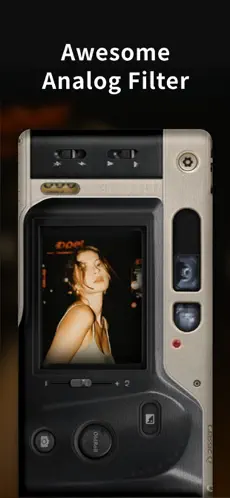
OldRoll covers instant, fisheye and Super 8mm styles, with named cameras like Classic M (rangefinder tones), INS P (instant), TOY F and TOY K (disposable) and 120 V. Version 8.9.1 (October 27, 2026) added an SLR camera with its own frame colors and QR code sharing for looks. It’s the cheapest way in on iOS version: minimum iOS 15.0.
Honest caveats: its age rating includes “Contains Advertising”, and the privacy labels show identifiers used to track you and user content linked to you, which is more than most apps here. The store page lists a pile of VIP plans, among them a $17.99 “vip forever” tier and monthly options at $4.49 and $4.99. Reviews are friendly but thin. A 5-star reviewer says the free version is helpful.
Pricing: Free to download, with in-app purchases.
ism — Best for Presets and a Y2K Digicam

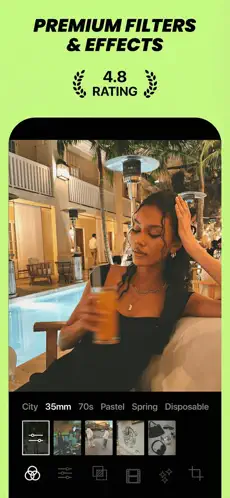
ism is the most filter driven app here, and it says so. The description promises 500+ presets, an in-app digicam for a lo-fi early 2000s look, AI edits, a collage maker and batch editing across an album. Those counts are the developer’s. The November 13, 2026 update (7.52.1) lists only “App optimization and bug fixes.”
If you mostly edit photos you already took, this suits you. If you want to see the film look through the viewfinder, VNTG or Dazz Cam fit better. For editing a batch, the tutorial at how to edit iPhone photos without Lightroom covers the free options.
Limits: iOS 18.0 minimum. Subscription pricing is steep, with Weekly Premium Pass listings at $3.99 and $7.99, Premium Yearly at $29.99 and ism Pro Yearly at $19.99. Privacy labels list purchases, identifiers and usage data as used to track you. A 1-star reviewer asks why pay when free apps give the same quality.
Pricing: Free to download, with a subscription.
Building Your Setup
You don’t need all seven. A workable pair: one capture first camera (Dazz Cam or VNTG) for shooting, and one editor for photos you’ve already taken. If you’d rather build the look yourself, our guide to the best iPhone photography apps and the Darkroom review cover grading tools.
Frequently Asked Questions
Which film look camera app for iPhone is cheapest?
Six of the seven are free to download, all with in-app purchases. Chromagraph Camera is the exception at $12.99 upfront, with no in-app purchases listed.
How do I tell Dazz Cam and DAZE CAM apart?
Dazz Cam is from DAZZ PTE. LTD. (117,097 ratings, iPhone and iPad). DAZE CAM is from Half Tab Inc. (12,185 ratings, Premium subscription).
Which apps carry Apple’s “Contains Advertising” label?
1998 Cam and OldRoll carry it on their store pages. None of the other five does.
Which collects the least data?
Chromagraph Camera lists Data Not Collected. Dazz Cam lists only usage data and diagnostics, not linked to you.
Prices and Plans at a Glance
| App | Download | In-app purchases (from the App Store listing) | Ads | Last updated |
|---|---|---|---|---|
| Dazz Cam | Free | Dazz Pro: $6.99 Dazz Pro One-Time Purchase: $19.99 Dazz Flash Color: $0.99 +7 more on the App Store |
— | 2026-09-25 |
| DAZE CAM | Free | Premium Monthly: $3.99 Premium Yearly: $34.99 Premium Monthly: $5.99 +4 more on the App Store |
— | 2026-10-12 |
| VNTG | Free | VNTG PRO: $5.99 VNTG PRO: $39.99 VNTG PRO: $49.99 +7 more on the App Store |
— | 2026-10-23 |
| Chromagraph Camera | $12.99 | None listed | — | 2026-10-31 |
| 1998 Cam | Free | 1998 Cam Premium – Monthly: $2.99 1998 Cam Premium – Yearly: $29.99 1998 Cam Premium – Monthly: $5.99 +7 more on the App Store |
Yes | 2026-10-24 |
| OldRoll | Free | monthly rss: $4.49 Yearly VIP-Trial5: $19.99 Yearly VIP-Trial4: $13.99 +7 more on the App Store |
Yes | 2026-10-27 |
| ism | Free | Ism – Premium Weekly: $7.99 Premium Pass: $7.99 Weekly Premium Pass: $7.99 +7 more on the App Store |
— | 2026-10-26 |
Related: Check out our new guide: ChatGPT Review 2026: Which Paid Tier You Actually Need
Related: Check out our new guide: ElevenReader Review 2026: Natural Voices, Paid Listening Hours
Which One Should You Pick?
- Want one app and don’t want to think: Dazz Cam.
- Want a subscription camera and editor: DAZE CAM.
- Want the instant camera ritual: VNTG.
- Want a look that isn’t a filter, and accept a small rating base: Chromagraph Camera.
- Edit batches of existing photos: ism.
Our pick: Dazz Cam. It’s free to start, and 117,097 ratings at 4.75 stars is the deepest track record on the list.
title: 7 Best Film Look Camera Apps for iPhone in 2026 (Free and Paid)
yoast_seo_title: 7 Best Film Look Camera Apps for iPhone in 2026
yoast_meta_desc: Seven film look camera apps for iPhone compared: Dazz Cam, DAZE CAM, VNTG, Chromagraph and more, with prices, ads, and what each free tier stops at.
slug: best-film-look-vintage-camera-apps-iphone
excerpt: Seven film look camera apps for iPhone, sorted by whether they render the look as you shoot or filter it afterwards, with prices, ads and privacy labels for each.
categories: Photography, Best Apps
tags: film camera apps, vintage camera apps, Dazz Cam, DAZE CAM, VNTG, Chromagraph, iPhone photography
focus keyphrase: film look camera apps iphone
featured_app_id: 1422471180
featured_app_name: Dazz Cam – Vintage Camera
featured_app_ratings: 117097