
Published Apr 14, 2026 · Updated Oct 25, 2026
Apple now ships its own AI assistant, Apple Intelligence, built right into iOS 26. And for a lot of quick tasks, like summarizing a notification or rewriting an email, it’s genuinely good. But the moment you need real depth, like drafting a long document, researching a topic with actual citations, or generating an image, you hit the ceiling fast. That’s where third party AI apps still run laps around the built in stuff.
There are now dozens of AI apps on the App Store, and they are not interchangeable. Each one is built around a different strength, and picking the wrong one for the job just wastes your time. This list breaks down the eight that are actually worth your home screen, what each one does best, and where each one falls short.
Jump to a section
Best AI Apps for iPhone: Quick Picks
- Best overall assistant: ChatGPT. The broadest feature set and the biggest user base for a reason.
- Best for writing and analysis: Claude. Reads long documents and writes like a careful editor.
- Best for cited research: Perplexity. Answers questions with sources you can actually check.
- Best for Google users: Gemini. Ties into Gmail, Docs, and your Google account.
- Best for Microsoft 365: Copilot. Lives inside Word, Excel, and Outlook.
- Best for real time news: Grok. Pulls live from X the moment something breaks.
- Best free image generator: Meta AI. Image generation with no subscription.
- Best for trying many models: Poe. One app, every major model in one place.
Best AI Apps for iPhone: Comparison Table
| App | Best For | Price | Rating |
|---|---|---|---|
| ChatGPT | All around assistant | Free / $20/mo Plus | 4.8 (12M) |
| Claude | Writing and long documents | Free / $20/mo Pro | 4.7 (298K) |
| Perplexity | Cited research | Free / $20/mo Pro | 4.8 (501K) |
| Gemini | Google ecosystem | Free / $19.99/mo AI Pro | 4.7 (2.2M) |
| Copilot | Microsoft 365 | Free / $20/mo Pro | 4.7 (1.3M) |
| Grok | Real time news | Free / $30/mo SuperGrok | 4.9 (1.4M) |
| Meta AI | Free image generation | Free | 4.7 (293K) |
| Poe | Multiple models in one app | Free / ~$19.99/mo | 4.7 (54K) |
ChatGPT — Best Overall AI Assistant


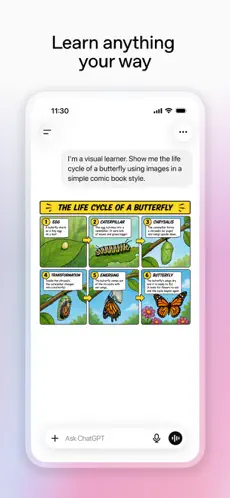
ChatGPT is still the app every other AI assistant gets measured against, and for good reason. It does a lot: image generation, photo upload, and an Advanced Voice Mode for real-time conversation. The app is free to download.
What a lot of people don’t realize is how much the voice mode has improved. Advanced Voice Mode lets you have a real-time conversation on the go, which makes it useful for hands free use while commuting, cooking, or walking the dog.
ChatGPT Plus costs about $20 a month. ChatGPT will occasionally answer with total confidence about something it has wrong. For a list of AI options that also do photo work, see our roundup of the best photo editing apps for iPhone.
Claude — Best for Writing and Deep Analysis


Claude, from Anthropic, is the assistant you reach for when the writing actually matters. It can analyze PDFs, screenshots, and other documents you upload.
The voice is also a real differentiator. Claude reads as careful and measured, and it’s better than most at understanding what you meant rather than what you literally typed. If you ask it to tighten a paragraph, it edits instead of rewriting from scratch, which is a small thing that adds up.
The tradeoffs: But for long form writing, drafting emails, and working through dense material, it’s the strongest option. Claude Pro is about $20 a month.
Perplexity — Best for Research With Citations


Perplexity is built different. It’s an AI search engine built around cited answers. You ask a question and it answers with a synthesized summary plus numbered citations pointing at the actual sources, so you can click through and check its work. That matters more than people think, because a confident AI answer with no source is how you end up with a plausible looking fact that’s completely wrong.
Every answer comes with cited sources. For anything involving current events, product comparisons, or “is this still true” questions, Perplexity beats a generic assistant.
It’s not the app you’d use to draft a novel or have a rambling conversation. It’s a research tool. Perplexity Pro is about $20 a month, and the free tier is genuinely useful on its own.
Google Gemini — Best for Google Users

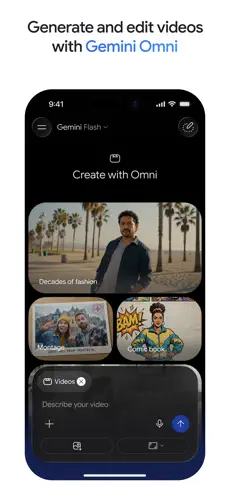
Gemini is Google’s answer to ChatGPT, and it’s the obvious pick if your life already runs through Gmail and Google Calendar. Because it sits inside your Google account, you can connect apps like Gmail and Calendar for more personalized help, and upload documents to get summaries.
Gemini Live, the voice mode, is worth mentioning too. It’s a conversational voice assistant that you can use while driving or walking, and it feels closer to talking to a person than reading answers off a screen. Image generation, powered by Nano Banana 2, is built in.
The free tier is solid, and Google AI Pro runs about $19.99 a month and includes 5TB of storage.
Microsoft Copilot — Best for Microsoft 365 Users


Copilot is Microsoft’s assistant, and if you live in Word, Excel, Outlook, and Teams for work, it’s the one that actually plugs into your files. It can draft a document, summarize a long email thread, and pull insights out of a spreadsheet because it has access to the stuff you’re already working on. That integration is the whole pitch.
As a standalone iPhone app it also lets you upload files and images to ask questions and generate summaries.
The honest version is that if you’re not in the Microsoft ecosystem, ChatGPT or Claude are stronger general purpose choices. The app also feels a little clunkier than its rivals. But for Microsoft 365 subscribers, the deep integration with your documents is the entire reason to keep it. Microsoft 365 Premium, offered in the app, is about $20 a month.
Grok — Best for Real Time News


Grok, from xAI, is the one to reach for when something is happening right now and you want the latest. Because it’s wired directly into X, it can pull live posts and breaking updates the moment they surface, before they’ve been digested by the news cycle.
It has a distinct personality, a more direct, casual tone than the polished default of its rivals, and image generation built in.
The downside is that full features lean on a paid SuperGrok plan at about $30 a month, and a lot of the real time value assumes you’re already on X. If you want a filtered, safe default, this isn’t it. If you want the raw feed, it’s the closest thing to it.
Meta AI — Best Free Image Generator

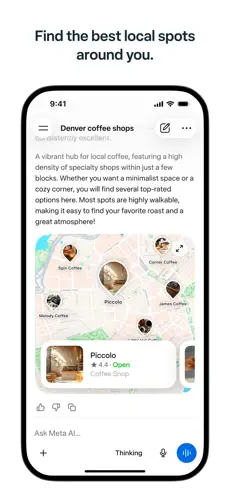
Meta AI flies under the radar because it doesn’t have the name recognition of ChatGPT, but it includes image generation in a free app. You describe a scene, it renders it, and .
It’s also already woven into the apps you probably use daily. Meta AI lives inside Instagram, WhatsApp, and Messenger, so you can generate an image or ask a question without leaving the conversation you’re already in. The reasoning and writing quality trail the leaders, but for quick questions and images it’s more than adequate.
The tradeoff is privacy. The App Store privacy label lists many data types linked to you, including location, contacts, and search history. Still, if you just want to make images on your phone without paying, this is the one.
Poe — Best for Trying Many Models in One App


Poe, from Quora, solves a problem you don’t know you have until you’ve downloaded three separate AI apps: it puts all the major models in one place. Instead of jumping between ChatGPT, Claude, and Gemini, you open Poe and pick whichever model fits the task, all from one login.
It also lets you build custom bots, which is more useful than it sounds. You can create a bot with a specific system prompt for a recurring task, like “act as a copy editor” or “turn messy notes into clean bullets,” and reuse it forever. For heavy AI users, that removes a lot of repetitive prompting.
The catch is the free tier is fairly limited, and the pricing uses a points system for some models, which can be confusing. If you only need one model, a dedicated app is simpler. But if you want to sample everything and keep one icon on your screen, Poe is the efficient choice. A subscription runs about $19.99 a month.
Which AI App Should You Pick?
Most people don’t need eight AI apps. They need one or two that match how they actually work. If you want a single app that covers the most ground, start with ChatGPT. If your day is spent writing and reading dense documents, Claude is the better fit. If your job involves research, Perplexity will save you more time than any general assistant.
After that, the ecosystem picks itself. Gemini if you’re in Google, Copilot if you’re in Microsoft, Grok if you want the raw real time feed, Meta AI if you want free images, and Poe if you want to try everything without committing. Apple Intelligence is there for the quick, local tasks, but for anything serious, a dedicated app still wins.
Our pick: ChatGPT. It’s the most complete assistant on the iPhone, and the free tier is enough to decide if AI is worth paying for at all.
Frequently Asked Questions
Is ChatGPT free on iPhone?
Yes. The app is free to download, with optional paid plans. ChatGPT Plus costs about $20 a month.
What is the difference between Claude and ChatGPT?
Both are strong general assistants. Claude is better at long documents, careful writing, and nuanced analysis, while ChatGPT offers image generation and voice mode. Many people keep both for different jobs.
Does Apple Intelligence make third party AI apps unnecessary?
Not yet. Apple Intelligence is great for quick, local tasks like summarizing a notification or rewriting a sentence, but it’s not built for long documents, deep research, or image generation at the level of a dedicated app. The two complement each other.
Are these AI apps private?
Privacy varies by app and by plan. Treat any AI app like a public place: don’t paste in passwords, financial details, or confidential work unless you’ve reviewed the data policy.
Which AI app gives the best free image generation?
Meta AI offers image generation with no subscription. ChatGPT and Gemini also generate images.
For more on how these assistants fit into a broader iPhone workflow, see our guide to the third party AI apps that actually work with Siri, and our roundup of the best note taking apps for iPhone.
Is your app on this list? Add a free "Featured on iOS App Lists" badge to your website or press kit.