
Published May 26, 2026 · Updated Oct 25, 2026
Point your iPhone at the night sky and the right app tells you exactly what you’re looking at: which star, which constellation, which planet, and when the International Space Station will glide overhead. The tech behind this is genuinely clever. Your phone’s GPS, compass, and gyroscope combine with a star catalog to build a live sky map that tracks every movement of your hand.
But the best astronomy and stargazing apps for iPhone are not interchangeable. Some are tuned for fast identification, some for planning a telescope session, and a couple for photographing the Milky Way. Here are eight of them, sorted by what each one actually does well.
Jump to a section
Best Stargazing Apps for iPhone — Quick Picks
- Best overall AR stargazing: Night Sky, the most polished point-and-identify experience
- Best Apple-native AR: Sky Guide, gorgeous sky map that works fully offline
- Best free planetarium: Stellarium Mobile, open-source astronomy for any date and location
- Best visuals and learning: Star Walk 2 Plus, beautiful maps with rich educational content
- Best events calendar: Sky Tonight, never miss a meteor shower or conjunction
- Best for telescope users: SkySafari, the serious astronomer’s tool
- Best for ISS spotting: Satellite Tracker by Star Walk, pass alerts for the station
- Best for astrophotography: PhotoPills, plan Sun, Moon, and Milky Way shots
At a Glance: The Best Stargazing Apps Compared
| App | Best For | Price | Rating |
|---|---|---|---|
| Night Sky | Overall AR stargazing | Free + subscription | 4.7 |
| Sky Guide | Apple-native AR, offline use | Free + subscription | 4.8 |
| Stellarium Mobile | Free planetarium | Free + Plus IAP | 4.8 |
| Star Walk 2 Plus | Visuals and learning | Free | 4.6 |
| Sky Tonight | Astronomy events | Free + subscription | 4.8 |
| SkySafari | Telescope control | $0.99 | 4.7 |
| Satellite Tracker | ISS and satellite passes | Free + subscription | 4.6 |
| PhotoPills | Astrophotography planning | $10.99 | 4.7 |
Night Sky — Best Overall AR Stargazing App


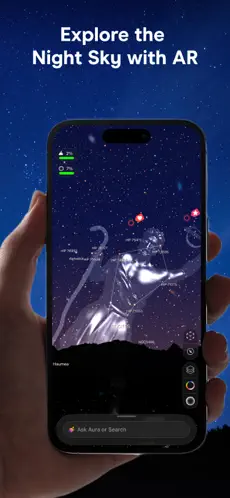 Night Sky is the most refined augmented reality stargazing app on the App Store, and it keeps getting stranger in a good way. Hold your phone toward any part of the sky and the AR overlay labels stars, planets, constellations, and satellites in real time, complete with names, distances, and context. The identification is fast and the interface stays out of the way, which matters when you’re outside in the cold.
The newer additions push it past a simple sky map. Night Sky Aura is a built-in AI assistant you can ask almost anything about space, and it will point the app at whatever object you’re asking about. Sky Tags let you pin personal notes to objects, a memorial star or something you want to revisit later, and share them over iMessage. Connected Stargazing rides on SharePlay so you can stargaze with someone who isn’t standing next to you.
The free tier covers the basics. Night Sky+ (a subscription) unlocks the deeper object database and the extra AR modes, and the app nudges you toward it more often than it should. That persistence is the main annoyance.
Pricing: Free with optional Night Sky+ subscription.
Sky Guide — Best Apple-Native AR Experience

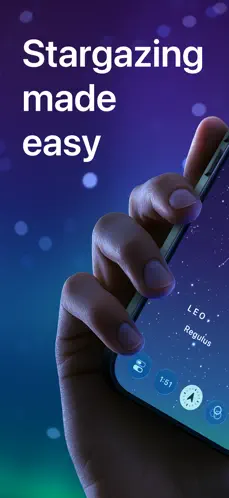 Sky Guide is one of the highest-rated AR stargazing apps in the category, with a 4.8 from more than 370,000 reviews. The AR mode draws constellation figures directly over your live sky, which turns learning the night sky into something closer to a game than a chore. The graphics are clean without being flashy.
Two features set it apart. First, it works fully offline, no Wi-Fi, no cellular, no GPS required, which makes it the app you actually want on a backcountry camping trip. Second, it sends genuinely useful satellite notifications, telling you when the ISS is about to fly over with enough warning to go outside and look up. The time controls are cinematic, letting you scrub forward to see where the Moon will sit for a photo or backward to watch a historic comet.
Sky Guide’s weakness is the subscription model. The free download covers the core sky map, but optional PLUS and PRO upgrades are sold as in-app purchases. Worth it if you stargaze weekly, annoying if you only open the app twice a year.
Pricing: Free with optional PLUS and PRO in-app purchases.
Stellarium Mobile — Best Free Planetarium

 Stellarium is the pick for anyone who wants a serious planetarium without paying for one. It’s the mobile version of the open-source Stellarium desktop program that’s been a staple of amateur astronomy for years, and the pedigree shows. You get an accurate simulation of the sky for any date, time, and location, with stars, nebulas, galaxies, and clusters all labeled.
The detail is what stands out. You can view the constellations the way different sky cultures drew them, not just the Western names, and zoom into realistic Milky Way and deep-sky imagery. A red night mode preserves your dark adaptation, which is a small thing that matters a lot at a dark site. The base version is limited to objects brighter than magnitude 8, fine for naked-eye and binocular use, and the Stellarium Plus upgrade extends that to magnitude 22 for faint-object hunting.
The interface is minimalist to a fault. It’s clean, but some settings hide in menus that take a minute to find. For free, though, it’s hard to complain.
Pricing: Free; Stellarium Plus is an in-app upgrade, available as a one-time payment or a subscription.
Star Walk 2 Plus — Best Visuals and Learning

 Star Walk 2 has the most beautiful sky map in the category. The star field rendering, the constellation art, and the nebula visualizations make it as rewarding to browse as it is to use for identification. Point your phone up to identify objects live, or drag the map around to see what’s visible tonight or on any date you pick.
The educational layer is the strongest part. Every star, planet, and deep-sky object has a detailed card with distance, magnitude, size, and history. The Time Machine fast-forwards and rewinds the sky, which finally makes it clear why certain constellations only show up in certain seasons. You can also view the sky at different wavelengths, the kind of detail most apps skip. The original Star Walk won an Apple Design Award, and this “Plus” version keeps the polish and is ad-supported, with an in-app purchase to remove ads.
It’s heavy, though. The app wants a fair bit of storage and the first load can be slow on older iPhones. That’s the tradeoff for the prettiest sky map here.
Pricing: Free with optional in-app purchases for the full catalog.
Sky Tonight — Best Events Calendar

 Sky Tonight answers the question every casual stargazer actually asks: what am I looking at, and what’s happening tonight? It’s built by the Star Walk team, but where Star Walk 2 is about beauty, Sky Tonight is about utility. The app pushes notifications for meteor showers, eclipses, and conjunctions, and lays out a calendar of what’s visible from your location on any given night.
The customization runs deeper than it first looks. You can filter objects by visual brightness, so a beginner sees only the obvious stuff while an experienced observer sees the faint targets too. It surfaces asterisms alongside the official 88 constellations, which most apps ignore. The interactive trajectory view shows how a planet’s position changes night to night, exactly what you want when a bright object keeps appearing in the same spot and you can’t figure out what it is.
The tradeoff is focus. It does a lot, and the interface can feel crowded next to the more stripped-down apps. If you want a single astronomy app that never lets you miss an event, this is the one.
Pricing: Free with a subscription for the full feature set.
SkySafari — Best for Telescope Users

 SkySafari is where the hobby gets serious, and SkySafari is where the hobby gets serious. The current release is version 8., and it’s the app you reach for when you want depth instead of polish. The object database is enormous, covering millions of stars and deep-sky objects, and telescope control lives in the separate SkySafari 8 Plus and SkySafari 8 Pro apps. Telescope control is handled by those separate apps.
SkySafari also includes some genuinely useful tools. OneSky shows what other users are observing in real time, a neat way to discover targets you’d never pick yourself. Guided audio tours deliver more than four hours of narration on the history and science of the sky. There’s even a pronunciation guide so you stop saying constellation names wrong at star parties.
It’s the least pretty app on this list, and that’s fine. SkySafari assumes you already know what you’re doing. Beginners will find the interface utilitarian, but that’s the point: this is a working instrument, not a toy.
Pricing: $4.99 for the base app, with an optional Premium subscription; SkySafari 8 Pro is a separate app at $34.99.
Satellite Tracker by Star Walk — Best for ISS Spotting

 Watching the International Space Station glide overhead is one of the most accessible astronomy experiences there is. The station is bright enough to see from a city, and it crosses a good slice of the sky in a few minutes. Satellite Tracker exists to make sure you’re looking at the right moment. You can set an alert for each visible pass so you know when to look.
It tracks far more than the ISS. Starlink and thousands of other satellites are in there. The flyby timer counts down to the next pass over your location, and three view modes (globe, satellite, and sky) let you watch a satellite’s orbit around a 3D Earth or follow an arrow pointer to it in the sky.
Satellite tracking is a niche use case, so this app makes the most sense as a companion to a general sky map rather than a replacement for one. The subscription covers extra satellites and removes ads, but the free tier is plenty for ISS passes.
Pricing: Free with a subscription for the full satellite catalog.
PhotoPills — Best for Astrophotography Planning

 PhotoPills isn’t a stargazing app in the traditional sense, and that’s exactly why it earns a spot here. If you’ve ever tried to photograph the Milky Way and spent an hour guessing where it would rise, this app tells you precisely, for any date and location, overlaid on a map or in augmented reality. It plans Sun, Moon, and Milky Way positions and finds the exact alignment you want for a shot.
The calculators are where it gets serious: long exposure, star trails, spot stars (to avoid star trailing), timelapse, and depth of field, all built in. It also lists golden hour, blue hour, supermoon dates, and moonrise times. Mark Gee, who won Astronomy Photographer of the Year, calls it the tool he uses to plan every shoot, which is about as strong an endorsement as this category gets. If you’re pairing it with an iPhone instead of a dedicated camera, our roundup of the best iPhone photography apps covers the capture side.
The catch is price and learning curve. PhotoPills costs $10.99, a one-time purchase with no subscription, but it assumes you understand photography fundamentals. If you just want to look at the sky, this app is overkill. If you want to shoot it, this is the app built for the job.
Pricing: $10.99 one-time purchase.
Tips for Stargazing with Your iPhone
A few practical notes that make every one of these apps work better in the field. Switch your iPhone to a red-tinted display before you head out: Settings > Accessibility > Display & Text Size > Color Filters has a red option that preserves night vision better than any screen brightness setting. Give your eyes 20 minutes to adjust to the dark before expecting to see faint objects.
Location matters more than any app. Rural skies reveal dramatically more than suburban or urban ones, and some of these apps, like Night Sky, include a light pollution indicator that shows how bad your local sky is and where to drive for something better. Check a weather app before you commit to a night out, since a single cloud bank can wipe out an hour of setup. For clear-sky forecasting, our roundup of the best weather apps for iPhone covers the radar apps worth having.
Frequently Asked Questions
What is the best free stargazing app for iPhone?
Stellarium Mobile is the best free planetarium, with an accurate sky simulation for any date, time and location in the free version. Night Sky and Sky Guide both have solid free tiers for basic AR identification. If you only need satellite passes, Satellite Tracker’s free tier handles ISS alerts.
Can stargazing apps work offline?
Sky Guide and Stellarium Plus are built to work without an internet connection. Sky Guide is the standout here: it’s built to run with no Wi-Fi, no cellular, and no GPS, which makes it the pick for remote camping. Event calendars and live satellite positions need a connection to update, but the core sky map doesn’t.
How do I find the International Space Station with my iPhone?
Satellite Tracker by Star Walk is the dedicated tool. Enable pass notifications and it alerts you before each visible flyover with the time and direction to look. Sky Guide also sends ISS alerts, and the free NASA app does the same.
Which app is best for a telescope?
SkySafari’s telescope control is in the separate SkySafari 8 Plus and SkySafari 8 Pro apps. Telescope control is in the separate SkySafari 8 Plus and SkySafari 8 Pro apps. The $4.99 base app covers the essentials; the Pro version adds a much larger database.
Do I need a subscription for a good stargazing app?
No. Stellarium Mobile and the base SkySafari cover real astronomy without a recurring fee, and PhotoPills is a one-time purchase. The subscription apps (Night Sky, Sky Guide, Sky Tonight) are worth paying for only if you stargaze often enough to use their premium features.
Which Stargazing App Should You Pick?
If you want one app that does everything well, start with Sky Guide or Night Sky. Both nail the core point-and-identify experience, and the choice mostly comes down to whether you want Sky Guide’s offline reliability or Night Sky’s deeper feature set. Grab Stellarium Mobile if you want a serious planetarium without spending anything, and add SkySafari 8 Plus or Pro the moment you buy a telescope. PhotoPills is a separate purchase for photographers only, and Satellite Tracker earns its place next to any of them for ISS passes.
Our pick: Sky Guide. It is among the highest-rated apps here, works completely offline, and the satellite notifications turn casual stargazing into something you actually do.
Is your app on this list? Add a free "Featured on iOS App Lists" badge to your website or press kit.