
Published Apr 22, 2026 · Updated Oct 27, 2026
Not every app on the App Store deserves space on your home screen. These eight do. We verified every app on this list is currently live on the App Store, confirmed current pricing, and checked that each has been updated recently. No fabricated awards, no fake reviews — just apps that hold up in 2026.
Jump to a section
Must-Have iPhone Apps in 2026 — Quick Picks
- Best for music: Spotify
- Best for navigation: Google Maps
- Best for learning: Duolingo
- Best for the outdoors: AllTrails
- Best for frequent flyers: Flighty
- Best for notes and projects: Notion
- Best for task management: Things 3
- Best for password security: 1Password
Spotify — Best Music App


With 39 million App Store ratings, Spotify is rated by tens of millions of people — and those numbers reflect genuine daily use by hundreds of millions of people. The core product is a streaming library of over 100 million tracks with personalised playlists (Discover Weekly, Daily Mixes, Release Radar) that actually get better the more you use them. Podcasts and audiobooks are built in, making it a single destination for most audio listening.
The free tier is ad-supported. A Premium subscription removes ads, unlocks on-demand playback, and enables offline downloads. Duo and Family plans are also available.
Download Spotify on the App Store
Google Maps — Best Navigation App


Apple Maps has improved significantly in recent years, but Google Maps remains the more reliable choice for most people most of the time — particularly for real-time traffic, transit directions, street-level detail, and international coverage. Over 7 million iOS ratings at 4.68 stars reflect how deeply embedded this app is in everyday life.
Live traffic conditions that genuinely reroute you around delays, detailed transit directions for buses and trains, restaurant and business listings with photos and opening hours, and Street View for scoping out destinations before you arrive. Google Maps is free to download.
Download Google Maps on the App Store
Duolingo — Best Language Learning App


Duolingo has over 5 million App Store ratings at 4.7 stars, and it’s earned that position by being the most approachable language learning experience on any platform. The app covers 40+ languages and structures lessons as short, game-like sessions that fit into five or ten minutes of spare time. Streak tracking, XP, and leaderboards create genuine motivation to keep coming back — the gamification works better than it has any right to.
The free tier is fully functional and covers the core lesson content. Super Duolingo removes ads and unlocks unlimited energy.
Download Duolingo on the App Store
AllTrails — Best App for the Outdoors


AllTrails is the go-to app for anyone who hikes, runs trails, or bikes off-road. The database covers over 500,000 trails around the world, each with user reviews, photos, and current conditions. At 4.89 stars from over a million ratings, it’s one of the highest-rated apps on this entire list.
The free tier gives access to trail maps and reviews while connected. AllTrails Plus unlocks offline maps (critical when you’re out of signal range) and conditions planning, while Peak adds custom route creation.
Download AllTrails on the App Store
Flighty — Best App for Frequent Flyers


If you fly regularly, Flighty will change how you experience airports. The app tracks your flight in real time — including the incoming aircraft before boarding starts — and delivers gate change and delay alerts faster than airline apps. The reason: Flighty monitors the inbound plane rather than waiting for the airline to push a notification.
Beyond alerts, Flighty includes calendar sync, TripIt sync, and a clean design that makes your travel history genuinely pleasant to look at. Free to download; full features require a subscription. For occasional travellers it may not justify the cost, but for anyone flying more than a handful of times a year it’s one of the most useful apps on this list.
Download Flighty on the App Store
Notion — Best for Notes and Projects


Notion sits at the intersection of note-taking, project management, and personal wiki. It’s flexible enough to be a simple notes app if that’s all you need, but powerful enough to run entire team workflows with linked databases, Kanban boards, and real-time collaboration. For personal use, a notes-plus-task-list setup takes about 10 minutes to configure and scales as your needs grow.
The free tier is generous for individuals — free for personal use with as many notes and docs as you want. Paid Plus and Business plans are available for teams.
Download Notion on the App Store
Things 3 — Best Task Manager
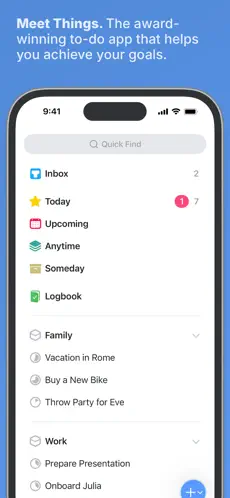

Things 3 is a one-time purchase at $9.99 — no subscription, no recurring fees, and it’s been the gold standard for iPhone task management since it launched. The app is built around a clean, opinionated system: your Today view shows what to focus on, your upcoming view shows what’s coming, and projects give structure to anything longer-term. It’s simple enough to use with no setup, but deep enough to handle complex project hierarchies with sub-tasks, tags, and deadlines.
If you want something free, Apple’s Reminders app is solid for basic task management. But if you find yourself constantly frustrated by it, Things 3 is the upgrade.
Download Things 3 on the App Store
1Password — Best Password Manager


If you’re still reusing the same few passwords across accounts, or relying on a Notes doc to store credentials, 1Password is the single most impactful security upgrade you can make on your iPhone. The app generates strong, unique passwords for every account, stores them encrypted, and fills them automatically via the iOS keyboard extension. You can also unlock with Apple Watch or Touch ID on supported devices.
Beyond passwords, 1Password stores secure notes, credit card details, documents, and two-factor authentication codes. The Watchtower feature flags weak, reused, or compromised passwords from known data breaches.
Free to download; full use requires a subscription.
Download 1Password on the App Store
Frequently Asked Questions
What iPhone apps do I actually need in 2026?
The honest answer is that most people genuinely need very few third-party apps beyond what Apple includes. But the eight on this list — a music app, navigation, language learning, trail maps, flight tracking, notes, task management, and a password manager — each solve real problems that Apple’s built-in apps don’t fully address.
Are these apps free?
Most are free to download. Spotify, Google Maps, Duolingo, AllTrails, Flighty, and Notion all have free tiers — though full features on most require a subscription. Things 3 is the exception: it’s a one-time $9.99 purchase with no ongoing costs.
Which app on this list is most worth paying for?
That depends on your habits. For music listeners, Spotify Premium removes a genuinely frustrating free tier. For hikers, AllTrails Plus’s offline maps are a convenience when you’re out of signal range. For anyone who flies regularly, Flighty’s subscription is built around fast delay alerts. For security, 1Password is the most impactful investment you can make regardless of how often you use it.
Is 1Password safe to use?
Yes. 1Password uses end-to-end encryption and says it can’t see what you store in your account.
Should I use Notion or Apple Notes?
Apple Notes is the better choice for quick captures and simple notes — it’s fast, free, and deeply integrated with iOS. Notion is the better choice if you want to build structured systems: project trackers, reading lists, travel planners, linked databases. Both can coexist, and many people use Apple Notes for quick ideas and Notion for anything requiring structure.
For more iPhone app recommendations, check out our guide to the best meditation apps for iPhone if you’re looking to build a mindfulness habit, or our roundup of the best offline iPhone games for entertainment that works anywhere.
See also our monthly roundups: the best new apps of July 2026 and the best new apps of June 2026.
Is your app on this list? Add a free "Featured on iOS App Lists" badge to your website or press kit.