
Published Jun 21, 2026 · Updated Nov 8, 2026
The right set of iPhone apps can mean the difference between a stressful trip and a smooth one. Whether you’re booking flights, navigating a city where you don’t speak the language, or trying to find a great restaurant that isn’t a tourist trap, there’s an app built for exactly that moment.
Two apps from the original version of this post have been replaced: Foursquare City Guide has been dropped from this list, and Sitata has been swapped out for Yelp.
Jump to a section
TripIt: Travel Planner


Free (Pro from ~$49/year) · ⭐ 4.8 (298,000+ ratings) · Updated March 17, 2026
Download on the App Store →
 TripIt solves one of the most tedious parts of travel: keeping all your booking confirmations in one place. Forward any confirmation email — flights, hotels, car rentals, restaurant reservations — to plans@tripit.com, and TripIt automatically parses them into a single master itinerary.
The free version is genuinely useful on its own: you get a clean, shareable itinerary, offline access, and calendar sync. TripIt Pro (~$49/year) adds real-time flight alerts, check-in reminders, and a fare refund monitor that watches your booked flights and alerts you if the price drops so you can claim the difference. For frequent travellers, Pro pays for itself quickly.
With 298,000 ratings at 4.8 stars, TripIt has earned its reputation as the most reliable travel organisation app on iOS. It’s the first app to install before any trip. Packing comes next, and our roundup of the best outfit planner apps for iPhone covers that stage.
Skyscanner Flights & Travel

Free · ⭐ 4.8 (491,000+ ratings) · Updated March 17, 2026
Download on the App Store →
 Skyscanner remains the best flight search app on iPhone in 2026. It compares prices across multiple airlines and online travel agencies, surfaces the cheapest dates across a whole month at a glance, and includes an “Explore Everywhere” feature that shows you the cheapest destinations to fly to from your home airport on any given date — genuinely useful if you have flexible plans.
Price alerts are a standout feature: set one on any route and Skyscanner will notify you when fares drop. The app covers flights, hotels, and car rentals, making it a one-stop shop for the booking phase of any trip. A calendar view of the cheapest dates and filters for stops, airline, or departure time are all included.
If you only install one flight search app, this is it. The combination of breadth, speed, and a genuinely clean interface puts it ahead of every competitor.
Airbnb

Free · ⭐ 4.8 (700,000+ ratings) · Updated March 18, 2026
Download on the App Store →
 Airbnb has evolved well beyond its original premise of renting a spare room. The app now offers entire homes, boutique apartments, unique stays like treehouses and houseboats, and “Airbnb Rooms” for a more budget-conscious shared-home option. For travellers who find hotels impersonal or overpriced, Airbnb consistently turns up options that hotels simply can’t offer — particularly for groups, families, or longer stays where having a kitchen matters.
The Experiences feature is worth exploring too: local hosts lead activities ranging from cooking classes to photography walks, and they’re often significantly better than packaged tourist tours. Reviews are verified, the in-app messaging with hosts is clean, and you can use over 80 filters to find the amenities you want. Travelling with a dog or cat? See our list of the best iPhone apps for pet owners before you book.
Google Maps

Free · ⭐ 4.7 (7,100,000+ ratings) · Updated March 20, 2026
Download on the App Store →
 Google Maps is the most-rated app on this entire list and one of the most essential tools on any iPhone full stop. For travel specifically, the offline map download feature is invaluable — the offline maps feature helps you avoid getting lost in an area with bad signal.
Beyond navigation, Google Maps functions as a powerful local discovery tool. Street View lets you preview exactly what a hotel entrance or restaurant looks like before you arrive. “Saved” lets you build lists of places you want to visit and access them from a map. Public transit directions with real-time updates are included, though some features are not available in all countries or cities. For navigating any unfamiliar destination, nothing comes close. Driving instead? Our note on Apple Maps’ real-time emergency vehicle road warnings covers in-car navigation.
Google Translate

Free · ⭐ 4.3 (82,000+ ratings) · Updated March 19, 2026
Download on the App Store →
 Google Translate is the practical solution to the language barrier problem, and it covers several use cases that matter for travellers. Camera translation — point your phone at a menu, sign, or document and see it translated in real time overlaid on the image — is genuinely impressive and works well for restaurant menus and transit signage. Voice translation handles back-and-forth conversations with locals in real time.
Offline translation packs are available for free download and cover the major travel languages. Download the relevant language before your trip and Translate works without an internet connection — essential when you’re navigating a remote area or keeping data usage down. Supports up to 249 languages, though feature support varies by language. The 4.3-star rating is lower than other apps on this list, but reflects the scale of what it does rather than any serious quality concern.
Xe Send Money & Currency

Free · ⭐ 4.8 (117,000+ ratings) · Updated March 19, 2026
Download on the App Store →
 Xe is a trusted currency converter and exchange rate tracker,, with 4.8 stars across 117,000 ratings. It tracks live exchange rates for every major currency and lets you check live exchange rates before you spend.
The calculator is fast and intuitive: set your home currency once, then tap any amount in local currency to see the instant conversion. Historical rate charts let you check trends if you’re deciding when to exchange money. XE has expanded into international money transfers as well, though for travel the currency tracking tool is the main draw. Keep it on your home screen for the first few days in any new country and you’ll quickly develop a feel for local prices.
Citymapper: All Live Transit

Free · ⭐ 4.9 (100,000+ ratings) · Updated March 18, 2026
Download on the App Store →
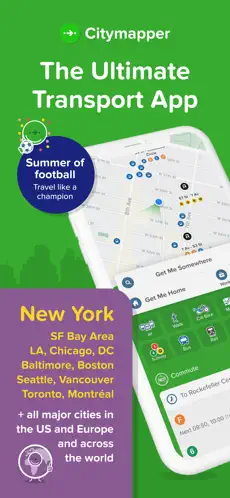 Citymapper is the best public transit app on iPhone, and it isn’t particularly close. While Google Maps covers transit routing globally, Citymapper goes significantly deeper in the cities it supports — showing live wait times, disruption alerts, and integrations with e-scooters and ride-hailing services all in one route.
The 4.9-star rating from 100,000 users reflects how much better it is for city navigation than the alternatives. If you’re visiting New York, Chicago, Los Angeles, San Francisco, or one of the many other supported cities, Citymapper makes getting around by public transit feel effortless. You can subscribe to your favourite lines for automatic disruption, delay, and status alerts.
OpenTable

Free · ⭐ 4.9 (5,200,000+ ratings) · Updated March 14, 2026
Download on the App Store →
 OpenTable is the standard for restaurant reservations when travelling, with 4.9 stars across 5.2 million ratings — one of the highest-rated apps on the App Store in any category. It covers tens of thousands of restaurants across major travel destinations worldwide, with real-time availability, verified reviews, menus, and photos all in one place.
Search by date, time, and location, filter by cuisine and price, and manage your reservations from the app. You earn points every time you book and dine through OpenTable. For popular restaurants in major cities, booking through OpenTable lets you see availability and reserve a table in advance — particularly useful when you’re visiting somewhere with a specific restaurant in mind and can’t afford to show up and be turned away.
Tripadvisor: Plan & Book Trips

Free · ⭐ 4.8 (460,000+ ratings) · Updated March 19, 2026
Download on the App Store →
 Tripadvisor replaces Foursquare City Guide in this list. For local discovery, Tripadvisor is the more powerful tool anyway — covering restaurants, attractions, tours, hotels, and experiences with reviews from millions of travelers. When you arrive somewhere new and want to know what’s genuinely worth seeing or eating, Tripadvisor’s depth is unmatched.
The app lets you book experiences, tour tickets, and hotels. The app surfaces top-rated recommendations nearby. Saved lists let you organise everything you want to visit before your trip. Trip planning, review reading, and booking all live in one place, which makes it a genuinely useful companion throughout the entire travel experience rather than just at the research stage.
Yelp: Food, Services & Reviews

Free · ⭐ 4.5 (1,800,000+ ratings) · Updated March 16, 2026
Download on the App Store →
 Yelp replaces Sitata in this list. Yelp, with a 4.5-star rating,, is a far more useful companion for day-to-day travel needs.
While Tripadvisor skews toward tourist attractions and experiences, Yelp excels at finding the kind of everyday places locals actually use — the coffee shop two blocks from your hotel, a pharmacy, a dry cleaner, a hardware store. Reviews include photos, hours, prices, and details about atmosphere that help you decide quickly whether a place fits what you’re looking for right now.
Frequently Asked Questions
What is the best all-in-one travel app for iPhone?
TripIt is the best single app for organising an entire trip — it consolidates all your booking confirmations into one itinerary automatically. For discovery and planning before you travel, Tripadvisor covers attractions, restaurants, and tours comprehensively. Most travellers end up using two or three apps from this list rather than relying on one.
Which iPhone app is best for finding cheap flights?
Skyscanner is the strongest flight search app on iPhone. Its flexible date grid, Explore Everywhere feature, and price alerts make it easier to spot cheap fares.
Do any of these travel apps work offline?
Yes — several are specifically designed for offline use. Google Maps lets you download entire city maps for offline navigation. Google Translate has offline language packs. TripIt keeps your itinerary accessible without a connection. Download everything you need before you leave the hotel.
Is Google Maps or Apple Maps better for international travel?
Google Maps is generally stronger for international travel in 2026 due to better coverage in more countries, deeper business listing data, and more reliable public transit routing globally.
What’s the best iPhone app for navigating public transit abroad?
Citymapper is the best option for the cities it covers — it offers live wait times, disruption alerts, and multi-modal routing. For cities not covered by Citymapper, Google Maps’ transit directions are a reliable fallback.
For the flight itself, complement these planning apps with our guide to the top 5 flight tracking apps for iPhone — real-time departure updates, gate changes, and delay alerts that keep you ahead of the airline announcements.
Weather can make or break a trip. Our Windy.com review covers the weather app that pilots and outdoor fanatics trust — hyperlocal forecasts, wind maps, and the kind of detail that standard weather apps skip entirely.
For tracking your specific flights in real time once you’re at the airport, our dedicated guide to flight tracking apps for iPhone covers the best options. Traveling for World Cup 2026? Our roundup of the best iPhone apps for World Cup 2026 covers scores, streaming, and match-day tools. And if you’re managing a travel budget, the best checkbook apps for iPhone includes tools that work well for tracking spending on the road.
Is your app on this list? Add a free "Featured on iOS App Lists" badge to your website or press kit.