
Published Jul 21, 2026 · Updated Oct 27, 2026
Mimo is the best free coding app for iPhone for most people: 4.8 stars across 110,000 ratings, and a free download that teaches Python, JavaScript, and SQL with hands-on coding. If you want a course library with no subscription and nothing to upsell you, Khan Academy is a free nonprofit library that includes computer science principles.
The hard part of learning to code on a phone is not the phone. It is the 15 free minutes on a train, the lunch break, the couch, and whether the app you open makes those minutes count. Every app below is free to start, every one rates 4.4 or higher, and each is matched to a real way people learn: gamified drills, full courses, or a genuine interpreter you can run code in.
Jump to a section
Quick Picks
- Best overall for beginners: Mimo, 3-minute lessons with real code, 110,000 ratings
- Best breadth of languages: Sololearn, 20+ languages, community challenges, free courses
- Best completely free course library: Khan Academy, nonprofit, no subscription, computer science principles
- Best for Python depth: Programming Hub, interactive lessons and code examples across 20+ languages
- Best companion to a desktop course: Codecademy Go, daily review cards for the Codecademy platform
- Best for data science and SQL: DataCamp, Python, SQL, R, and AI tracks with in-browser exercises
- Best for short daily practice: Encode, short daily lessons, Python, JavaScript, HTML, CSS and SQL
- Best for professional skills: Enki, spaced repetition across SQL, data, and productivity
- Best for running your own code: Python Coding Editor and IDE, a real Python 3 interpreter on iPhone
- Best for writing Swift: Swifty Compiler, run Swift on the phone you already own
Comparison Table
| App | Best For | Languages | Free Tier | Rating |
|---|---|---|---|---|
| Mimo | Complete beginners | Python, JavaScript, HTML, CSS, SQL | Free to start | ★4.8 |
| Sololearn | Sampling many languages | 20+ | Free to start, community access, ads | ★4.8 |
| Khan Academy | A free course library | Computer science principles | Free, no subscription | ★4.6 |
| Programming Hub | Python depth | 20+ | Core lessons, limited practice | ★4.8 |
| Codecademy Go | Reinforcing a desktop course | 14 | Daily review cards | ★4.8 |
| DataCamp | Data science and SQL | Python, SQL, R, AI fundamentals | First chapter of every course | ★4.8 |
| Encode | Short daily practice | JavaScript, Python | All lessons, with ads | ★4.8 |
| Enki | Professional skill building | SQL, Python, data, productivity | Daily rotating workouts | ★4.8 |
| Python Coding Editor and IDE | Writing real Python | Python 3 | Editor, interpreter, debugger | ★4.4 |
| Swifty Compiler | Writing Swift | Swift | 10 run credits per day | ★4.5 |
Mimo — Best Overall for Beginners


Mimo is the coding app that feels most like Duolingo, and that comparison does real work. Lessons are interactive, and you write real code as you go, and the streak counter does the rest. Mimo teaches Python, JavaScript, HTML, CSS, and SQL.
The projects are where it pulls ahead of the other beginner apps. You build projects for a portfolio. That output is the difference between watching a course and finishing something. Mimo GmbH has kept the app current too, with an update landing in October 2026.
Treat it as your first month, then move on.
Pricing: Free to download, with Mimo Pro available as an in-app subscription (one listed option is $9.99).
Sololearn — Best Breadth Across Languages


Sololearn covers a wide range of languages: Python, Java, C++, C#, JavaScript, SQL, and more than 20 in total.: Python, Java, C++, C#, JavaScript, SQL, and more than 20 in total. You can start learning to code for free.
What sets it apart is the community layer. There is a community where you can share your code and questions., a supportive community you can turn to for help. Reading somebody else’s solution to a problem you just failed teaches faster than reading a second explanation of the same thing.
Course quality is uneven by language. The in-app editor is also cramped on a phone screen, so plan to move your real practice to a laptop before long.
Pricing: Free with ads. PRO, which removes ads and adds the AI tutor, runs about $7/month.
Download Sololearn | sololearn.com
Khan Academy — Best Completely Free Course Library


Khan Academy is the outlier on this list because it has no business model to convert you into. It is a nonprofit, the app is free, and there is no pro tier waiting at the end of lesson four. If you have been burned by a free coding app that paywalls the interesting half of its curriculum, start here.
Khan Academy’s library includes computer science principles, though its listing says programming content lives on khanacademy.org rather than in the app. It also stacks up well next to the rest of the apps college students use on iPhone.
The trade-off is pacing. Khan Academy lessons are long, built for a desk and a notebook rather than a bus seat, and the app’s streak mechanics are gentler than Mimo’s. That is fine if you want understanding, less fine if you need momentum on day one.
Pricing: Free, with no subscription.
Download Khan Academy | khanacademy.org
Programming Hub — Best for Python Depth

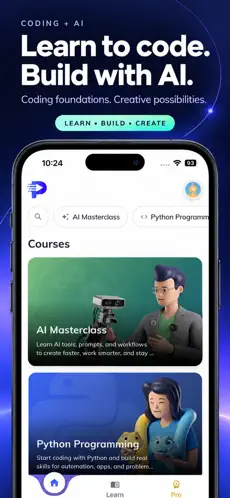
Programming Hub pairs interactive lessons with a large library of code examples. Lessons explain a concept, show the syntax, then hand you an exercise across 20+ languages with including Python. The latest update added an AI Playground that turns prompts into code.
Dense content suits a specific learner. If you want to know why a list comprehension beats a loop, Programming Hub tells you. If you want a cartoon mascot congratulating you on a streak, it does not.
Two caveats. The free tier carries ads and caps daily practice, and the interface is cluttered enough that the editor gets tight on a smaller iPhone.
Pricing: Free with ads and core lessons. Pro, which removes the ads and unlocks all practice, runs about $7/month.
Download Programming Hub | programminghub.io
Codecademy Go — Best Companion to a Desktop Course

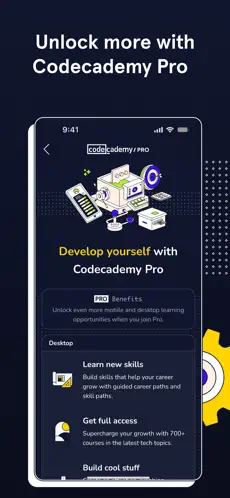
Codecademy Go is a supplement, and it is honest about that. The app delivers daily review cards and syntax practice, plus course enrollment and personalized course recommendations for whatever language you are already studying on a laptop. Think of it as the spaced repetition layer your desktop course never had.
Used that way it is excellent. The daily flash cards are easy to skim on the go. If you are paying for Codecademy Pro already, the app is free reinforcement.
Download it as your only coding resource and you will be disappointed. The mobile builds also move slower than the platform itself, with the last update in early 2026.
Pricing: Free for daily review. Paid Pro and Plus plans are available in the app.
Download Codecademy Go | codecademy.com
DataCamp — Best for Data Science and SQL


DataCamp is the most employable skill set on this list. Courses run in Python, SQL, R, and the AI stack, and lessons combine short videos, code-alongs and instant practice. The free tier gives you the first chapter of every course, which is enough to find out whether the teaching style clicks before you pay for anything.
The SQL track deserves a specific mention. DataCamp covers SQL joins and relational databases in PostgreSQL. Pair it with a phone that can run AI models locally and you have a self-contained data practice setup with no laptop in the loop.
That structure is the selling point and the frustration in the same package.
Pricing: Free tier with the first chapter of every course. Full access is a paid subscription, discounted heavily for annual billing.
Download DataCamp | datacamp.com
Encode — Best for Short Daily Practice


Encode bets everything on the idea that the hardest part of learning to code is opening the app. Short daily lessons with interactive exercises, covering Python, JavaScript, HTML, CSS and SQL.
The exercises are the best designed on this list for a thumb. You are not picking an answer from a list, you are writing real code in hands-on exercises.
Neither track will carry you from zero to employed, . That is the design. It is a habit tool that slots in next to a real course, not a replacement for one.
Pricing: Free with ads. Encode Plus, which removes ads, is $9.99/month or $39.99/year.
Download Encode | upskew.com/encode
Enki — Best for Professional Skill Building

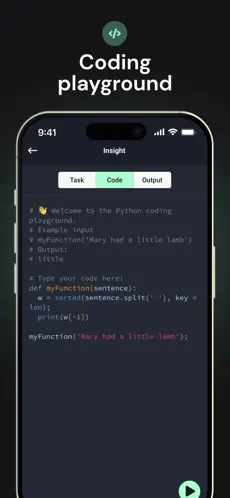
Enki is aimed at working professionals. Topics run from SQL joins to Python list comprehensions to Excel pivot tables to data science fundamentals, delivered as 5-minute workouts with spaced repetition. The app tracks what you have learned and brings concepts back right before they fade.
That rotation is the point. One morning you are writing a CTE, the next you are reading a regression output, the next you are reminded what a Python generator does. For a product manager, analyst, or operations lead who needs working literacy rather than developer depth, nothing else on this list fits as well.
Treat it as maintenance for skills you got somewhere else. Treat it as maintenance for skills you got somewhere else. It also has far fewer ratings than Mimo or Sololearn.
Pricing: Free with daily workouts across a rotating set of topics. Premium, at roughly $8/month, opens the full topic library.
Python Coding Editor and IDE — Best for Running Your Own Code

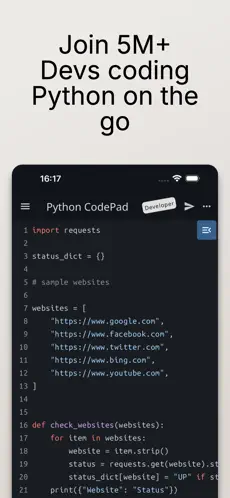
This one is built around running Python code rather than lessons. Python Coding Editor and IDE ships a Python 3 interpreter on the device, so you write a script, tap run, and see the output in a console like you would on a laptop. Standard library imports, functions, and classes all work, and there is a debugger that steps through your code line by line when something misbehaves.
The practical use is surprising. Write a script that does a calculation you keep repeating, and you have written your first real automation. The gap between exercises and useful code closes faster when the phone can actually execute what you type.
It is the lowest rated app on this list for a reason. Some features sit behind in-app purchases, and the free version carries ads, the interface is utilitarian, and nobody is going to describe it as fun. It is a tool, not a course, and it works best paired with one of the teaching apps above.
Pricing: Free to download, with ads and in-app purchases that unlock additional features.
Download Python Coding Editor and IDE
Swifty Compiler — Best for Writing Swift on iPhone


Swift is the one language on this list you can use to ship something to the phone you are holding, and Swifty Compiler is the closest thing to a Swift playground that fits in a pocket. You write Swift, run it, and see results without a Mac in the room. Import files, take a code snapshot as an image, and share code straight out of the app.
The free tier gives you 10 run credits a day, which sounds tight until you notice how much faster you move when every run costs something. Code completion, error highlighting, and auto-closing brackets are all there, and the app has stayed current through 2026 releases.
Two things to know. And if your actual goal is shipping an app, the language is the small part of the job. Building and shipping an iOS app means design, testing, review, and a long list of decisions that have nothing to do with syntax.
Pricing: Free, with 10 daily run credits. Optional purchases extend the credits and the export tools.
Which One Should You Pick?
If you have never written a line of code, start with Mimo. It gets you typing real syntax in the first five minutes, and the streak system works on the part of your brain that needs a reason to come back tomorrow. Finish the intro Python track, then decide whether you like building things or solving puzzles.
If you want depth without paying anything, use Khan Academy for the concepts and Sololearn for the language sampling. That pair covers computer science fundamentals and a wide range of languages, and both have a free tier. Readers with a lot of commute time get more out of the iPad study setup than a phone alone, since the editor never feels cramped there.
If you already write code and want a specific skill, skip the beginner apps entirely. DataCamp for SQL and Python data work, Enki for broad professional literacy, and the Python editor for the moment you want a script running on the device in your hand. The two languages worth learning first have not changed: Python and JavaScript are the two languages most of these apps teach first.
Our pick: Mimo. The highest rating on the list, a free download, and an October 2026 update showing the app is still being built.
Frequently Asked Questions
Can I actually learn to code on just an iPhone?
You can learn concepts, syntax, and logic, and you can write small programs that run. You cannot realistically build and ship production software from a phone. Treat mobile apps as the first month or two of learning, then move the serious work to a computer with a real editor and version control.
Do these free coding apps for iPhone stay free?
Khan Academy does, because it is a nonprofit with no subscription tier. The rest use a free tier to teach you the basics and sell extras on top, such as unlimited practice or more projects. Mimo and Sololearn both let you start learning for free.
Which programming language should I learn first?
Python for most people. The syntax reads close to English, it is used in data work, automation, and web backends, and most apps on this list teach it. JavaScript is the better first choice if websites are the goal, since it runs in the browser. Pick one and stay with it for a few months instead of sampling four.
How long does it take to get good enough to build something?
With 15 to 30 minutes a day, expect to understand loops, functions, and data structures in 4 to 8 weeks, and to ship a small working project in 3 to 6 months. The apps build the foundation. Only your own projects build the rest.
Are certificates from coding apps worth anything to employers?
No. Hiring managers evaluate what you have built and how you explain it, not completion badges. A small app you can demo, or a script that solved a real problem, carries more weight than any certificate a phone app issues. That is a good reason to spend your time with an app that runs code, not just one that quizzes you on it.
Related: Check out our new guide: 7 Best Tarot Apps for iPhone in 2026: Learn the Cards or Buy a Reading
Related Articles
- Best Kids Coding Apps for iPhone and iPad in 2026, for younger learners
- Best Offline AI Apps for iPhone, what you can build once the basics land
- Best iPhone Apps for College Students in 2026, the rest of the study stack