
Published Jul 18, 2026 · Updated Oct 27, 2026
If you want an app for kids with no subscription to cancel, Khan Academy Kids and PBS KIDS Games are the two on this list that have none: both are free outright, with no ads, no in-app purchases, and no trial that turns into a bill. The other six educational apps run on a subscription or in-app purchases, and every price is in the table below before you hand over a card. Khan Academy Kids is still the best free iPhone app for kids here, because a nonprofit gives away a full reading, math and logic curriculum for ages 2 to 8.
Most “free” kids apps are ad delivery vehicles with a coloring book attached. They interrupt play with banner ads, push gem packs, or open with a trial that quietly bills $79.99 a year if you forget to cancel. The eight apps below are the exception: all educational, all free or with a genuinely useful free tier, and none hiding a subscription behind a wall your child hits five minutes in. For younger children who would rather draw than solve anything, free coloring apps are the cheaper entry point.
Jump to a section
Quick Picks
- Best overall: Khan Academy Kids for a full free curriculum with no ads and no purchases
- Best for ages 2-5: PBS KIDS Games for familiar characters from PBS shows
- Best for reading: Epic for a 40,000+ title library, after a 7-day free trial
- Best for creative play: Todli for drawing, coloring, and quiet-time play without menus
- Best for preschool basics: Kiddopia for ABCs, counting, shapes, and puzzles
- Best for grades K-6: ABCya for 300+ learning games with no ads
- Best for learning to read: Learn to Read – Reading.com for structured phonics
- Best all-rounder: Keiki for a single app covering letters through early math
The 8 Free Kids Apps Compared
| App | Best For | Ads | Rating | Price |
|---|---|---|---|---|
| Khan Academy Kids | Complete curriculum | None | ★4.8 | Free |
| PBS KIDS Games | Trusted characters | None | ★4.4 | Free |
| Epic | Reading and books | None | ★4.7 | 7-day trial, then $11.99/mo |
| Todli | Drawing and creativity | None | ★4.5 | Free |
| Kiddopia | Preschool fundamentals | None | ★4.4 | 7-day trial, then subscription ($79.99 option listed) |
| ABCya | K-6 learning games | Light | ★4.4 | Free, $9.99/mo premium |
| Learn to Read | Phonics and reading | None | ★4.7 | Subscription, $12.49/mo |
| Keiki | Single-app learning | None | ★4.6 | Free to download, $39.99/year |
Khan Academy Kids — Best Completely Free Educational App


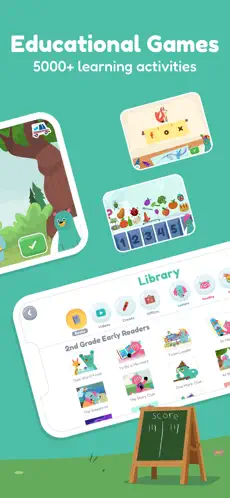
Khan Academy Kids is what happens when a well-funded nonprofit builds a kids learning app with no profit motive. No ads, no subscriptions, no in-app purchases. Just a library of thousands of educational activities aligned to Common Core standards for ages 2 through 8.
The app follows five animated characters through lessons in reading, math, social-emotional skills, and logic. The adaptive learning path adjusts difficulty based on how your child is doing: not in a gamified “pay to keep going” way, but in a genuine “here’s what you’re ready for next” way. There’s also a library mode where kids can choose their own activities and a library of storybooks and videos.
The art style is warm. The library mode lets kids browse on their own and the circle time section is a good wind-down activity before bed. The only real limitation: it’s designed for pre-K through second grade. After that, kids age out and need Khan Academy’s main app or something else entirely.
Pricing: Free. No ads. No in-app purchases.
PBS KIDS Games — Best for Familiar Characters, Zero Ads

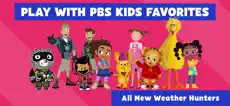
PBS KIDS Games has no in-app purchases. The games feature characters from PBS shows: Daniel Tiger, Wild Kratts, Molly of Denali, Arthur, Odd Squad. If your kid already watches PBS, these are familiar faces.
There are over 250 games covering science, math, reading, creativity, and social skills. New games are added weekly.
The downside: the games skew young. The description targets ages 2-8. By first or second grade, kids will outgrow the content and need something more challenging. But for the preschool years, this is the safest download on the App Store. It’s just a walled garden of games. For a parent who wants to hand over the phone without worrying about what else a kid might tap, that simplicity is the selling point.
Pricing: Free. No ads. No in-app purchases. Funded by PBS.
Epic — Best Digital Library for Kids (One Free Book Per Day)

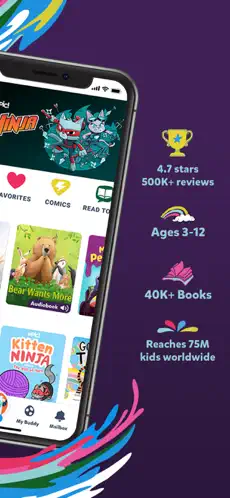
Epic is a digital library with 40,000+ children’s books, audiobooks, and educational videos. The monthly subscription is $11.99, beginning with a 7-day free trial.
The app includes a read-to-me feature for pre-readers, reading level filters, and tracking so you can see what your kid is reading and for how long. Teachers use Epic in classrooms for a reason: the content is genuinely educational, not just “kids app” filler.
Pricing: Subscription beginning with a 7-day free trial: $11.99/month.
Todli — Best for Drawing, Coloring, and Creative Play


Todli is an ad-free drawing and coloring app made for kids aged 2 to 5, with a free version that covers only part of the content. Kids open it, pick a template or a blank canvas, and start creating.
The app includes coloring pages organized by theme (animals, vehicles, dinosaurs, princesses), simple drawing tools with bright colors, and a free drawing mode. There’s also a gallery where their artwork is saved. The interface is deliberately simple: big buttons, no pop-ups, no external links a kid could accidentally tap.
It leans toward creative play, with some early-learning extras like letter and number tracing. It’s creative play, and that’s the point. For the car ride or restaurant where you need 20 minutes of quiet, Todli delivers without the guilt.
Pricing: Free to download, with in-app purchases. No ads.
Kiddopia — Best Preschool Fundamentals (Subscription After Trial)


Kiddopia covers the full preschool curriculum: ABCs, counting, shapes, colors, puzzles, and early science. The app averages 4.4 stars. The production quality is high: the voice acting, animations, and game design feel like a premium product.
The free trial gives you full access for 7 days. After that, Kiddopia Full Access is a subscription; the App Store lists a $79.99 option. This isn’t a free app in the same sense as Khan Academy Kids, but the trial is generous enough to figure out if your kid connects with it, and the content quality justifies the cost if they do.
One thing parents appreciate: Kiddopia adds new content monthly, so there’s always something fresh. No “complete the app and it’s over” problem.
Download Kiddopia on the App Store | Developer Website
Pricing: 7-day free trial, then a Kiddopia Full Access subscription (a $79.99 option is listed). No ads.
ABCya — Best for K-6 Learning Games (No Ads, Subscription for Full Access)


ABCya has been making educational games for over ten years. The free tier gives you six free games each week, and an optional subscription unlocks 300+ games. The description says there are no ads. The ABCya Family subscription ($9.99/month) unlocks the full 300+ game library.
The games are organized by grade and subject: math, language arts, science, social studies, and just-for-fun logic puzzles.
The graphics won’t impress anyone. But the educational design is solid and teachers have been recommending ABCya to parents for two decades for good reason.
Pricing: Free to download with six free games each week. ABCya Family subscription $9.99/month unlocks 300+ games. No ads.
Learn to Read – Reading.com — Best Phonics-Based Reading App


Reading.com teaches reading through systematic phonics: letter sounds first, then blending, then words, then sentences. Reading.com is a paid subscription, listed at $12.49/month.
The lessons follow a predictable structure: fully scripted phonics lessons that a grown-up and child do together. It’s more engaging than flashcards and more structured than hoping a kid absorbs phonics through exposure alone.
For parents who want a systematic reading curriculum without hiring a tutor or buying a $200 reading program, this is a solid starting point on iPhone.
Pricing: Subscription, $12.49/month or $74.99/year.
Keiki — Best Single App for Ages 2-6


Keiki bundles ABCs, counting, logic puzzles, coloring, and basic problem-solving into one app. The app is 100% ad-free, with a free trial before the subscription starts. The Keiki World Premium subscription is listed at $39.99/year and unlocks the full library of 1,500+ interactive activities.
The games are designed with input from early childhood educators and the difficulty curve is well-judged. A 3-year-old working on letter recognition and a 5-year-old doing simple addition can both find content at the right level.
The ad-free experience means you’re not constantly batting away pop-ups while your kid tries to tap the right letter.
Pricing: Keiki World Premium subscription, $39.99/year. No ads.
Which One Should You Pick?
If you want one app that covers everything with no catches and no payments ever, get Khan Academy Kids. It exists because a nonprofit decided kids deserve a great education for free, and it delivers.
For the preschool crowd who just need safe entertainment, PBS KIDS Games is the answer. Familiar characters and no in-app purchases. You can hand over the phone and not worry about what they’ll find.
If reading is the priority, start with Epic’s 7-day free trial.
Our pick: Khan Academy Kids. Free forever, no ads, no purchases, and the educational design is the best in its category. A nonprofit built a better kids learning app than most companies with nine-figure VC funding managed to produce.
Related: Check out our new guide: Magic Tiles 3 Review 2026: Superb Piano Taps, Ruthless Ads
Frequently Asked Questions
Are there any completely free kids apps with no ads?
Yes. Khan Academy Kids and PBS KIDS Games are completely free with no in-app purchases; Todli is ad-free but sells in-app purchases. Khan Academy Kids is funded by a nonprofit, PBS KIDS Games is funded by public broadcasting, and Todli is free to download but sells in-app purchases. Khan Academy Kids and Todli describe offline use.
How do I prevent my child from making in-app purchases?
Go to Settings → Screen Time → Content & Privacy Restrictions → iTunes & App Store Purchases → In-app Purchases → Don’t Allow. This blocks all IAP system-wide. For additional safety, only Khan Academy Kids and PBS KIDS Games list no in-app purchases.
What age range do these apps cover?
Khan Academy Kids covers ages 2-8. PBS KIDS Games is best for 2-6. ABCya covers kindergarten through 6th grade. Epic has books for ages 2-12. Most of the “preschool” apps (Kiddopia, Keiki, Todli) start at age 2.
Do these apps work without Wi-Fi?
Khan Academy Kids and Todli describe offline use; ABCya requires an internet connection. Epic lets you download books to read offline.
Is there a free alternative to ABCmouse?
Yes. Khan Academy Kids is the closest free equivalent to ABCmouse’s full curriculum at ages 2-8. It covers the same subjects (reading, math, logic, social-emotional learning) with comparable production quality. The main difference: ABCmouse costs $12.99/month while Khan Academy Kids is completely free.
Do any of these apps have hidden costs or “free trial” traps?
Khan Academy Kids and PBS KIDS Games have no subscriptions, no trials, and no in-app purchases. Apps like Kiddopia and Keiki open with a free trial that converts to a subscription if not cancelled. Epic is a paid subscription that begins with a 7-day free trial. Every pricing model is disclosed above.
Related guides: Best free drawing apps for iPad and iPhone if your kid prefers a blank canvas to a lesson, our best free coloring apps for kids when they would rather color inside the lines, best flashcard and study apps once they are old enough for homework, and the best iPad apps for students for the school years that come after these.
External Source: Khan Academy Kids: Free, fun educational app for young kids, the official Khan Academy Kids page confirming free, no-ads, no-subscription model.