
Published Mar 23, 2026 · Updated Oct 27, 2026
Paprika Recipe Manager 3 is the best recipe app for iPhone for most people. It costs $4.99 once, with no subscription, and it clips recipes from any website, builds a grocery list, and syncs across your devices. If you want the same job done for free, Samsung Food is the pick. The rest of this list covers the niche cases: a huge browsing library, a minimalist reader, and apps that pull recipes out of Instagram and TikTok.
Cooking from a phone has one real problem. Most recipe websites are buried under autoplay video, cookie banners, and a 900-word story about a trip to Tuscany before you reach the ingredients. The apps below strip that away. They save the recipe, scale it to your serving size, and put the steps where your hands can see them while something is actually on the stove.
Jump to a section
Best Recipe Apps for iPhone — Quick Picks
- Best overall: Paprika Recipe Manager 3, a one-time $4.99 with no subscription
- Best for discovering new recipes: NYT Cooking
- Best free meal planner: Samsung Food
- Best for your own collection across devices: Recipe Keeper
- Best minimalist meal planner: Crouton
Best Recipe Apps for iPhone at a Glance
| App | Best for | Price | Rating |
|---|---|---|---|
| Paprika Recipe Manager 3 | Overall recipe management | $4.99 once | 4.9 |
| NYT Cooking | Discovering tested recipes | Free + subscription | 4.9 |
| Samsung Food | Free weekly meal planning | Free | 4.8 |
| Recipe Keeper | Cross-platform collection | Free + in-app purchase | 4.8 |
| Crouton | Minimalist meal planning | Free + subscription | 4.8 |
| Pestle | Clipping from social media | Free + subscription | 4.7 |
| Tasty | Video recipes and browsing | Free + subscription | 4.9 |
| Mealime | Guided healthy meal plans | Free + subscription | 4.8 |
| Kitchen Stories | Guided cooking | Free + subscription | 4.8 |
Paprika Recipe Manager 3 — Best Overall


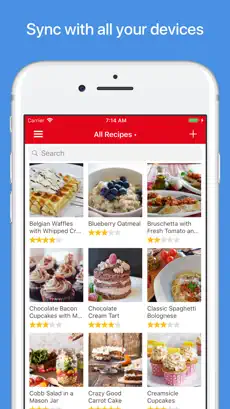
Paprika has been the reference point for recipe management on iPhone for years, and version 3 still earns it. The model is the reason. You pay $4.99 one time and you own it. There’s no subscription. Recipes are stored locally on your device and sync through Paprika’s free Cloud Sync.
The built-in browser is the feature that sells it. Open a recipe anywhere on the web inside Paprika, tap the download button, and it parses the page down to ingredients and steps. Quantities scale automatically when you change servings, common measurements convert, and cooking timers get detected and offered as one-tap buttons. The grocery list does the quiet work that saves real time: it merges duplicates across recipes, so three dinners that each call for eggs produce one line item instead of three, and it sorts the merged list by supermarket aisle.
The trade-offs are real. The interface hasn’t changed much in years, and it looks dated next to Crouton or Mela. You also pay upfront, which stings if you just want to try something. For anyone who keeps a real recipe collection, though, a one-time $4.99 that lasts for years beats a subscription that quietly renews every month. It’s the calculator of recipe apps: unglamorous, complete, and always there.
Pricing: $4.99 one-time purchase. No subscription.
NYT Cooking — Best for Discovering New Recipes


If the problem is deciding what to cook rather than storing what you already cook, NYT Cooking is in a different league. Every recipe is tested by a real kitchen before it ships, which is why the instructions read like someone actually made the dish. Recipes include ratings, reviews and tips from other home cooks. The app is fast, the search is good, and the recipe box keeps your saves organized.
It also has a deep library of editor-curated collections behind it. The app has editor-curated collections and a searchable database of over 20,000 recipes. Save a recipe and you can pull its ingredients straight into a shopping list.
The catch is the paywall. The app is free to download, but meaningful access runs through a New York Times Cooking subscription, and a handful of free recipes won’t get you far. If you already subscribe to NYT Cooking, you can log in for full access. If you don’t, and you just want somewhere to keep your own recipes, this isn’t the app for that. It’s a publication, not a filing cabinet.
Pricing: Free download. Full library requires a New York Times Cooking subscription.
Samsung Food — Best Free Meal Planner

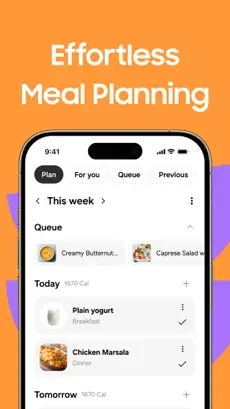
Samsung Food began life as Whisk, the recipe and shopping app that Samsung later rebranded, as SamMobile reported when the name changed. The odd branding hides a genuinely strong free app. It runs on iPhone and iPad like any other app.
What you get for nothing is a lot. You can save recipes from any website, and the planner lets you map a full week and roll every planned meal into one consolidated grocery list. The built-in library is large and searchable by ingredient, which is handy when you have half a bag of spinach and no plan.
It’s the most capable free option on this list by a distance, and it’s the one I’d hand to someone who wants meal planning to just work without paying. The trade-offs are a slightly busy interface and an occasional nudge toward Samsung Food Plus. The free tier covers planning meals, saving recipes and building shared shopping lists.
Pricing: Free. Optional Samsung Food Plus subscription for extra features.
Recipe Keeper — Best Cross-Platform Organizer


Recipe Keeper is the app for people with a cookbook they actually want to keep, not just a folder of links. It runs everywhere: iPhone, iPad, Mac, Windows, Android, and the web, with your collection syncing across all of them. That last part matters if you cook from an iPad in the kitchen but plan on a laptop at your desk.
The import tools are the strongest here. You can pull recipes from hundreds of supported websites, or scan them straight out of a cookbook, a magazine, or your grandmother’s handwritten index cards using the camera. From there you can tag by course and category, add photos, rate dishes, and flag favorites. The shopping list and meal planner are built in, and the list groups items by aisle.
It’s less pretty than Crouton and there’s a bit more setup before it feels like yours. The app is free to download and offers a Pro Upgrade in-app purchase. The upside is that it’s built to work across Windows and Android too, so a mixed-device household can share one cookbook.
Pricing: Free to download. Pro Upgrade in-app purchase ($19.99); other platforms need a separate purchase.
Crouton — Best Minimalist Meal Planner


Crouton is what happens when a developer treats recipe management as a design problem. It’s built around a weekly meal plan you drag recipes into, and the whole thing feels calm rather than cluttered. Import works from almost anywhere: websites get parsed automatically, and you can scan recipes out of a cookbook using its OCR and AI extraction, including handwritten ones. If you’re stuck, it can generate a meal plan from your saved recipes on its own.
The details are where it earns the following. Steps display one at a time so you can cook without touching your phone, timers are built into the instructions, and the grocery list is built from your recipes. Recipes can be shared with family and friends using iCloud.
The honest downside is a smaller user base. It has a few thousand ratings rather than tens of thousands, and some features sit behind the Crouton+ upgrade. It’s Apple-only, so it won’t help a Windows household. If you want the best-looking recipe app on iPhone and you don’t mind paying for the full version, it’s the one to get.
Pricing: Free to download. Crouton+ in-app purchase unlocks more features.
Pestle — Best for Quick Recipe Clipping


Pestle is the fastest way to save a recipe you just found. The share extension is the star: from Instagram, TikTok, Facebook, YouTube, or any website, you tap Share and then Save to my Cookbook. It pulls out the ingredients and steps and throws away everything else, which is exactly what you want from a video recipe that has no written version anywhere.
Once a recipe is in, the guided cooking mode turns it into a guided flow with as many timers as the recipe needs and reminders for quantities mid-way through. It syncs instantly between iPhone and iPad, supports Handoff, and has a household feature for sharing a cookbook with someone else.
The trade-offs are small scope and a low profile. Pestle does clipping and cooking well, and its rating count is modest because it’s a focused app rather than a mass-market one. If your habit is saving recipes from social feeds and you want them to land somewhere clean in two taps, this is the best tool for that specific job.
Pricing: Free to download.
Tasty — Best for Video Recipes


Tasty is the app to open when you don’t know what you want and you’d rather watch than read. It carries more than 10,000 recipes, each with a video, and the guided cooking mode walks you through with clips rather than walls of text. It’s one of the biggest recipe apps on the App Store, and BuzzFeed’s food brand is the reason.
The browsing is genuinely good. Recommendations shift with the season, the time of day, and the occasion, there’s a lively community posting their own cooks, and an AI assistant called Botatouille answers “what can I make with this?” style questions. For a lot of people this is the app that finally makes cooking feel approachable, because watching someone do it is easier than decoding a recipe card.
The caveats are ads and ownership. The free version is ad-supported, and you’re mostly browsing BuzzFeed’s library. It’s weaker as a personal recipe vault than Paprika or Recipe Keeper. As a discovery and video app, though, it is a strong pick.
Pricing: Free with ads.
Mealime — Best for Guided Meal Planning

Mealime has announced it will shut down on October 21, 2026, so we no longer recommend starting with it. Most meals are designed to come together in about 30 minutes, which is the whole pitch: healthy dinners without the planning overhead.
It’s popular for a reason, with more than 7 million users according to the developer. You can filter hard on dietary needs, whether that’s vegetarian, gluten-free, or a specific calorie target, and the grocery list updates the moment you swap a meal. In some regions you can even push the list to a delivery service, which turns the whole thing into one workflow.
Mealime Pro is a $2.99/month upgrade for added benefits.
Kitchen Stories — Best for Guided Cooking

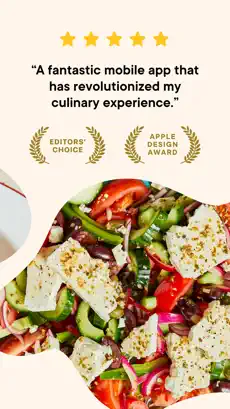
Kitchen Stories sits between a cooking school and a recipe box. Recipes come with step-by-step instructions and high-quality photos, so the app teaches as it goes. If you’ve ever wondered what “fold gently” actually looks like, this is the app that shows you instead of describing it.
The library is chef-tested and broad, covering quick weeknight meals, baking, and specific techniques. The digital cookbook lets you save and organize recipes, and the subscription tier adds the useful trick of saving recipes from Instagram and TikTok into your collection in one tap, which solves the screenshot mess most people end up with.
As a pure personal vault it’s lighter than Paprika or Recipe Keeper, the free tier is ad-supported, and the best saving features want the Plus subscription. Treat it as the app you open to learn and be inspired, and keep your permanent collection somewhere else. For beginners especially, the guided format is the fastest way from “I can’t cook” to “I can follow this.”
Pricing: Free with ads. Kitchen Stories Plus subscription for ad-free use and social recipe saving.
Which Recipe App Should You Choose?
If you want one app to own outright with no recurring fee, Paprika 3 at $4.99 is the answer. It’s the most complete recipe manager here, and paying once is a genuine advantage over a subscription that never ends.
If you love discovering new recipes and you already read the New York Times, NYT Cooking is worth the subscription. If you want a free weekly planning workflow, Samsung Food is the strongest option by a wide margin. If your recipes need to live on a Windows PC and an iPhone at once, Recipe Keeper is a strong choice. If design matters most, Crouton is the best-looking planner on the list. And if your problem is recipes trapped in Instagram videos, Pestle is built for exactly that.
Our pick: Paprika Recipe Manager 3. A one-time $4.99, no subscription, and it handles the whole job from clipping to grocery list without asking for anything else.
Frequently Asked Questions
What is the best free recipe app for iPhone?
Samsung Food, formerly Whisk, is the strongest free option. It saves recipes from websites, includes a weekly meal planner, and generates a consolidated grocery list without a required subscription. Kitchen Stories is also free with ads if you’d rather cook along with photo instructions.
Is Paprika worth buying?
Yes, for anyone who keeps a real recipe collection. At $4.99 once with no subscription, Paprika Recipe Manager 3 offers more management features than most paid subscription apps, and the price is a one-time cost rather than a monthly bill. If you only want to browse recipes, a free app will do.
Can iPhone recipe apps save recipes from Instagram or TikTok?
Some can. Pestle and Kitchen Stories Plus support saving recipes from Instagram and TikTok. Paprika is built around saving recipes from websites.
Do recipe apps work offline?
It depends on the app. Paprika stores every recipe locally and works fully offline, including the grocery list and meal planner. Recipe Keeper also works offline.
What happened to Whisk?
Whisk was later rebranded as Samsung Food. The app is available free on iPhone and iPad, with meal planning and recipe saving.
More Kitchen App Guides
If you’re organizing more than dinner, our guide to the best grocery list apps for iPhone pairs well with any of these. If you’re tracking what you eat rather than what you cook, our roundup of the best calorie counter apps for iPhone picks up where the recipes leave off. And if you work in a kitchen rather than just cooking at home, our list of the best apps for restaurant servers and line cooks is the one to read. If tonight is a restaurant night rather than a cooking night, our MenuFit review covers the ordering-out end of it, and our piece on ordering DoorDash inside Apple Messages covers delivery.