
Published Apr 18, 2026 · Updated Nov 13, 2026
Spotify is the best music app for most iPhone users. Premium unlocks offline downloads, the free tier is genuinely usable, and its personalized recommendations are its strongest feature. If lossless audio matters more to you than discovery, Apple Music includes lossless audio and Spatial Audio with Dolby Atmos.
The best music apps for iPhone in 2026 don’t compete on catalogue size anymore. One is built around a radio station that learns your taste, another exists because half the music you want was never released commercially, and a third is a 4.9-star app that owns no catalogue at all. Picking the right one comes down to what you actually do with your phone: commute, work out, hunt down a live bootleg, or press a button and find out what that song in the coffee shop was.
Jump to a section
Best Music Apps for iPhone in 2026 — Quick Picks
- Best overall: Spotify, for the sharpest recommendations and a real free tier
- Best for lossless: Apple Music, which includes lossless and Dolby Atmos
- Best for live and rare recordings: YouTube Music, for live performances, covers and remixes
- Best if you already pay for Prime: Amazon Music, since the included tier costs nothing extra
- Best free radio: Pandora, a station that adapts to your taste for $0
- Best sound quality: TIDAL, with HiRes FLAC up to 24-bit/192kHz
- Best for independent artists: SoundCloud, for tracks that never make it to streaming
- Best for mixed playlists: Deezer, where Flow builds a station from your own likes
- Best for high-res audio: Qobuz, with lossless and Hi-Res streaming and downloads
- Best for identifying a song: Shazam, one button and you have the answer
The Best Music Apps for iPhone in 2026 at a Glance
| App | Best for | Price | Rating |
|---|---|---|---|
| Spotify | Overall listening | Free / Premium subscription | ★ 4.77 |
| Apple Music | iPhone and Siri integration | Subscription | ★ 4.85 |
| YouTube Music | Live and rare recordings | Free with ads / paid tier | ★ 4.77 |
| Amazon Music | Prime subscribers | Free with Prime / $13.99 per month | ★ 4.72 |
| Pandora | Radio-style listening | Free / Plus and Premium subscriptions | ★ 4.80 |
| TIDAL | Sound quality | Free trial / $15.49 per month | ★ 4.71 |
| SoundCloud | Independent artists | Free with ads / paid tier | ★ 4.84 |
| Deezer | Mixed playlists | Free / $14.99 per month | ★ 4.66 |
| Qobuz | High-res streaming and downloads | Free trial / subscription | ★ 4.62 |
| Shazam | Identifying songs | Free | ★ 4.89 |
Spotify — Best Overall


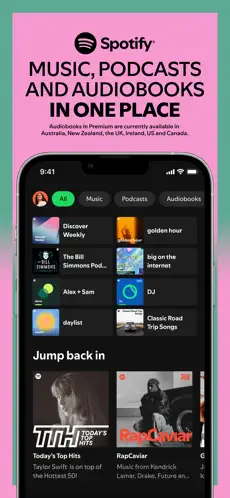 Spotify’s strength is the algorithm. Discover Weekly and Release Radar surface music that feels chosen rather than computed, and the AI DJ, a personalized guide that chooses what to play for you, makes passive listening feel intentional. It also folds podcasts and audiobooks into the same app, which is why so many people never open a second audio app at all.
Here’s the part most lists skip. Spotify’s recommendation quality depends on how much you feed it. Skip tracks aggressively, save albums, follow artists, and the algorithm sharpens within a couple of weeks. Treat it as background noise, and every playlist you get will sound like the same twenty songs rearranged.
The free tier is genuinely usable, and offline downloads still require Premium.
Pricing: Free with ads. Premium adds offline downloads and ad-free listening.
Apple Music — Best for iPhone and Siri

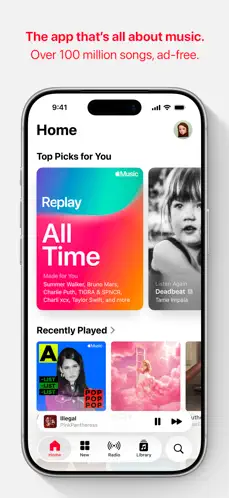 Apple Music’s advantage isn’t the catalogue, which is comparable to Spotify’s. It’s the integration. Ask Siri to play something and it plays, without a handoff to a third-party app. Shazam lets you add songs you identify directly to your Apple Music playlists. If you own an Apple Watch, Apple Music also lets you download and stream music straight to it.
Here lossless audio and Spatial Audio with Dolby Atmos are part of the service.
The criticism: Apple Music is worse at discovery, and it’s not close. The personalised mixes have improved, but the app still feels like a library you maintain rather than a service that learns.
Pricing:
YouTube Music — Best for Live and Rare Recordings

 If the version of a song you want was never officially released, YouTube Music is where it lives. Studio versions sit next to concert footage, radio sessions, extended edits, covers, and fan uploads, and the app treats all of them as playable music rather than video. For anyone whose listening leans on live sets, covers and remixes, that range is the main reason to pick it.
The catch, and it’s a big one: the free tier is close to useless for background listening. Audio stops the moment you lock your phone or switch apps unless you pay, which makes the free version a shop window rather than a service.
Pricing: Free with ads and no background play. YouTube Music Premium and YouTube Premium are sold as in-app subscriptions through the App Store listing.
Amazon Music — Best if You Already Have Prime

 Amazon Music is the pragmatic pick. If you pay for Prime, all the music is already included ad-free, and it costs you nothing extra to try. The app is competent rather than exciting: playlists work, and downloads are available with Unlimited. The full tier also includes a growing collection of spatial audio.
The criticism: The Prime tier is shuffle-based, so it works as background listening and little else., so it works as background listening and little else. And if you cancel Prime, you drop back to the free tier with ads.
Pricing: Ad-free music with shuffle play is included with Prime. Amazon Music Unlimited Individual is $13.99 per month in the App Store listing.
Pandora — Best Free Radio

 Pandora builds stations around your taste and it shows. You seed a station from one artist, then thumb tracks up or down, and the station narrows toward what you actually liked rather than what a genre tag says you should like. It’s the least demanding app on this list: you seed a station, then just press play and adjust.
Here’s the thing worth knowing: Pandora’s free tier is ad-supported radio: you build stations and thumb tracks up or down, and you can watch an ad to search and play any track.
The criticism: Pandora is a US-only service and it shows. Albums and offline listening sit behind Premium.
Pricing: Free. Pandora Plus and Pandora Premium are sold as in-app subscriptions, with Premium listed at $14.99 per month.
TIDAL — Best Sound Quality

 TIDAL streams HiRes FLAC up to 24-bit/192kHz, and it puts audio quality at the centre of the product. If you plug in a DAC or decent wired headphones, the difference between TIDAL and a standard stream on an album with a good master is audible, not theoretical.
One thing you should know, because almost every comparison page still gets this wrong. All TIDAL plans include HiRes lossless sound quality. Nearly Nearly everything that tier offered, including high resolution audio, was folded into the standard plan. Reports at the time documented the change and the price attached to it.1 If a review quotes you $19.99 a month for a TIDAL tier, that review is years out of date.
The criticism: on Bluetooth earbuds the audio advantage largely disappears, because the codec becomes the bottleneck, not the source file.
Pricing: Free trial for 30 days, then $15.49 per month for TIDAL Individual (Family is $26.99), and every plan includes HiRes lossless.
SoundCloud — Best for Independent Artists

 SoundCloud is where music lands first. Bedroom producers, DJ mixes, unreleased edits, and unsigned tracks show up here first, and a lot of them never leave. Fans can share tracks and connect directly with artists and other listeners. Follow the right fifteen accounts and the feed becomes more useful than any algorithmic playlist.
The criticism: the free tier is heavy on ads and inconsistent. Some tracks are locked to the Go+ tier.
Pricing: Free with ads. SoundCloud Go / Go+ and the Artist plans are sold as in-app subscriptions.
Deezer — Best for Mixed Playlists

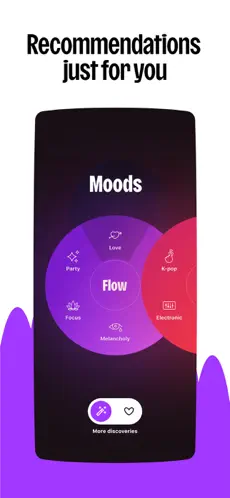 Deezer’s Flow is an infinite, personalized mix of favorites and discoveries. It mixes what you’ve liked with what you haven’t heard, adapts as you skip, and does it without asking you to curate anything. The song recognition built into the app is also genuinely good, and SongCatcher helps you find songs playing around you.
The criticism: reviewers report bugs, including crashes on CarPlay and downloads that stall.
Pricing: Free with ads. Premium is $14.99 per month and Family is $22.99 in the App Store listing; Duo and Student plans also exist.
Qobuz — Best for High-Res Audio and Downloads

 Qobuz is the audiophile’s answer to this list, and it’s built around a detail the others bury: it offers Hi-Res streaming and downloads in lossless and high-resolution quality. The editorial side is genuinely good too. Liner notes, artist interviews, and album write-ups sit alongside the music, which makes it feel closer to a magazine than a jukebox. If you have a decent DAC and a wired setup, this is the app built for it.
The criticism: the app is unapologetically aimed at people who care about audio quality, and the app is unapologetically aimed at people who know what a FLAC file is. If you mostly listen through AirPods on a commute, you’re paying for something you can’t hear.
Pricing: Free trial, then a monthly subscription. The Studio Solo, Premium and Hi-Fi plans are sold as in-app subscriptions via the App Store listing.
Shazam — Best for Identifying a Song

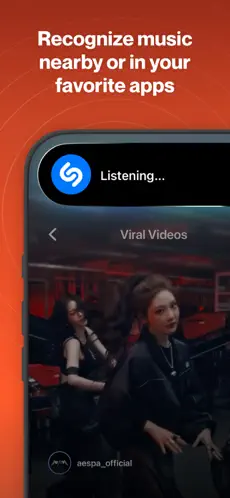 Shazam isn’t a streaming service and doesn’t pretend to be one, which is exactly why it belongs here. One tap identifies a track in a few seconds, works offline for match history, and also recognises songs playing in other apps. The results feed straight into Apple Music and the offline mode recognises songs even when you have no signal.
Once a song is identified, you can open it in Apple Music, Spotify, YouTube Music, Amazon Music or Deezer.
Pricing: Free. No subscription or in-app purchases.
Which One Should You Pick?
Start with what you already pay for. Anyone with a Prime subscription should try Amazon Music before spending anything, because the included tier costs nothing to test. Anyone in the Apple ecosystem gets the most from Apple Music, since lossless and Siri control are built in. If you want one app to do everything, Spotify is still the safest recommendation, and its free tier will tell you whether you’ll use it before you commit.
For the specific cases: TIDAL if you have a wired pair of headphones or a DAC and you want the best possible stream. SoundCloud if your listening is built on DJ mixes and unreleased tracks. Qobuz if you want Hi-Res streaming and downloads. Pandora if you never want to build a playlist again. And Shazam alongside whichever you choose, because it costs nothing and identifies songs on the spot.
If your phone is also your instrument or your editing studio, our roundup of the best apps for musicians on iPhone covers the production side. Our guide to the best podcast apps for iPhone is worth a look if talk radio matters as much as music here, and the best video editing apps for iPhone covers what to do when you want to cut footage of that concert rather than just listen back to it. Readers who prefer an evening away from screens might prefer the best apps for book lovers instead.
Our pick: Spotify. It pairs a huge catalogue with recommendations good enough to change what you listen to, and the free tier means the decision costs you nothing to make.
Frequently Asked Questions
What is the best free music app for iPhone?
Pandora is the best free option for radio-style listening, with stations that adapt to your thumbs up and down. Spotify’s free tier lets you stream music and podcasts with ads, but offline downloads need Premium. YouTube Music’s free tier stops playing when you lock your phone, which rules it out for commuting.
Is Spotify or Apple Music better for iPhone?
Apple Music offers Siri control and lossless audio. Spotify is better at discovery and cross-platform use, and it has a free tier. If you’re already deep in Apple’s ecosystem, Apple Music is the easier purchase.
Which music app has the best sound quality?
TIDAL streams HiRes FLAC up to 24-bit/192kHz, and Apple Music includes lossless audio. The catch is your hardware: over Bluetooth, most earbuds can’t carry the extra data, so the difference usually needs wired headphones or a DAC to be worth paying for.
Do I need a subscription to listen offline?
Yes, on almost every app here. Spotify, Apple Music, Amazon Music, TIDAL, Deezer and Qobuz all gate downloads behind a paid tier. SoundCloud works the same way: offline saving comes with its paid Go and Go+ tiers.
What is the best app for discovering new artists?
SoundCloud for artists before they break, because tracks from emerging artists land there first. Spotify is better if you want the discovery handled for you rather than done manually, and Pandora takes the least effort of all if you’d rather thumb tracks up and down than follow accounts.
Is your app on this list? Add a free "Featured on iOS App Lists" badge to your website or press kit.