
Published Jun 15, 2026 · Updated Oct 27, 2026
Some days you want a puzzle that makes you feel like an idiot for ten minutes before that glorious click of understanding. Other days you want to drag wooden blocks around a grid while half-watching Netflix (yes, Netflix has games now — here’s how to play them). Both are valid. Most “best puzzle games” roundups treat these as the same thing. They’re not.
So we split them. Below you’ll find three brain-bending teasers for people who enjoy being confused on purpose, then four genuinely calming puzzlers for winding down. Every app here has cleared 100,000 ratings on the App Store — these aren’t obscure gems, they’re the ones millions of people actually keep on their phones.
Jump to a section
Quick Picks
- Best for making you feel clever: Brain Test — trick puzzles that punish assumptions and reward lateral thinking
- Best for logic nerds: Crossmath — math-meets-crossword with a near-perfect 4.94★ rating
- Best for trivia fans: Who Is? — mystery riddles where you hunt for clues to work out who’s lying or who did it
- Best for pure relaxation: Zen Word — a letter-connecting word game with no countdown, designed to calm you down
- Best for “one more round” addiction: Blockudoku — sudoku-grid logic wrapped in a wooden-block aesthetic
- Best eye candy: Polysphere — rotate shattered 3D sculptures until they become gorgeous artwork
- Best for ASMR-loving match fans: Tile Match 3D — tap identical tiles, hear satisfying pops, repeat
Brain Teasers
These three are for people who enjoy being wrong before they’re right. Expect trick questions, math that sneaks up on you, and riddles that make you groan when you finally get them.
Brain Test: Tricky Puzzles — Best for Creative Thinkers


 Brain Test doesn’t play fair — and that’s the point. Each level presents what looks like a simple logic puzzle, then punishes you for making the obvious assumption. Expect to experiment with each level rather than trusting first impressions. The game actively trains you to stop trusting first impressions.
It’s made by UNICO STUDIO, and as of June 2026 it sits at 4.78★ across 1.4 million ratings — making it the most popular app in this entire article.
Here’s the thing: some puzzles cross the line from “clever” to “obtuse.” You’ll hit levels where the solution feels arbitrary rather than earned. The hint system softens this, but using hints too often drains the satisfaction. The VIP subscription (weekly) removes ads, adds 100 lamps, and makes hints and skips cheaper — whether that’s worth it depends entirely on your frustration tolerance.
Pro tip: If you’re stuck, try doing the exact opposite of what the puzzle seems to want. Brain Test’s design philosophy is basically “subvert every expectation.” Also: swipe everything. Even things that aren’t buttons. Especially things that aren’t buttons.
Pricing: Free with ads. VIP subscription (weekly) for ad removal, cheaper hints and skips, and a double daily gift.
Download Brain Test: Tricky Puzzles | UNICO STUDIO
Math Puzzle Games – Crossmath® — Best for Numbers People

 Crossmath is exactly what it sounds like: crossword puzzles where the clues are arithmetic problems. You solve a grid of arithmetic using addition, subtraction, multiplication, and division. Your job is to make the math work. It sounds dry. It’s not.
At 4.94★ across 246,196 ratings, Crossmath is the highest-rated app in this entire article. That’s not an accident. Guru Smart Holding Limited offers four difficulty settings: Easy, Medium, Hard, and Expert.
The catch? It’s still math. If the phrase “order of operations” makes your eye twitch, this isn’t your game. Also, some reviewers find the ads intrusive. Not deal-breaking, but worth knowing going in.
Pro tip: Also: work the intersections first. Cells that belong to both a tricky row and a tricky column are usually where the bottleneck lives.
Pricing: Free with ads and in-app purchase.
Download Crossmath | Guru Smart Holding Limited
Who Is? Brain Teaser & Riddles — Best for Pop Culture Buffs

 Also from UNICO STUDIO, Who Is? flips the Brain Test formula toward trivia. Each level is a mystery-style riddle — who is lying, who is the killer, who is the mother — and you hunt for clues to answer it. The clues are genuinely clever — you hunt for clues to work out the answer.
With 4.79★ and 173,919 ratings, it’s comfortably popular. But it occupies a weird middle ground. It’s not as creatively unhinged as Brain Test, and it’s not as rigorous as a dedicated trivia app. The result is a game that’s consistently fun but rarely surprising.
And to be honest, the difficulty curve wanders. Some levels require genuinely broad cultural knowledge; others are solvable by anyone who’s seen a movie poster in the last decade. You’ll breeze through five puzzles, then hit one that assumes you know the name of a 1970s French philosopher. It’s uneven. But when the clues land, they land.
Pro tip: Save hints for the puzzles where you genuinely have zero context — guessing blindly burns through hints fast. And if a clue seems hyper-specific to a profession or era, it probably is. Google is not cheating. It’s research.
Pricing: Free with ads and IAP.
Download Who Is? Brain Teaser & Riddles | UNICO STUDIO
Relaxing Puzzlers
If the first three apps made your brain hurt, these four are the antidote. No trick questions. No math. Just satisfying mechanics designed to calm you down. For more in the same corner of the App Store, we’ve also reviewed CubeAway and Magic Sort!.
Zen Word® – Relax Puzzle Game — Best for Winding Down

 Zen Word knows exactly what it is. It’s a word game — find hidden words by connecting letters — wrapped in soft colors, gentle animations, and a “relax puzzle game” label that the developers (Oakever Games) lean into hard. No countdown.
The numbers back it up. 4.89★ across hundreds of thousands of ratings, with regular updates. It’s actively maintained and absurdly popular for a genre that most developers treat as an afterthought.
The trade-off: Zen Word isn’t going to surprise you. Some reviewers say the challenge fades in later levels. Some people will find that meditative. Others will find it boring. If you need escalating difficulty to stay engaged, this probably isn’t your daily driver — but it makes a perfect palate cleanser between more intense games.
Pro tip: A fresh visual arrangement often reveals words your brain was filtering out in the original configuration. Also: work outward from the center. Most puzzle designers place key letters near the middle.
Pricing: Free with ads and IAP.
Download Zen Word | Oakever Games
Blockudoku – Block Puzzle Game — Best for “One More Round”

 Blockudoku is one of the most popular apps in this article — 654,144 ratings and counting. It’s also deceptively simple: you get wooden-style block pieces, you place them on a 9×9 sudoku grid, and you clear rows, columns, or 3×3 squares when they fill completely. That’s it.
Easybrain nailed the formula. The block placement feels tactile, the wood-grain aesthetic is warm without being twee, and the scoring is calibrated so you’re always this close to beating your high score. Daily Challenges, Seasonal Events, and Tournaments keep it from getting stale. .”
But. Blockudoku has a luck problem. The pieces are random, and sometimes the game just decides your run is over — you’ll get three awkward shapes in a row with nowhere to place them, and that’s that. No amount of skill saves you.
Pro tip: Never place a piece that creates a single empty cell in a row or column unless you have a 1×1 block coming to fill it. Single-cell gaps are run-enders. Also: clear 3×3 squares and rows with every move to keep the board from filling up.
Pricing: Free with ads and IAP.
Download Blockudoku | Easybrain
Polysphere: Art Puzzle 3D — Best Visual Experience

 Polysphere is an art puzzle: you restore pictures by rotating scattered pieces. Each level gives you a shattered 3D sculpture — think a polygonal vase or a geometric animal — and you rotate it in space until the fragments align into a complete image. When it clicks, the shards resolve into artwork. It’s genuinely striking.
AI Games FZ built something that feels more like an interactive gallery than a puzzle game. With 607,487 ratings at 4.55★, it’s clearly found an audience. The tactile rotation mechanic is smooth, and there’s a quiet satisfaction in watching chaos resolve into order through nothing but spatial reasoning.
The downside: the puzzles can start to feel samey. The puzzles start to feel same-y, and the novelty of the 3D mechanic wears thin when you realize most solutions follow the same rotational logic. Polysphere is a great experience — just not an infinitely deep one.
Pro tip: Start by finding the edges of the image. Rotate until you see where the artwork’s border should be, then work inward. Most people spin randomly and hope for the best — resist that instinct. Slow, deliberate rotation catches alignment cues your peripheral vision misses at speed.
Pricing: Free with ads and IAP.
Download Polysphere | AI Games FZ
Tile Match 3D: Triple Match — Best for Match-3 Fans

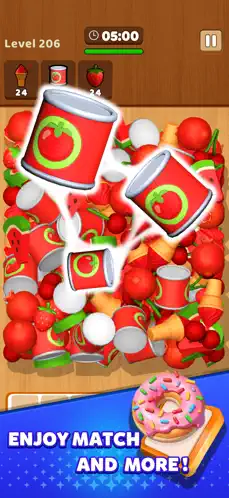 Tile Match 3D takes the classic “find three matching tiles” formula and gives it a 3D pile to dig through. It’s part matching game, part spatial puzzle, part digital archaeology.
At 4.92★ across 107,193 ratings, it’s the second-highest-rated app in this article. FUNSEA LIMITED clearly studied what makes match games satisfying: the tile-pop feedback is crisp, the colors are distinct enough to scan quickly, though some reviewers say later levels get hard to beat without spending money.
Fair warning: the “3D pile” gimmick sometimes works against the game. When tiles are deeply buried, you’re not making strategic choices — you’re just clearing whatever’s accessible and hoping the right ones surface. It can feel passive in a way that undermines the puzzle aspect. But if you’re here for the ASMR-adjacent satisfaction of tapping matching tiles until a board clears, Tile Match 3D delivers.
Pro tip: The difference between picking tile A vs tile B often comes down to which one unblocks a chain of accessible tiles in the next layer.
Pricing: Free with ads and IAP.
Download Tile Match 3D | FUNSEA LIMITED
Which One Should You Pick?
It depends on what you actually want from a puzzle game — and that’s why we split this list.
If you want to feel smart: Start with Brain Test. The trick-puzzle format means every solution is a tiny dopamine hit, and it rewards lateral thinking over memorization. Just be ready to swallow your pride and use hints when a puzzle goes full moon-logic on you.
If you want numbers that feel like play: Crossmath earns that 4.94★. It’s the app to recommend to anyone who says they “hate math” but loves Sudoku — it turns out arithmetic is fun when it’s wrapped in puzzle logic.
If you want to unwind without thinking: Zen Word or Blockudoku. Zen Word for when you want words, Blockudoku for when you want blocks. Both are designed to lower your heart rate, not raise it. Blockudoku has the edge in long-term replayability thanks to its tournament structure.
If you want something beautiful to fiddle with: Polysphere is unlike anything else on this list. It’s not the deepest game, but as a 10-minute visual escape, it’s hard to beat.
FAQ
Are these puzzle games actually free?
Yes — all seven are free to download and play. Every single one has ads and in-app purchases. That’s just the mobile gaming reality in 2026. Expect ads, and expect to be offered purchases for hints, coins, or ad removal. Reviewers complain about ad frequency in most of these, Brain Test included.
What’s the difference between a brain teaser and a relaxing puzzler?
Brain teasers are designed to challenge you — they use misdirection, complex logic, or riddle-based thinking. Relaxing puzzlers prioritize flow state and satisfaction. No trick questions, no “aha” moments, just consistent mechanics that feel good to execute. Think of it as the difference between a crossword puzzle and coloring.
Which puzzle game has the most content?
Blockudoku offers Daily Challenges, Seasonal Events, and Tournaments, which keep fresh content coming.
Do any of these work offline?
Who Is? and Tile Match 3D both say they work without an internet connection. Check each app’s App Store listing for the others. For more games that don’t need a connection, see our best offline iPhone games list.
Related: Check out our new guide: Block Out! Review 2026: The Color-Sort Puzzle That Beats Its Own Inspiration, and Colony Flow!, another color-sort with no timers. For younger players, our Kidoku review covers sudoku built for kids.
For classic tile-matching, our best mahjong games for iPhone roundup covers solitaire, American, and multiplayer variants, and we reviewed Vita Mahjong on its own.
Related: Check out our new guide: Amaze GO! Review 2026: A Calm Arrow Puzzle With an Ad Problem
Related: Check out our new guide: Woodoku Blast Review 2026: A Brilliant Block Puzzle With an Ad After Every Level
Related: Two more puzzle reviews worth a look: Disney Solitaire, and Royal Smash!.
Related: Check out our new guide: Bus Traffic Fever! Review 2026
More from iOS App Lists
- Must-Have iPhone Apps in 2026 — Our flagship roundup of the essential apps every iPhone should have
- Best iPhone Apps for College Students — Productivity, study, and yes, some games for downtime between classes
- AllTrails iPhone App Review 2026 — The hiking app that puzzle-game fans might enjoy for its route-finding brain-teaser energy
- Best iPhone Games in 2026 — Top picks across every genre, not just puzzles
- Our best Halloween iPhone games roundup: the seasonal picks, from cozy to genuinely terrifying
Last updated: June 15, 2026. All ratings and download counts verified via App Store API as of this date.
Is your app on this list? Add a free "Featured on iOS App Lists" badge to your website or press kit.