
Published Oct 7, 2026 · Updated Nov 22, 2026
The best baby tracker app for most parents is Baby Tracker: Newborn Log by Nighp. Its free tier logs everything (feeds, sleep, diapers, pumping, growth, medicine) and it has more ratings than every other app on this list combined at 227,329. If what you actually want is to avoid a monthly fee, Baby Feed Timer runs free for 7 days and then asks for a single purchase, which runs free for 7 days and then asks for a single purchase instead of a monthly fee.
That distinction is the whole article. Every baby tracker on this list is free to download. Almost none of them stay free once the useful part starts.
The reason is that the hard problem in this category is not logging. Logging is a timer and a plus button, and every app here does it. The hard problem is prediction: given the last three feeds and the morning nap, when will this baby sleep next? That model is what parents pay for, and the developers know it.
What follows is what each app’s free tier actually covers, what it gates, and which one to install depending on whether you are tracking one baby or two, whether a nanny or a daycare is logging alongside you, and whether you are pumping.
Jump to a section
Quick Picks
- Best free tier: Baby Tracker: Newborn Log, everything logs free, predictions are the paid part
- No subscription at all: Baby Feed Timer, 7 days free then one purchase, no monthly fee
- Best sleep prediction: Huckleberry, the SweetSpot model built with pediatric sleep experts
- Best for twins or two kids: Nara Baby, separate logs per child and it tracks you too
- Best for a whole care team: Baby Connect, which runs in a web browser
The Comparison at a Glance
| App | Best for | Free tier | Rating | Ratings |
|---|---|---|---|---|
| Baby Tracker: Newborn Log | Most parents | Full logging, 3-day prediction preview | 4.80 | 227,329 |
| Huckleberry | Sleep prediction | Logging and contraction timer | 4.92 | 74,331 |
| Baby Feed Timer | No subscription | 7-day full trial, then one-time purchase | 4.85 | 24,499 |
| Nara Baby | Twins, and the parent | Paid plan (monthly or lifetime in-app purchase) | 4.90 | 24,032 |
| Baby Connect | Shared care teams | 7-day trial, then subscription | 4.79 | 13,982 |
| Cubtale | Pumping and milk stash | Free to download, with in-app subscriptions | 4.85 | 7,361 |
| Napper | Sleep schedules | Free to download, with in-app subscriptions | 4.89 | 4,516 |
| Baby Daybook | A single day view | Free to download, with in-app purchases | 4.84 | 3,306 |
1. Baby Tracker: Newborn Log — Best Free Tier


Nighp’s Baby Tracker is the app most parents end up with, and the rating count explains why: 227,329 ratings at 4.80 stars, which is nearly three times the next most-rated tracker on this page. It covers feedings, sleep, diaper changes, pumping, growth, health, and milestones in one place, and the free tier is the whole logging side of it.
The main paid feature is called What’s Next, and Plus also removes ads. It uses on-device AI to turn your recent logs into timing cues: a likely wind-down window before sleep, an estimated length for the next nap, an approximate wake-up window, when the next feed is probably due, and a good moment to check the diaper. You get a 3-day preview of it with no subscription required to start, and then it becomes Baby Tracker Plus.
Why this one? Because the free tier is genuinely complete and the paywall sits in front of the optional part rather than the necessary part. Compare that to Huckleberry, where the app’s single most famous feature is a membership feature.
The thing most people miss: the privacy design of What’s Next. The listing says the cues are computed on device, and the listing says your baby’s logs aren’t sent to Nighp to generate the cues. If that matters to you, it is a strong reason to choose this one if on-device processing matters to you. It is also optional, and can be hidden entirely in Settings if you find the cues more noise than signal.
The catch: three days is a short preview for a feature whose whole value is pattern recognition. Three days is a short preview, so log regularly to get the most out of it. Know that going in.
Pricing: free with a full logging tier. What’s Next runs a 3-day free preview, then Baby Tracker Plus, which can be shared with your whole sync group through Group Plus so only one person pays.
Download Baby Tracker | Developer Website
2. Huckleberry: Baby Tracker — Best Sleep Prediction


Huckleberry has the highest rating of anything here at 4.92 stars, and it is the tracker parents mention by name when they describe finally getting a baby to nap. The company says more than 5 million families have used it, and the app was built with input from pediatric sleep specialists rather than as a pure logging tool.
The signature feature is SweetSpot, which predicts your baby’s ideal nap and sleep times and adjusts as their rhythms change, so you are not counting hours in your head or watching for tired cues that arrive thirty seconds before a meltdown. It is the closest thing here to a sleep coach in app form.
Why this one? Because sleep is the problem that breaks new parents, and Huckleberry aims its paid tier squarely at that. The free tier covers a contraction timer for labor prep plus one-touch tracking for sleep, diaper changes, feedings, pumping, growth, milestones, weight, potty training, activities, and medicine, plus a complete breastfeeding log.
The thing most people miss: the app spans the whole arc, from pregnancy through the solids stage, so you are not switching apps when the newborn phase ends.
The catch: SweetSpot is the reason to install Huckleberry, and SweetSpot is behind Plus and Premium memberships. That is a harder paywall than Nighp’s. You are downloading an app whose best feature sits behind a paid membership, and the free logging tier is broadly the same set of timers the free apps give you.
Pricing: free to download. SweetSpot and the expert guidance sit inside Plus and Premium memberships. Check the in-app offer for current Plus and Premium pricing before you commit.
Download Huckleberry | Developer Website
3. Baby Feed Timer — One Purchase, No Subscription

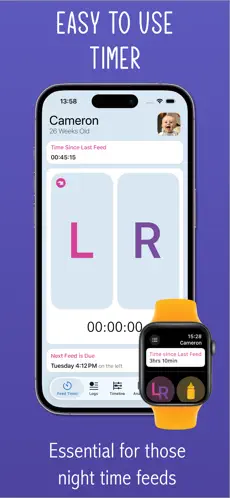
Baby Feed Timer is the answer to the question this article started with. The listing is blunt about how it works: after a 7-day free trial, the full version is available as a one-time in-app purchase. No subscription, no monthly fee, no annual renewal. You buy it once and it is yours.
It is also the smallest download here by a wide margin at 38 MB, against 229 MB for Huckleberry and 332 MB for Cubtale. It tracks breastfeeds, bottle feeds, pumps, diapers, sleep, medication, temperature, solid food, weight, and length, and it tells you which breast to start on, which sounds trivial until you are half asleep at 3 AM and cannot remember.
Why this one? Because it does the one job most parents actually need on night one: it counts the feed, times it, and remembers the side. It syncs across phones, including non-iPhones, and the developer runs a browser view of the log so a partner can see the day without installing anything.
The thing most people miss: the analysis screen. Time Magazine singled it out, and it is the part that answers the question every pediatrician asks at the two-week check, which is how many feeds and how long. Apple Watch logging is also there, so you can log a night feed without getting the phone out of the crib-side table.
The catch: it is a feed timer that grew into a tracker, and you can feel the ancestry. The design is plainer than Nara or Baby Daybook, and it is built around feeds rather than sleep scheduling.
Pricing: 7 days free, then a one-time purchase.
Download Baby Feed Timer | Developer Website
4. Nara Baby — Best for Twins and for the Parent


Nara Baby was designed by a mother tracking her own newborn, and that shows in two ways. It is built to handle twins and multiple children to track and compare multiple children or twins, and it tracks the parent’s own physical and mental health alongside the baby’s.
It covers breastfeeding with a left/right timer that remembers which side ended the last feed, bottle feeding by time and amount, pumping per side, and solids with dozens of first foods preloaded. You can turn off any activity type you do not use, which keeps the log screen from becoming a wall of buttons.
Why this one? The parent-tracking is the differentiator. Postpartum appointments, journal notes, and self-care routines live in the same app as the feeding log, which means the one place you already open ten times a day is also the place that reminds you to look after yourself.
The thing most people miss: wake window tracking sits next to the nap log, so you can see the pattern forming.
The catch: the listing shows Nara Baby Monthly and Lifetime in-app purchases, and recent reviewers say tracking is now behind a paywall. Set expectations accordingly, and check the in-app offer. Nara says more than 1.5 million parents have used it.
Pricing: free to download. The listing shows in-app purchases for a paid plan.
Download Nara Baby | Developer Website
5. Baby Connect — Best for a Whole Care Team


Baby Connect’s pitch is that it runs in a web browser as well as on a phone. When a daycare worker, a nanny, or a grandparent needs to log a bottle, handing them a login to a website is a completely different experience from asking them to install and learn an app.
Sync is instant and built for teams. Feedings, nursing, naps, diapers, milestones, and pumping flow to everyone at once, with reports, trends, charts, and weekly averages on top. Health tracking covers medicine, vaccines, temperature, weight, and height, and there are percentile comparisons against US and international growth data.
Why this one? If more than two adults touch this baby’s day, the web access settles the argument. It also syncs with Siri, which is a small thing that becomes a large one when you are holding a baby in one arm.
The thing most people miss: the built-in activity descriptions run past a hundred, so a caregiver logging something unusual has words for it rather than a blank note field.
The catch: the interface looks like software that has been maintained for a long time rather than designed recently, and the listing leans on press quotes rather than describing what changed lately. The free window is also a trial rather than a permanent tier.
Pricing: free to download with a subscription. The listing shows a 7-day free trial, so check in-app for current plans.
Download Baby Connect | Developer Website
6. Cubtale — Best for Pumping and Milk Stash


Cubtale has a breastmilk stash inventory feature. You log exact quantities, assign milk to numbered bags, manage multiple stash locations like a freezer and a work fridge, get automatic expiration tracking, and receive FIFO rotation guidance that tells you which bag to thaw first.
For an exclusively pumping parent, that is not a nice extra. It is the difference between using milk before it expires and pouring it down the sink, and the expiration deadlines are the kind of thing a sleep-deprived brain will absolutely lose track of.
It also starts in pregnancy and continues without switching: week-by-week updates, a kick counter, a contraction timer, weight tracking, symptom logs, appointment and test reminders, and photo memories through all three trimesters. The baby side adds WHO growth percentiles, vaccination logs, and pattern charts.
Why this one? Because the pumping and stash workflow is the most under-served job in this category, and Cubtale treats it as the main event rather than a checkbox.
The thing most people miss: the pregnancy-to-baby continuity means your data history starts months before birth, including visit notes, so the two-week pediatrician appointment has your whole timeline in one place.
The catch: it is the largest download here, and the range of features means the log screen has more surface area to navigate than the single-purpose apps. If you are not pumping or storing milk, the feature that justifies Cubtale will not apply to you.
Pricing: free to download, with in-app subscriptions.
Download Cubtale | Developer Website
7. Napper — Best Sleep Schedule Engine


Napper was built by a dad on parental leave for his own baby, which is the same origin story as half the good apps in this category, and the company says it now helps more than 100,000 families. Its core is a personalised sleep schedule derived from your baby’s natural rhythms and infant sleep research, and the schedule adjusts as sleep needs change.
That last part matters more than it sounds. An app that recalculates is doing real work.
It also covers the practical side: feed logging, and a library of white noise, lullabies, and nature sounds for the part of the night where you need a sound machine and do not own one.
Why this one? If sleep is your specific crisis and you want the schedule handled rather than just logged, Napper is built entirely around that problem. It also lets you share it all with your partner and anyone else who helps out.
The thing most people miss: the sound library doubles as the thing you would otherwise buy a separate device for, which makes the download earn its place on night two.
The catch: with 4,516 ratings it is the second-least-reviewed app here, so you are trusting a smaller user base than Nighp’s. Napper offers in-app subscriptions.
Pricing: free to download, with in-app subscriptions. Check the in-app offer for current pricing.
Download Napper | Developer Website
8. Baby Daybook — Best Single Day View


Baby Daybook’s best screen is a visual sleep timeline that shows the whole day at a glance, which is the fastest way to see that your baby slept in four 25-minute chunks and that is why everyone is miserable. Alongside it you get live sleep prediction updates and smart reminders, plus instant syncing with other caregivers.
The logging set is complete: breastfeeding with start and stop timers per breast, pumping sessions with milk output, bottle feeding for breast milk and formula, solids with reaction notes, diaper and potty training logs, and growth milestones.
Why this one? The timeline. Baby Daybook’s visual sleep timeline makes the shape of the day legible on one screen. If you have ever handed your phone to a pediatrician and watched them scroll through a list, you will understand the value of a chart.
The thing most people miss: the food reaction log. Tracking what was introduced and what happened afterward is exactly the record you need when the pediatrician asks about a rash.
The catch: the company says over 2 million parents use it, while the listing shows 3,338 ratings. And know that Premium is sold as monthly, yearly and lifetime in-app purchases.
Pricing: free to download, with Premium monthly, yearly and lifetime in-app purchases.
Download Baby Daybook | Developer Website
What to Check Before You Install
Three things decide which of these you should actually install.
How many people will log? Two parents with one phone each is the easy case. Anything past that, where a nanny or a daycare is involved, changes the answer to Baby Connect, because the web browser access removes the install hurdle entirely.
Are you pumping? If yes, Cubtale’s stash inventory is built for pumping parents. If you are exclusively nursing, Baby Feed Timer’s left/right timer and one-time price is the better fit.
Do you want predictions or records? This is the real fork. Prediction apps (Huckleberry, Napper, Baby Daybook, Nighp’s What’s Next) charge subscriptions and are aimed at fixing sleep before it breaks. Record apps (Baby Feed Timer) charge once and focus on logging feeds and other activities. Neither is wrong. They answer different questions.
One more thing worth saying plainly: these are logging tools, not medical advice. If feeding or sleep is genuinely worrying you, the AAP’s guidance is the place to check, and your pediatrician beats any app. Nighp’s own listing makes the same point about its What’s Next cues.
If you want to see where this data can end up once you have months of it, our look at the Apple Health app redesign covers how the Health app handles the same kind of record over years. And if broken nights are your normal rather than a phase, the apps for shift workers and broken sleep cover the same territory from the other direction. When the baby is old enough for a screen of their own, the free iPhone apps for kids start becoming relevant.
Frequently Asked Questions
Is there a baby tracker app with no subscription?
Yes. Baby Feed Timer is one. Baby Feed Timer gives you a 7-day free trial, then offers the full version as a one-time purchase. There is no monthly or annual fee after that, which makes it the only app here without a subscription option.
What is the best free baby tracker app?
Baby Tracker: Newborn Log by Nighp. It has 227,329 ratings at 4.80 stars, more than every other app on this page combined, and the free tier covers the entire logging side: feeds, sleep, diapers, pumping, growth, health, and milestones. The paid part is the What’s Next timing prediction, and you get a 3-day preview first.
Do baby tracker apps work for twins?
Nara Baby is built to track and compare multiple children or twins.
Can my partner and I share the same baby log?
All eight sync between caregivers, and the differences are in how well. Baby Connect also syncs to a web browser, which matters if a grandparent or daycare is logging too.
What is a wake window and do I need an app for it?
A wake window is how long a baby can comfortably stay awake between sleeps, and the pediatric guidance for it changes quickly as a baby grows. That is why the apps that recalculate automatically (Huckleberry’s SweetSpot, Napper’s schedule, Nighp’s What’s Next) are the ones parents pay for. You can track windows manually, and Nara Baby has wake window tracking next to its nap log.
Related: Check out our new guide: 6 Best Audiobook Apps for iPhone in 2026 (Library, Subscription and Buy Once)
Which One Should You Pick?
For most parents: Baby Tracker: Newborn Log. The free tier is complete, the rating base dwarfs everything else here, and the paid feature sits in front of an optional prediction rather than a basic necessity. Three days is a short look at What’s Next, but you are not losing anything by starting there.
If you want no subscription at all: Baby Feed Timer. 7 days free, then one purchase, then it is yours. It is also the smallest download here at 38 MB and the most willing to be a simple tool instead of a platform.
If sleep is the crisis: Huckleberry. The highest rating on the list at 4.92 stars, built with pediatric sleep specialists, and SweetSpot is the feature parents describe in reverent terms. Accept that the best part is behind a membership.
If two babies or your own health are in the picture: Nara Baby. Twins, multiple children, and postpartum self-tracking in one app, with the most calming interface of the group.
If a care team is logging: Baby Connect. Web browser access is the difference between a daycare using the log and a daycare not bothering.
If you are pumping: Cubtale. Milk stash inventory with expiration tracking and FIFO rotation is Cubtale’s headline feature.
Our pick: Baby Tracker: Newborn Log. Not because it has the best sleep model, because Huckleberry probably does. Because the free tier is real, the logging is complete, and it is the app that costs you the least to find out whether you need anything more expensive.
Is your app on this list? Add a free "Featured on iOS App Lists" badge to your website or press kit.